
Tally to ERPNext Migration, Checked Month by Month
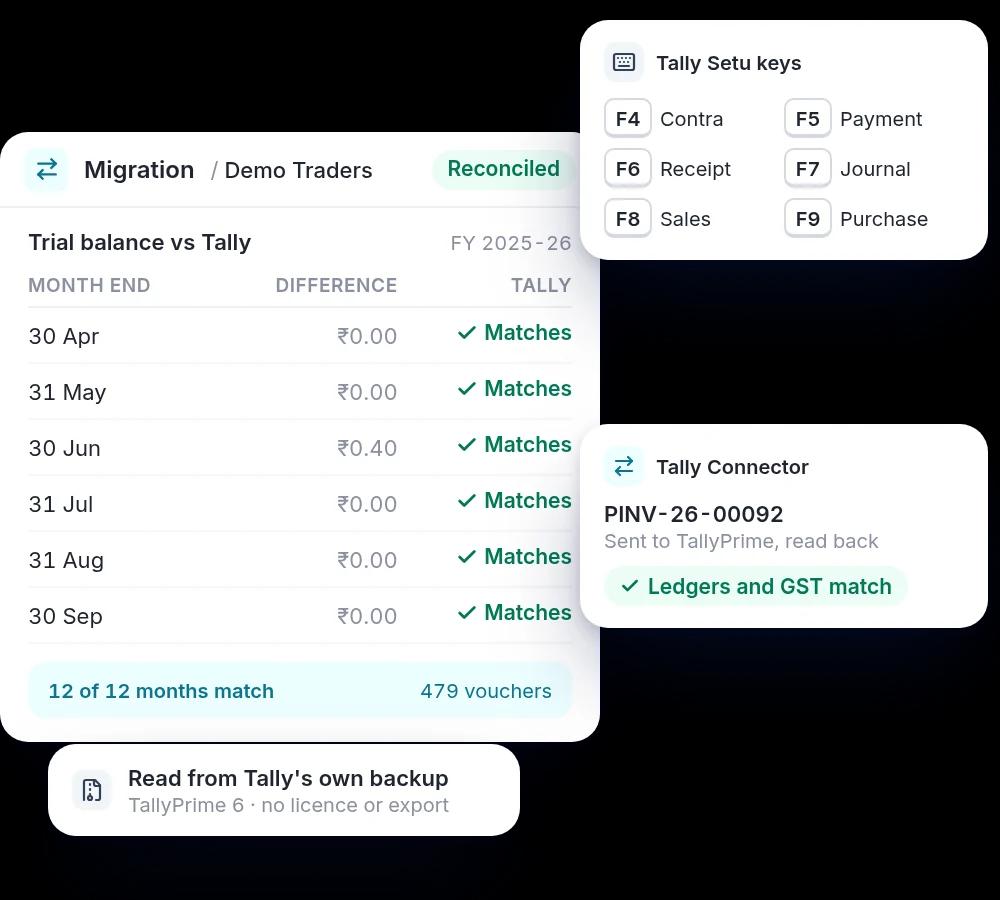
We move your Tally books into ERPNext and check the trial balance against Tally for every month. Your accountants keep Tally-style keys, and if accounting stays in Tally for a while, ERPNext feeds it.
Tally to ERPNext
Three barriers, three tools
Move the history
Keep accounting in Tally
Keep accountants fast
| If you want to | You need |
|---|---|
| Replace Tally completely | Tally Migrator and Tally Setu |
| Run operations in ERPNext, keep accounting in Tally | Tally Connector |
| Help accountants settle in after a move | Tally Setu |
| Move over gradually | All three |
See Tally Setu in action
Tally’s screen and keys, inside ERPNext. A 7-minute walkthrough in Hindi.
The aim is not to replicate Tally. It is to remove Tally as a barrier to ERPNext.
Tally and TallyPrime are trademarks of Tally Solutions. Girman Technologies is not affiliated with Tally Solutions.
Checked, not assumed
The migration reads Tally's own backup or data folder, so no Tally licence or export is needed, and nothing is installed on your ERPNext site. A dry run must show zero failures before anything is sent, and the trial balance is compared with Tally for every month afterwards.
What the service covers
Books migration
Masters, opening balances at your cut-over date, and vouchers month by month, from TallyPrime 3 to 7.
Month-end reconciliation
Trial balance compared with Tally at every month end, with the vouchers behind any difference.
Tally-style keys in ERPNext
Tally Setu: a Gateway screen, F4 to F9 voucher keys and a Tally-style Day Book.
Accounting kept in Tally
Tally Connector: operations in ERPNext, with masters, purchases and payments sent to TallyPrime and each read back to confirm.
GST setup
GSTINs and GST accounts set up with India Compliance before the books arrive.
Training
Your accountants trained in ERPNext, in Hindi or English.
How we work
Read the Tally data. Your backup or data folder is read; we list companies, years and voucher types.
Decide. Cut-over date, years to bring, and how each voucher type posts in ERPNext.
Dry run. Every opening and voucher built and checked; nothing is sent until none would fail.
Move. Masters, openings, then vouchers month by month, with pause and resume.
Reconcile. Trial balance compared with Tally for every month before we hand over.
Blah. Blah
Skills we bring
Is this the right fit?
A good fit when
- Your accounts are in Tally and operations sit in spreadsheets or other tools.
- You want years of history in ERPNext, not just opening balances.
- Your auditor or CA still needs Tally while operations move to ERPNext.
Probably not, when
- You rely on batch or serial numbers, or foreign-currency books, being moved automatically. Those are moved separately today.
- You want a Tally add-on, not a move. We help businesses adopt ERPNext.
Projects we have delivered
- Apna MartAccounting off Tally as 200+ stores and 60,000+ products came onto one ERPNext.
- Satvic MovementAmazon and Shopify orders, once typed into Tally by hand, on one ERPNext stock ledger.
- Nagpur trading businessWeekly batched Tally entries replaced by same-day billing across 3 locations.
- Grain milling machinery makerMoved from Excel and Tally; quotations now take 15 minutes instead of a day.


Frequently Asked Questions
Get In Touch

Girish Budhwani
Co-Founder, Girman | Ex Microsoft, Khatabook | IIT

Book a free consultation
or send a brief


Girman Tech is a Frappe Certified Partner in Bangalore, trusted for delivering tailored ERPNext solutions to businesses of all sizes. As an official Frappe and ERPNext Partner in Bangalore, we help companies to streamline operations and grow with open-source ERPNext solutions.
From seamless implementation to customization and ongoing support, our team ensures businesses unlock the full potential of open-source ERP. Based in Bangalore, we serve clients across India and globally with reliable, scalable, and future-ready ERP solutions.
Recognized By

BUSINESS

contact@girmantech.com

(+91) 93801 94282
Accounting ERP Software in Bangalore
Accounting ERP Software in Karnataka
HR Contact
careers@girmantech.com
(+91) 7558354540
COMPARISON
CONTACT
ADDRESS
Girman Technologies Pvt Ltd
BRIGADE NORTHRIDGE, PHASE-1, Yelahanka, Bangalore, Karnataka, India 560064