



Indian statutory compliance in an ERP means four connected obligations: generating an Invoice Reference Number (IRN) on the government's portal before a B2B invoice is valid, raising an e-way bill before goods move, filing GSTR-1 and GSTR-3B every period against reconciled purchase data, and deducting tax at source correctly at the point of payment. ERPNext handles all four through the open-source India Compliance app, which connects directly to the GST Network and the NIC portals.
The distinction that matters commercially is not whether a system "supports GST". It is whether compliance is native, or whether you are buying a connector.
The Operational Problem
A ₹200-crore distributor runs ERP for operations and Tally for statutory work. Every month, someone exports sales and purchase data, cleans it, uploads it to a filing tool, and reconciles it against GSTR-2B by hand.
Two things go wrong, reliably.
The first is input tax credit. Purchases that never appear in GSTR-2B, because a supplier did not file, are discovered weeks after the payment has gone out. The credit is not claimable, and by then there is no commercial leverage left to make the supplier fix it.
The second is the e-invoice window. An invoice raised on the 3rd, corrected on the 9th, and finally reported on the 12th fails at the portal if the company is above the reporting threshold. Now the sale has happened, the goods have moved, and the invoice cannot be legally validated.
Neither is an accounting failure. Both are integration failures: the ERP and the compliance layer are different systems that reconcile late.
What the Compliance Stack Actually Requires
E-invoicing (IRN). Businesses above the notified turnover threshold must report B2B invoices, credit notes and debit notes to an Invoice Registration Portal, which returns an IRN and a signed QR code. The threshold has stepped down since 2020 and currently stands at ₹5 crore aggregate annual turnover under Notification 10/2023-Central Tax. An IRN can be cancelled only within 24 hours, and only in full. There is no amendment on the portal; corrections flow through GSTR-1. Businesses with turnover of ₹10 crore and above must report within 30 days of the document date.
E-way bills. Movement of goods above the notified consignment value requires an e-way bill with Part A (invoice and consignee details) and Part B (vehicle or transporter details). The inter-state threshold is ₹50,000; several states set higher thresholds for intra-state movement. Validity runs one day per 200 km for standard cargo.
GST returns. GSTR-1 reports outward supplies. GSTR-3B is the summary return carrying the tax payment, and its input tax credit must be justified against GSTR-2B, which is built from what your suppliers filed, not what you recorded.
TDS and TCS. Tax deducted at source applies at defined rates once single-transaction or cumulative thresholds are crossed, and the rate depends on the deductee's entity type and whether a valid PAN exists.
How This Works in ERPNext
ERPNext's Indian compliance lives in a separate open-source app, India Compliance, maintained by Resilient Tech. It is free, GPL-licensed, and has roughly 89,000 installations on Frappe Cloud.
This is a change worth flagging for anyone on an older version: ERPNext removed India-specific functionality from core in v14. If you are on v13 or earlier, the features moved. They were not deleted.
bench get-app https://github.com/resilient-tech/india-compliance.git
bench --site [your-site] install-app india_compliance
Step 1: Configure GST Settings
Everything is configured in one place: India Compliance > GST Settings. There is no separate e-invoice or e-way bill settings page.
Set your GSTIN and register your NIC and GSTN credentials in the Credentials table. Key fields:
- e-Invoice Applicable From: the date your obligation began
- Automatically Generate e-Invoice on Invoice Submission
- e-Invoice Reporting Time Limit (in Days): default 30, enforcing the reporting window
- Enable SEZ / Overseas Transactions: required for export and SEZ invoices
- Default Threshold Value for e-Waybill Generation: default ₹50,000
- e-Waybill Threshold for Intrastate: a per-state override table
The whole section is invisible until you have bought API access. The e-Invoice block in GST Settings carries depends_on: eval: india_compliance.is_api_enabled(doc), and that helper returns settings.enable_api && (settings.api_secret || boot.ic_api_enabled_from_conf). On a site without an India Compliance API subscription the fields listed above are not merely disabled. They are absent from the page. Giving the company a GSTIN does not reveal them. An evaluator installing ERPNext and india_compliance to see whether e-invoicing is supported will look at GST Settings, find e-Waybill and no e-Invoice, and reasonably conclude it is not.
Screenshot 1. GST Settings with the e-Invoice section expanded. Not captured: see the note above. Our bench has no API credentials, so the section does not exist in the DOM to photograph, and an earlier capture silently framed the e-Waybill section instead.
Note the applicability model. ERPNext does not calculate your aggregate annual turnover and decide whether e-invoicing applies. You assert the start date. This is a deliberate design choice (turnover determination has enough edge cases that automating it would create false confidence), but it means someone must own that decision and revisit it each financial year.
Step 2: Generate E-Invoices
With auto-generation enabled, submitting a Sales Invoice calls the IRP and writes an e-Invoice Log record containing the IRN, acknowledgement number and date, the signed invoice, and the signed QR code, which is then printed on the invoice format.
The 24-hour cancellation rule is enforced in the application, not left to the portal to reject: attempting to cancel later returns a clear error. Cancellation requires a reason code: Duplicate, Order Cancelled or Data Entry Mistake.
Exports and SEZ supplies are supported, mapped to the correct GST categories once overseas transactions are enabled.
Screenshot 2. A submitted Sales Invoice showing IRN, acknowledgement number and signed QR code.
Step 3: Generate E-Way Bills
E-way bills can be generated from seven document types: Sales Invoice, Purchase Invoice, Delivery Note, Purchase Receipt, Stock Entry, Subcontracting Receipt and Asset Movement. Each source is individually enabled in GST Settings.
The generation dialog separates Part A and Part B, so you can create Part A when the invoice is raised and add vehicle details when the transporter is confirmed. Vehicle updates, transporter changes, validity extension and cancellation are all available from the document, with an e-Waybill Log recording every action.
Enable Generate e-Waybill with e-Invoice to produce both in a single API call where the movement is known at invoicing time.
Step 4: Reconcile Purchases Against GSTR-2B
This is where the ITC leakage described earlier gets fixed, and it is the strongest single argument for keeping compliance inside the ERP.
Open Purchase Reconciliation Tool, set company GSTIN and period, and download GSTR-2A/2B data. Downloaded documents land in GST Inward Supply records, matched against your Purchase Invoices and Bills of Entry.
Match statuses are Exact Match, Suggested Match, Mismatch, Manual Match, Only in 2A/2B and Only in Books. Per row you can take Accept, Ignore or Pending.
The fields that matter most are the ones about your supplier's behaviour: whether they filed GSTR-1 and GSTR-3B, the filing date, ITC availability, and any registration cancellation date. This turns an accounting reconciliation into a vendor management conversation, while you still hold the payment.
Enable Auto Reconciliation and schedule it per weekday so the download and match run without anyone remembering to do it.
Screenshot 3. Purchase Reconciliation Tool showing match statuses and supplier filing status columns.
Step 5: File GSTR-1
Open GSTR-1 (called GSTR-1 Beta in v14 and v15; renamed in v16). Select company GSTIN, year and period, review the computed data against the portal, then Upload → Proceed to File → File GSTR-1, authenticating with PAN and EVC OTP.
A GST Return Log stores books data, government data and the reconciliation between them for each period. Enable Restrict Changes to Transactions After Filing to prevent back-dated edits to a filed period, with a nominated role allowed to override.
GSTR-3B is computed but not filed via API. The GSTR 3B Report generates the JSON, Excel and PDF; you upload the JSON to the portal yourself.
Step 6: Configure TDS
TDS uses core ERPNext's Tax Withholding Category. Each category has a rates table with Tax Withholding Rate, Single Transaction Threshold, Cumulative Transaction Threshold, and a From Date / To Date validity range. Assign a default category on the Supplier master; it flows to the Purchase Invoice.
On a Purchase Invoice, tick Apply Tax Withholding Amount. On a Payment Entry (for TDS on advances), the equivalent field carries the same label. India Compliance adds a Section field carrying the statutory section code, plus an entity type distinguishing Company, Individual and no-PAN cases.
Where a supplier holds a lower or nil deduction certificate, create a Lower Deduction Certificate record with the certificate rate, validity dates and limit. ERPNext applies the certificate rate up to the limit and the normal rate above it, automatically.
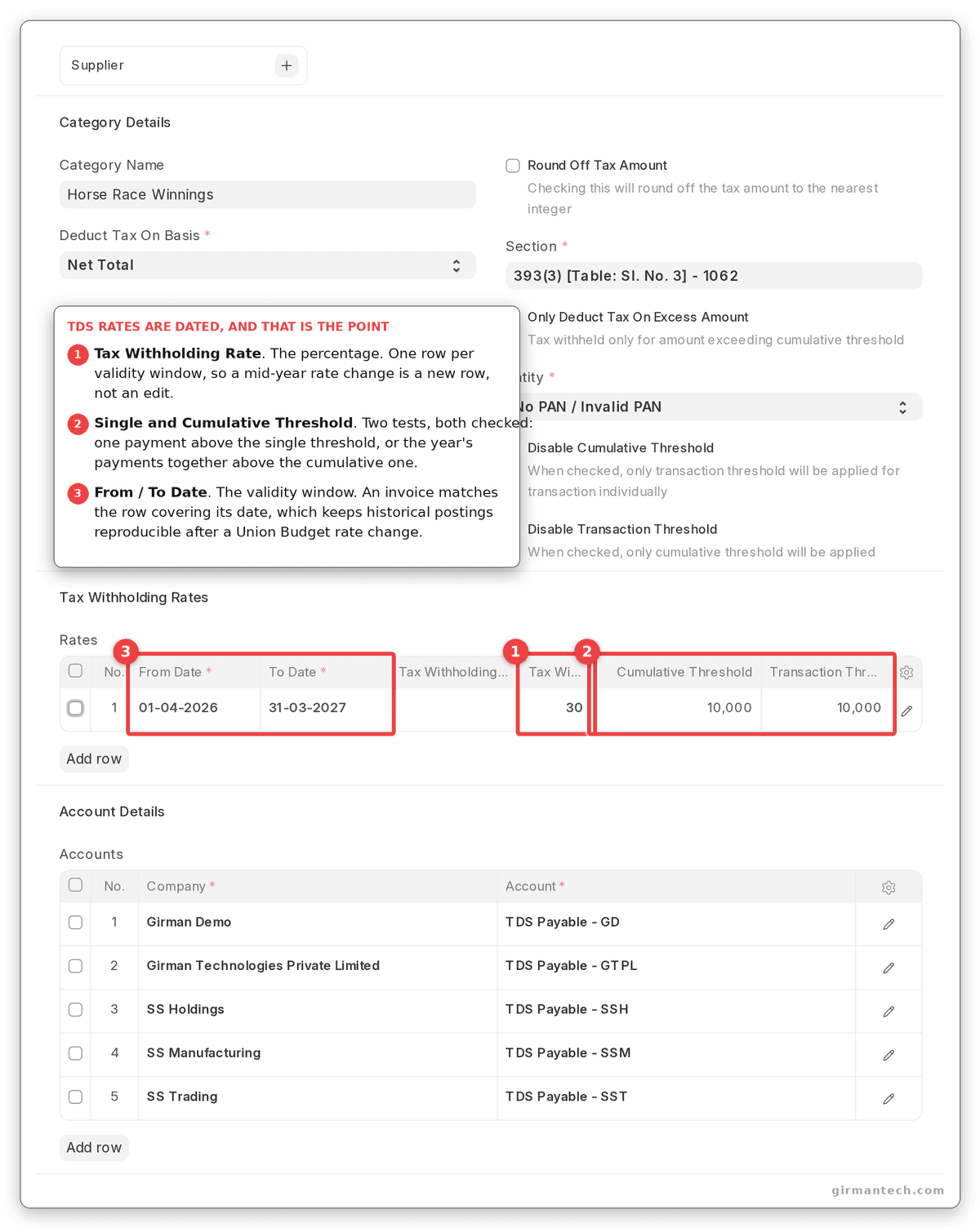
Tax Withholding Category with rates table showing thresholds and validity dates.
A Note on the 2026 Changes
Two statutory changes reshaped this area recently, and any content or configuration written before them is now wrong:
TCS on sale of goods under section 206C(1H) was withdrawn with effect from 1 April 2025. TDS on purchase of goods continues. If your ERP still carries a 206C(1H) tax category, it is a legacy artefact.
The Income-tax Act 2025 replaced the old 194-series section codes from 1 April 2026. Salary TDS now sits under section 392 and non-salary TDS under section 393. Returns filed with old section codes fail validation.
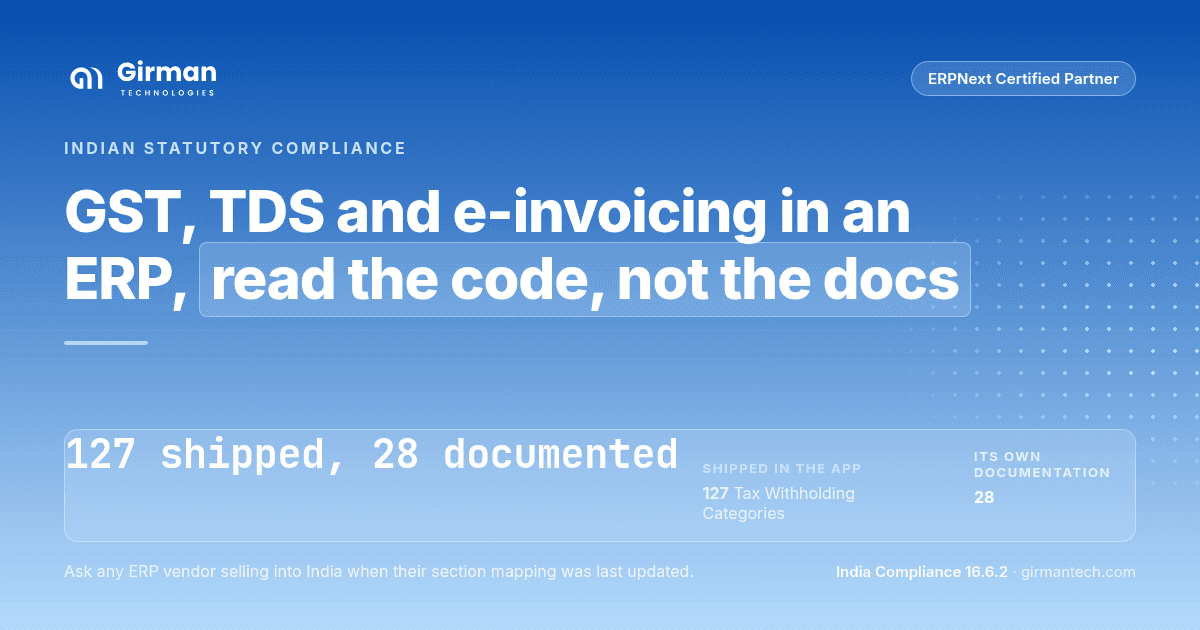
India Compliance ships the new mapping: 127 tax withholding categories carrying the new section codes, with the superseded ones retained for historical periods. Its own documentation still references the old count, which tells you something useful about open-source projects: read the code, not the docs. This is also a fair test to put to any ERP vendor selling into India. Ask when their section mapping was updated, and ask to see it.
ERPNext vs. SAP Business One vs. Dynamics 365 BC vs. Tally vs. Zoho Books
| Capability | ERPNext + India Compliance | SAP Business One | Dynamics 365 BC | TallyPrime | Zoho Books |
|---|---|---|---|---|---|
| E-invoice (IRN) generation | Direct from Sales Invoice | Partner-built GSP add-on required | JSON export / response import only | Direct (Tally is a GSP) | Direct (Zoho is a GSP) |
| E-way bill | Direct, from 7 document types | Via the same add-on | Excel export, then manual portal entry | Native | Native |
| GSTR-1 filing | Via API, with EVC OTP | Via GSP add-on | Export only | Native | Native |
| GSTR-2B purchase reconciliation | Built in, with supplier filing status | Add-on dependent | Not native | Native | Native |
| TDS with thresholds and LDC | Core ERPNext, 127 categories pre-loaded | India localisation | India localisation | Native | Native |
| TDS return generation (Form 26Q / 27Q) | Not supported | Localisation dependent | Localisation dependent | Native | Native |
| Manufacturing, inventory and full ERP scope | Yes | Yes | Yes | Accounting-led | Accounting only |
| Licensing | Open source; API credits purchased separately | Per-user licence + paid add-on | Per-user licence | ₹22,500 single-user, ₹67,500 multi-user + annual TSS | From ₹749/user/month (annual) |
Sources: India Compliance documentation, Microsoft Dynamics 365 BC documentation, Zoho Books India pricing. ERPNext holds 4.5/5 across 140 reviews on Capterra (as at September 2026).
The practical takeaway: Tally and Zoho Books have excellent Indian compliance and limited operational scope. SAP Business One and Business Central have full ERP scope and require you to buy and maintain a compliance connector. ERPNext is the option where both sit in one system without a separate licence, which is why it tends to win in Indian mid-market evaluations where manufacturing or distribution complexity rules out an accounting package.
One Honest Limitation
ERPNext does not generate TDS statutory returns, and it does not file GSTR-3B or the annual return.
Specifically absent: Form 26Q and 27Q generation, GSTR-9 and GSTR-9C annual returns, and ITC-04 for job work. GSTR-3B is computed and exported as JSON, but you upload it yourself. Some India-localised ERP products generate 26Q and 27Q directly; ERPNext does not.
In practice most companies hand TDS return filing to their chartered accountant anyway, so this is often a non-issue, but you should confirm it before signing, not after. If your CA currently receives a ready-made 26Q from your existing system, that workflow will change.
A second consideration is architectural. Every GST API call routes through Resilient Tech's endpoint and consumes purchased API credits, with a modest free allowance for new accounts. The app is free; the API layer is not, and one invoice can consume several credits. Model your actual monthly invoice volume against credit pricing before committing, and be aware there is no documented option to bring your own GSP for the GSTN return APIs.
Frequently Asked Questions
Does ERPNext support GST e-invoicing in India? Yes. The India Compliance app generates the IRN and signed QR code directly from a Sales Invoice by connecting to the Invoice Registration Portal, and can do so automatically on submission. Exports and SEZ supplies are supported.
Is the India Compliance app free? The app itself is free and open source under GPL v3. GST API calls consume credits purchased from the maintainer, with a limited free allowance for new accounts. Budget these against your monthly invoice volume.
Can ERPNext file GST returns directly? GSTR-1 can be filed through the API with PAN and EVC OTP authentication. GSTR-3B is computed and exported as JSON, Excel or PDF, but must be uploaded to the GST portal manually. Annual returns GSTR-9 and GSTR-9C are not supported.
Does ERPNext handle TDS and TDS thresholds automatically? Yes. Tax Withholding Categories carry rates with single-transaction and cumulative thresholds and date-bound validity, applied automatically on Purchase Invoices and on Payment Entries for advances. Lower deduction certificates are applied up to their limit and the normal rate above it. ERPNext does not generate Form 26Q or 27Q returns.
Do I need a GSP to use e-invoicing with ERPNext? No separate GSP contract is required. The India Compliance app routes API calls through its maintainer's certified endpoint using credits you purchase. This differs from SAP Business One and NetSuite, where a separate GSP connector is typically required.

.png&w=3840&q=75)
3d3fb9.png&w=3840&q=75)