



ERP over-customization is customization that costs more at upgrade time than it returns in daily use. It is rarely one large build. It accumulates from changes attached in the wrong place: vendor code edited where it sits, a standard component replaced instead of extended, configuration that exists only in the live database. SAP, Microsoft Dynamics, Oracle NetSuite and ERPNext all separate configuring a product, extending it and modifying it. They differ in who enforces the separation. Where nobody does, every major upgrade becomes a second implementation.
Most companies do not find out they are over-customized while they are customizing. They find out when the upgrade estimate arrives and it is larger than the original implementation.
In short:
- Configure first. Custom Fields, Property Setters, workflows and print formats are database records, and an upgrade carries them forward.
- Extend, do not replace. Put code in a custom app on
doc_eventsorextend_doctype_class(new in version 16), and never editapps/erpnext:bench updatestops on any local change. - Export only what you own. Tick Apply Module Export Filter, or another app's fields are frozen into yours and overwrite its updates on every migrate.
The Operational Problem
A Ludhiana auto-parts distributor with ₹140 crore turnover and 55 ERPNext users went live on version 14 in 2023. Over two years its first partner delivered 52 customizations. Version 14 reached end of life on 31 January 2026, so the business has had no security fixes since. The estimate to move to version 16 came back at ₹19 lakh and 12 weeks. The original implementation cost ₹26 lakh.
Forty-six of the 52 moved across in a day. They were Custom Fields, Property Setters, print formats, workflows and event handlers in the partner's own app. The estimate sat in the other six:
- Three edits inside
apps/erpnext.bench updaterefuses to run while any app has uncommitted changes, so the upgrade stopped at its first command. - Two controller overrides. Both were written as subclasses of
Document, not of the controllers they replaced. Version 15 accepts that. Version 16 refuses to load them. - One customization export taken without a filter. It copied India Compliance's own Sales Invoice fields into the partner's app. After the upgrade, those stale copies overwrote India Compliance's new definitions on every migrate.
None of the six was careless when it was written. Each was the shortest path to a deadline. Forty-six customizations attached at Frappe's extension points upgraded at almost no cost; six attached in the wrong place cost nearly three-quarters of the original project. This is an attachment problem, not a volume problem.
Configure, Extend or Modify: Where a Change Attaches
Every ERP offers three places to attach a change, and they carry very different upgrade costs.
- Configure. Change behaviour with the product's own settings and records: fields, layouts, workflows, approval rules, print formats. The change is data. The vendor's upgrade knows the data exists and carries it forward.
- Extend. Add code in a separate package that attaches at a point the vendor publishes: an event, a hook, a subclass. The vendor's code still runs. An upgrade replaces the vendor's code without touching yours, and your code is retested rather than rewritten.
- Modify. Change the vendor's own code, or replace one of its components outright. An upgrade either refuses to proceed or overwrites the change, so every release becomes a merge.
Over-customization is mostly modification that could have been an extension, and extension that could have been configuration.
The large vendors have converged on this ranking, and most now enforce it. SAP's clean core grades every extension from Level A to Level D by the lowest-level technology it touches; a modification of SAP's own code is Level D, "not clean core". Microsoft sealed Dynamics 365 Finance and Operations against changes to its code in release 8.0, in April 2018, and Business Central online has accepted only extensions since version 15, in October 2019. Odoo lets a custom module inherit and override almost anything, then refuses to upgrade a database until every custom module has a version for the target release.
Extending vs Replacing: The Line Teams Miss
Extending and replacing both look like writing a class. They behave differently at every upgrade.
An extension adds behaviour beside the vendor's. An event handler runs alongside the vendor's own validation; a mixin adds a method and calls the vendor's version with super(). When the vendor fixes a bug in that method, the fix arrives.
A replacement takes ownership. An override class that copies a vendor method instead of calling it freezes that method on the day it was copied. Every later fix has to be found and applied again by hand, and nothing reports one that was missed.
Microsoft drew this line in Dynamics 365 Finance and Operations and then closed one side of it. Changing Microsoft's code in place, which it calls overlayering, was given a three-year grace period from release 7.3 and is no longer carried forward; extensions are the only supported route. In Frappe the two sides are separate hooks, and both remain open.
How to Keep ERPNext Customizations Maintainable Across Upgrades
Every detail below was read in source on Frappe 16.52.0, ERPNext 16.51.1, HRMS 16.50.0 and India Compliance 16.10.1. Where version 15 differs, it was read on the version-15 branch.
Step 1: Configure First, With the Prefix
Customize Form, Custom Field and Property Setter changes are records in the database, and they are the upgrade-safe default. Since version 15, a Custom Field created from the desk gets a custom_ prefix on its fieldname (Frappe PR #21355). The prefix exists so that a future standard field cannot take the same name.
Two kinds of field do not carry it: fields created on version 14 or earlier, and fields an app or script creates with an explicit fieldname. Frappe checks for a duplicate name only when a Custom Field is created. When a later release adds a standard field with the same name, add_custom_fields in meta.py appends the custom field beside it without comparing names. List your unprefixed fields before a major upgrade and check each against the new release's doctype JSON.
Step 2: Export Only the Customizations You Own
Configuration made on a live site is invisible to version control until it is exported. Customize Form > Actions > Export Customizations writes the doctype's Custom Fields and Property Setters to <module>/custom/<doctype>.json inside your app. The button appears only in developer mode, and the server refuses the export without it. Sync on Migrate is ticked by default, so every bench migrate applies the file again.
The trap is that it exports all of them. On our version-16 bench, Sales Invoice carries 34 Custom Fields and 29 Property Setters, and all 34 fields belong to India Compliance. Export Sales Invoice without ticking Apply Module Export Filter, and your app now holds a copy of India Compliance's fields as they stood that day.
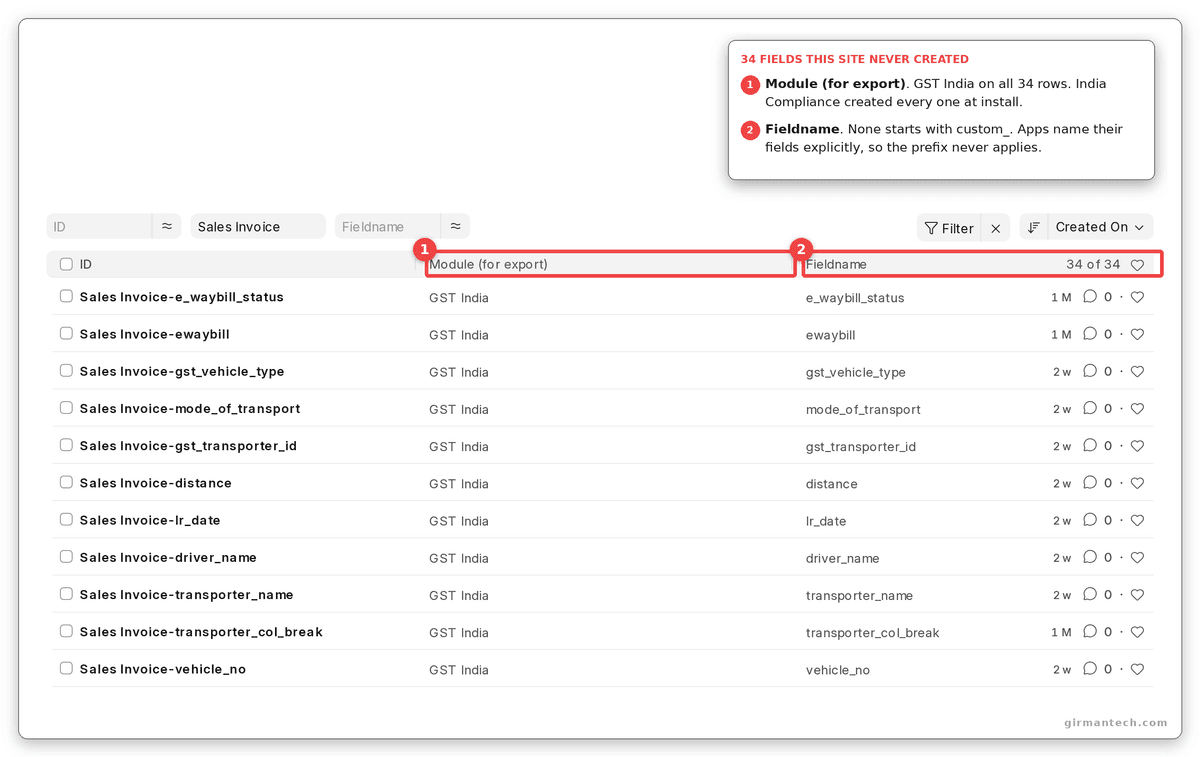
Custom Fields on Sales Invoice with Module (for export) shown: 34 of 34 belong to GST India, which is India Compliance, and none of their fieldnames starts with custom_.
The copy then wins. India Compliance updates its fields in a post_model_sync patch. bench migrate applies exported customizations after every patch has run, and it overwrites any existing field with the exported version. A field India Compliance removes in a later release comes back from your file, because the sync inserts any field it does not find.
Set Module (for export) on your own Custom Field and Property Setter records, then tick Apply Module Export Filter. Alternatively, ship them as fixtures in hooks.py with a filter on module.
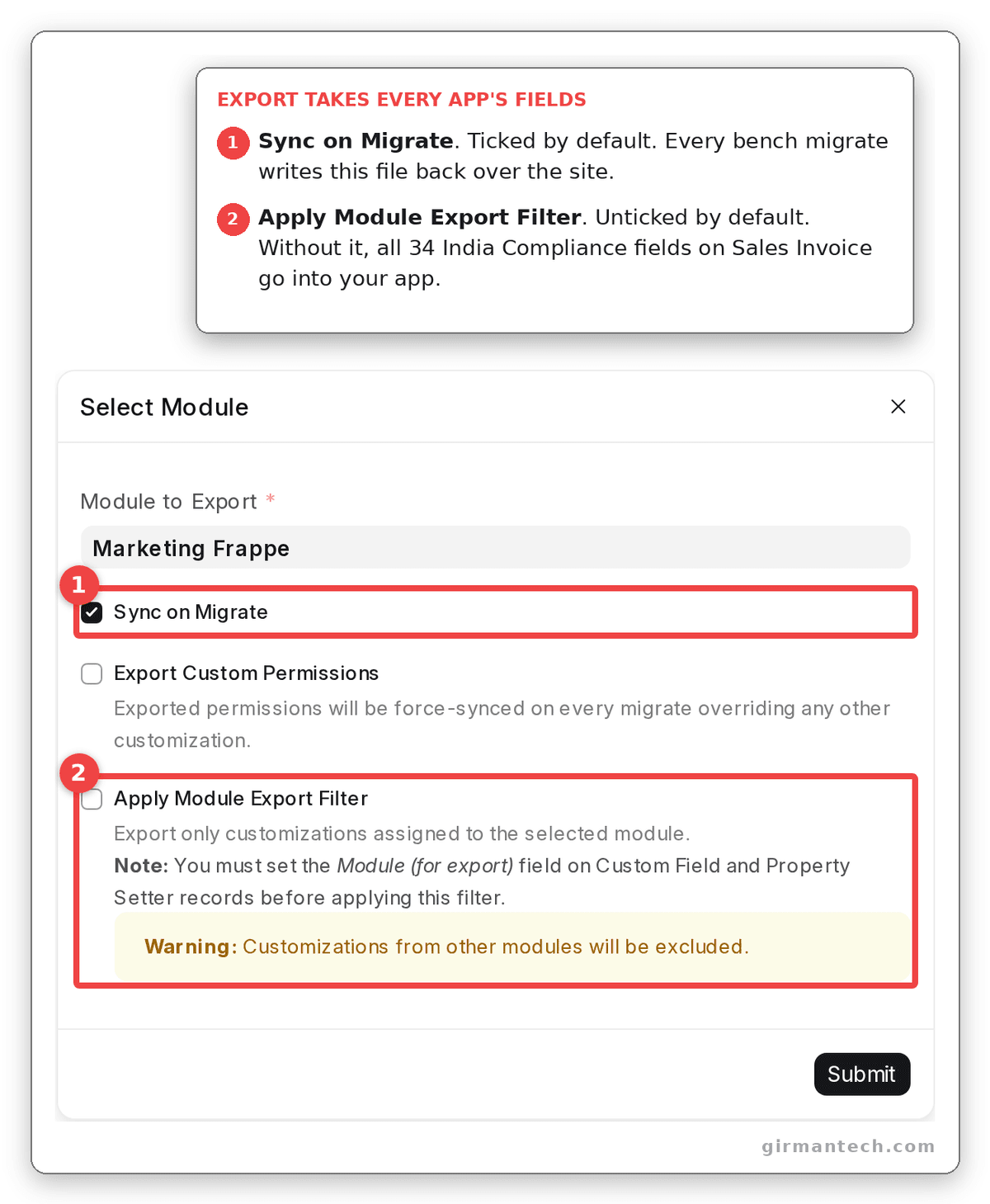
Export Customizations on Sales Invoice: Sync on Migrate is ticked by default and Apply Module Export Filter is not, so the export takes every app's fields on the doctype.
Step 3: Extend the Controller; Do Not Replace It
When a requirement needs code, it goes in a custom app. Frappe gives that app three ways to attach to a standard doctype.
doc_events. A function per event, such asvalidateoron_submit. Handlers from every installed app run, alongside the controller's own method.extend_doctype_class. New in version 16.0.0. Your class is mixed into the controller, ahead of it, and every app's extension is kept. ERPNext itself moved its Address customization from an override in version 15 to an extension in version 16.override_doctype_class. Your class replaces the controller. Only one survives: Frappe loadsclass_overrides[doctype][-1], the override from the last installed app.
That last rule is where installed apps collide. HRMS 16.50.0 already overrides Employee, Timesheet, Payment Entry and Project. Its Payment Entry class is what lets a payment reference an Expense Claim, Employee Advance, Leave Encashment or Gratuity. Install an app after HRMS that overrides Payment Entry with a subclass of ERPNext's class, and HRMS's class is no longer loaded. ERPNext's own method allows an employee payment to reference only a Journal Entry, so paying an expense claim fails with Reference Doctype must be one of Journal Entry.
Version 16 warns once. bench migrate prints The controller for Payment Entry is overridden by multiple apps in yellow and carries on (PR #34169). If an override is truly unavoidable, subclass the class that is loaded today: with HRMS installed, that is HRMS's EmployeePaymentEntry, not ERPNext's PaymentEntry.
Version 16 also tightened overrides. The class must subclass the controller it replaces, or the doctype fails to load with Invalid Override (PR #26152). Version 15 accepted any subclass of Document, so an override that worked on version 15 can stop a document opening on version 16.
One warning about Frappe's own documentation. Its hooks page shows an extend_doctype_class mixin whose validate calls super.validate(), without the parentheses after super. Copied as written, every save of that doctype fails with AttributeError: type object 'super' has no attribute 'validate'. The call is super().validate().
Step 4: Leave apps/erpnext Untouched
bench update runs git status in every app before it pulls anything. Any uncommitted change stops it: Cannot proceed with update: You have local changes in app "erpnext" that are not committed. The way out it suggests, bench update --reset, runs git reset --hard on every app and discards the edit. A committed edit fares no better. It turns the bench into a fork that has to be merged into every release.
The same message lists the route that scales: send the change upstream as a pull request. A fix merged into ERPNext costs nothing at the next upgrade.
Step 5: Order Patches Against the Migrate Sequence
bench migrate runs in a fixed order, set in frappe/migrate.py:
before_migratehooks[pre_model_sync]patches- Doctype JSON sync
[post_model_sync]patches- Fixtures, then exported customizations
- Orphaned DocType removal
after_migratehooks
So a patch cannot rely on a Custom Field your app ships as a fixture or export in the same release. When the patch runs, the column does not exist yet. Create the field inside the patch, or move the data step into after_migrate.
Step 6: Rehearse on a Copy, and Read What Migrate Prints
A clean exit code is not a clean upgrade. Two failures on apps we maintain came with no error at all.
- Deleted child tables. On version 15, and on version 16 until 16.52.0, migrate treated a DocType as deleted if importing its controller failed. A child table whose
.pyfile held only a comment had no class to import, so its DocType record was deleted in the same run that created it. The log said Orphaned DocType(s) found, in the same tone as the progress lines around it. Version 16.52.0 checks for the schema file instead (PR #41964, October 2026). - A new field on a Single doctype. Existing sites hold no row for it in
tabSingles, so the settings form shows it blank instead of applying the default in the JSON. The first person to save that form writes a zero. On one internal pricing app, a single save zeroed nine rates. Seed the missing rows inafter_migrate.
Restore last night's backup to a test site, upgrade it, run the transactions that matter, and read the whole migrate log before production sees the release.
What to Build, Configure or Avoid in ERPNext
The fit-gap analysis decides whether a requirement needs code at all. This table decides where the code, or the configuration, attaches.
| Requirement | Verdict | Attach it with |
|---|---|---|
| New field, label, mandatory flag or default | Configure | Customize Form, exported with the module filter |
| Approval by amount, role or department | Configure | Workflow, with a Condition on the transition |
| Alerts, assignments and naming | Configure | Notification, Assignment Rule, Document Naming Settings |
| A report on standard data | Configure first | Report Builder; a Query Report in a custom app only when that fails |
| Validation when a document is saved or submitted | Build | doc_events in a custom app |
| New method, property or computed field on a standard doctype | Build | extend_doctype_class (version 16) |
| Changed behaviour of a standard method | Build | extend_doctype_class, calling super() |
| Integration with a bank, portal or device | Build | Whitelisted methods and background jobs in a custom app |
| A control that must hold for imports and the API | Avoid Client Script | doc_events; Client Scripts run only in the browser |
| Replacing a standard controller | Avoid | Only when no hook exists; subclass the class loaded today |
Editing files in apps/erpnext or apps/frappe | Avoid | An upstream pull request |
| Exporting every customization on a doctype | Avoid | Apply Module Export Filter, or fixtures filtered on module |
How ERPNext Compares on Upgrade Safety
| Capability | ERPNext v15 | ERPNext v16 | SAP Business One | Odoo | Oracle NetSuite | Dynamics 365 Business Central |
|---|---|---|---|---|---|---|
| Changing the vendor's code | Possible; GPLv3 source on the bench. bench update stops on uncommitted edits | Same as v15 | Not possible; closed source | Community source under LGPLv3; Odoo Online accepts no custom Python modules | Not possible; closed source | Online: extensions only since version 15 (2019). On-premises: the base application can be changed in AL, against Microsoft's advice |
| Where an extension attaches | Hooks: doc_events, override_doctype_class | Adds extend_doctype_class, which several apps can share | User-defined fields and tables; add-ons on the DI API, UI API or Service Layer | Modules using _inherit on models and XPath on views; Studio | SuiteBuilder, SuiteFlow and SuiteScript | AL extensions |
| Who ports custom code to a new major release | The customer or partner; supported to end 2027 (planned) | The customer or partner; supported to end 2029 (planned) | The add-on vendor, against SAP's per-release Compatibility Issues document | The module's maintainer; the upgrade service covers standard apps and Studio, not in-house or partner modules without a maintenance contract | NetSuite says customizations migrate automatically; SuiteScript 1.0 and 2.0 scripts must move to 2.1 by release 2028.2 | The extension's publisher |
| Licensing model | Open source; no per-user fee | Open source; no per-user fee | Per-user licence, not publicly listed | Per-user subscription; Studio needs the Custom plan | Per-user, not publicly listed | Per-user, Essentials or Premium |
On Capterra, ERPNext holds 4.5/5 across 140 reviews, SAP Business One 4.3 across 346, Odoo 4.2 across 1,338, Oracle NetSuite 4.2 across 2,082 and Dynamics 365 Business Central 4.1 across 211. On Gartner Peer Insights ERPNext holds 4.5 across 59 ratings (all as at October 2026).
Every system here can be extended. What separates them is what stops a customer modifying the product. NetSuite, SAP Business One and Business Central online stop it by construction: there is no vendor code to change. Odoo and ERPNext publish their source, so the stop is a rule the customer has to keep, and each charges for breaking it at upgrade time: Odoo refuses the upgrade until custom modules are ported, and ERPNext refuses bench update until local edits are gone. Version 16 is the first ERPNext release in which several apps can add to one controller without one of them replacing the others.
One Honest Limitation
ERPNext has no sealed core. Nothing in Frappe stops a developer editing apps/erpnext, replacing a whole controller, or calling an internal method that the next minor release renames. The platform's guardrails are a git status check before bench update and one yellow line during migrate. Neither fails a build.
It bites hardest on minor releases. Version 16 ships behaviour in minor versions, not only in majors: BOM Secondary Items, with co-product and by-product support, arrived in 16.13.0. A customization written against an internal method can break between two minor releases, on an update most teams treat as routine. Systems that seal their base code and publish versioned extension interfaces catch this when the extension is deployed, not in production.
Design for it before go-live. Put three checks in your deployment pipeline: fail if any app other than your own has local changes; fail if a hooks.py declares override_doctype_class without a written reason beside it; and run your app's tests against every minor release before it reaches the live site.
What Changes in ERPNext v16
Version 16 changed the rules for custom apps more than any release since apps were introduced:
extend_doctype_classarrived in 16.0.0, so several apps can add to one controller without replacing it.- Overrides must subclass the controller they replace, or the doctype fails to load (16.0.0).
- Migrate warns when two apps override the same controller (16.0.0). It does not stop.
- ERPNext moved Address from
override_doctype_classtoextend_doctype_class, the pattern it now asks partners to follow. - Server Scripts are switched on only from
common_site_config.json, as covered in our fit-gap analysis. - Orphaned DocType detection checks for the schema file instead of importing the controller (16.52.0).
Still missing: a published list of controller methods that are stable across releases, and any command that reports which customizations a target version will break.
Frequently Asked Questions
How can a company keep ERPNext customizations maintainable during future upgrades? Attach every change at the lightest level that works: configuration first, then a custom app using doc_events or extend_doctype_class, and never edits to ERPNext's own files. Export only the customizations your app owns, with the module filter, so another app's fields are not frozen into yours. Rehearse every upgrade on a copy of production and read the whole migrate log, because several failures print warnings rather than errors.
Is it safe to edit ERPNext's source code directly? No. bench update stops when any app has uncommitted changes, and its suggested fix, bench update --reset, discards the edit. A committed edit becomes a fork that has to be merged into every release. Put the change in a custom app, or send it to ERPNext as a pull request.
What is the difference between override_doctype_class and extend_doctype_class? override_doctype_class replaces a doctype's controller, and only the override from the last installed app is loaded. extend_doctype_class, new in Frappe version 16, mixes your class into the controller and keeps every app's extension. On version 16 an override must also subclass the controller it replaces, or the doctype fails to load with Invalid Override.
Do Custom Fields survive an ERPNext upgrade? Yes. Custom Fields and Property Setters are database records, and an upgrade carries them forward. The risk is a name collision: since version 15, fields created from the desk get a custom_ prefix, but fields created earlier or by scripts can share a name with a standard field a later release adds, and Frappe does not check for that.
How much ERPNext customization is too much? Count where customizations attach, not how many there are. Fifty configuration changes and event handlers in a custom app can upgrade in a day; one edit to ERPNext's own files can block an upgrade outright. A customization that replaces or copies ERPNext code instead of calling it is over the line.
Why does ERPNext v16 show "Invalid Override" after an upgrade? Version 16 loads an override_doctype_class only when the class subclasses the controller it replaces. An override written as a subclass of Document, which version 15 accepted, now stops the doctype loading with Invalid Override. Subclass the controller that is loaded today, or move the change to extend_doctype_class and call super().