



Fit-gap analysis is the step in an ERP implementation where every business requirement is tested against the standard product and given a verdict: it fits as shipped, it fits once configured, it needs a light extension, it needs new code, or the process should change instead. Every major implementation method carries a version of it. SAP calls its approach Fit-to-Standard and classifies what remains as WRICEF objects. Oracle's methods label the same residue CEMLI. Microsoft Dynamics and NetSuite partners run fit-gap workshops, and in an ERPNext project the output decides which lines of a proposal are configuration and which are paid development. Skip it, and a business pays to build features it already owns.
For an Indian business, the answer to when ERPNext needs customization is narrower than most proposals suggest. Customize only when a requirement does not ship in your exact release, cannot be met by changing a default setting, and cannot be met by configuration. On ERPNext 16 that leaves mainly integrations with Indian banks and devices, intercompany eliminations, secondary sales tracking and retrospective rebates.
Most false gaps are not missing features. They are shipped features sitting in a default state that makes them look missing.
The Operational Problem
A Pune auto-components manufacturer with ₹180 crore turnover and 140 ERPNext users finishes its requirements workshop with 18 items marked as customization. One reads: stop any purchase order that would take a cost centre over its annual budget. During the demo, the team creates a Budget for the Production cost centre, raises a ₹14 lakh purchase order against it, and the order submits without a word. The requirement goes into the proposal as custom development.
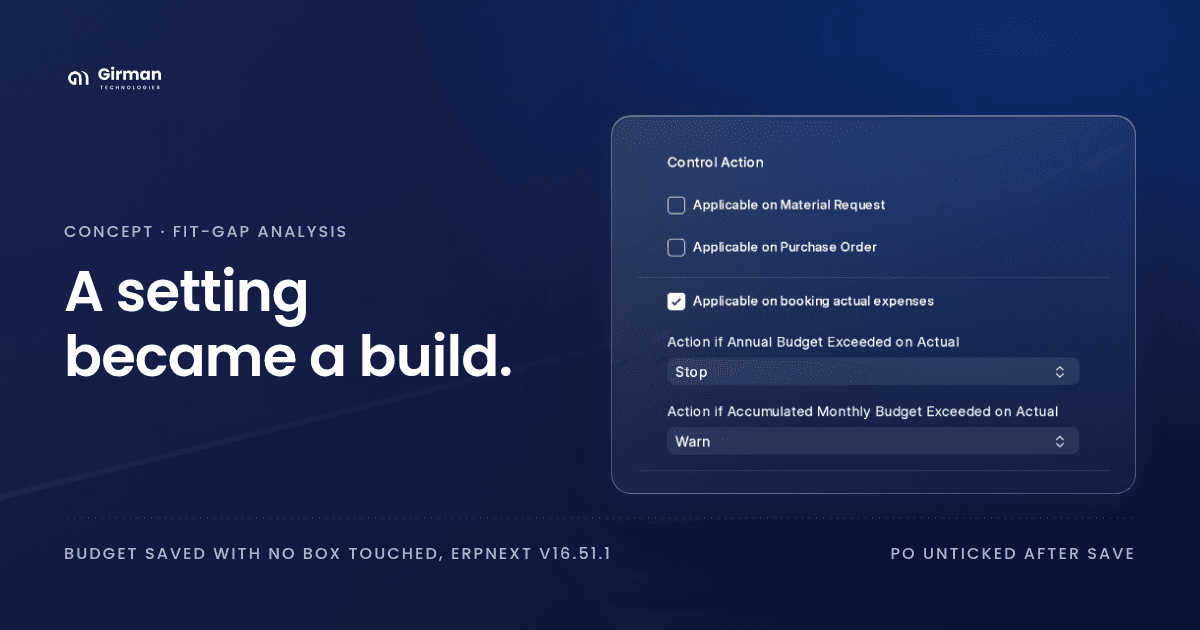
The feature was there. ERPNext's Budget ships a Stop action for purchase orders, but Applicable on Purchase Order defaults to 0, and until it is ticked the Stop action does not even appear on the form. Nobody ticked it, so the budget check never ran, and a setting became a build.
The build cost is the small part. On one recent scoping exercise of our own, checking each requested customization against source took 7 of 18 lines off the list, roughly 13 to 18 hours of effort: two working days.
The larger cost arrives at every upgrade. Custom code that duplicates a shipped feature must be retested on each release, and it never receives the improvements the shipped feature gets. A team that built bank-narration matching on an early v16 release now maintains code that v16.26.0 ships as Bank Transaction Rule.
This is a classification problem, not a technology problem. The requirement was real. The verdict was wrong, because it was reached by testing defaults instead of reading source.
The Five Verdicts of a Fit-Gap Analysis
We give every requirement one of five verdicts.
- Fit. The standard product does it as shipped.
- Configure. It does it once a setting, a master or a template is in place. No code. It survives upgrades because it is data.
- Extend. It needs a light, supported change: a custom field, a print format, a script, a report.
- Build. It needs new code: a new document type, an integration, logic the platform has no setting for.
- Adapt. The process should change instead, because the requirement encodes a habit rather than a control.
The first two verdicts cost nothing to maintain. The last two cost something at every upgrade. The whole economic value of the exercise sits in one discipline: moving a requirement down the list only when it truly belongs there, and never by mistake.
When Does an Indian Business Need ERPNext Customization?
The verdict answers it.
- Standard ERPNext is enough when the verdict is Fit or Configure: the requirement ships, or ships once a setting, master or template is in place.
- Customization is needed when the verdict is Extend or Build: a script, a custom report, a new document type or an integration.
- Neither when the verdict is Adapt: the process changes and nothing is built.
The steps below show how to tell which.
ERP Configuration vs. Customization
Proposals use the two words interchangeably, and the difference decides who pays at upgrade time. Configuration changes how a product behaves using its own settings and records. Customization changes what the product is, with code.
SAP has a famous version of the naming trap: what SAP calls Customizing, its Implementation Guide settings, is configuration. Code changes are enhancements or modifications.
Frappe has the same trap. Its Customize Form tool sounds like customization. Its own source describes it as "a Single DocType used to mask the Property Setter": every change it makes is stored as a Property Setter or Custom Field record in the database. That is configuration, and it is upgrade-safe for the same reason SAP's Customizing is.
How Fit-Gap Analysis Works in ERPNext
Five steps, in order. The order matters: each step removes requirements before the next, more expensive step looks at them.
Step 1: Pin the Exact Release
A verdict is only true for a release, and in v16 the minor release matters as much as the major one. Co-product and by-product support on the BOM first shipped in v16.13.0. Bank Transaction Rule first shipped in v16.26.0. A requirement correctly classified as a build on v16.12 is a configuration task on v16.51.
Record the exact versions of ERPNext, India Compliance, Frappe and HRMS you classified against, and re-run the classification before every upgrade. This post was verified against ERPNext 16.51.1, India Compliance 16.10.1, Frappe 16.52.0 and HRMS 16.50.0.
Step 2: Test the Feature With Its Defaults Changed
A feature that fails a demo has not been shown to be missing. Several of the commonest false gaps ship switched off:
- Budget. All four applicability boxes, Applicable on Material Request, Applicable on Purchase Order, Applicable on booking actual expenses and Applicable on Cumulative Expense, default to
0. Every Stop and Warn action is hidden until its box is ticked. Save a Budget with nothing ticked and ERPNext ticks Applicable on booking actual expenses for you, withStopon the annual budget, so the overrun is caught at the invoice. Applicable on Purchase Order stays at0, and no purchase order is checked. - Batch expiry. Has Expiry Date on the Item defaults to
0. Once set, the batch derives its expiry from Shelf Life In Days. - Nearest-expiry picking. Pick Serial / Batch Based On in Stock Settings defaults to
FIFO.Expiryis one of the three options. - Maker-checker approval. Allow Self Approval on a workflow transition defaults to
1. A requirement that the person who raised a document cannot approve it is one untick, not a build.
Before writing anything up as a gap, read the doctype's fields for a setting that controls it.
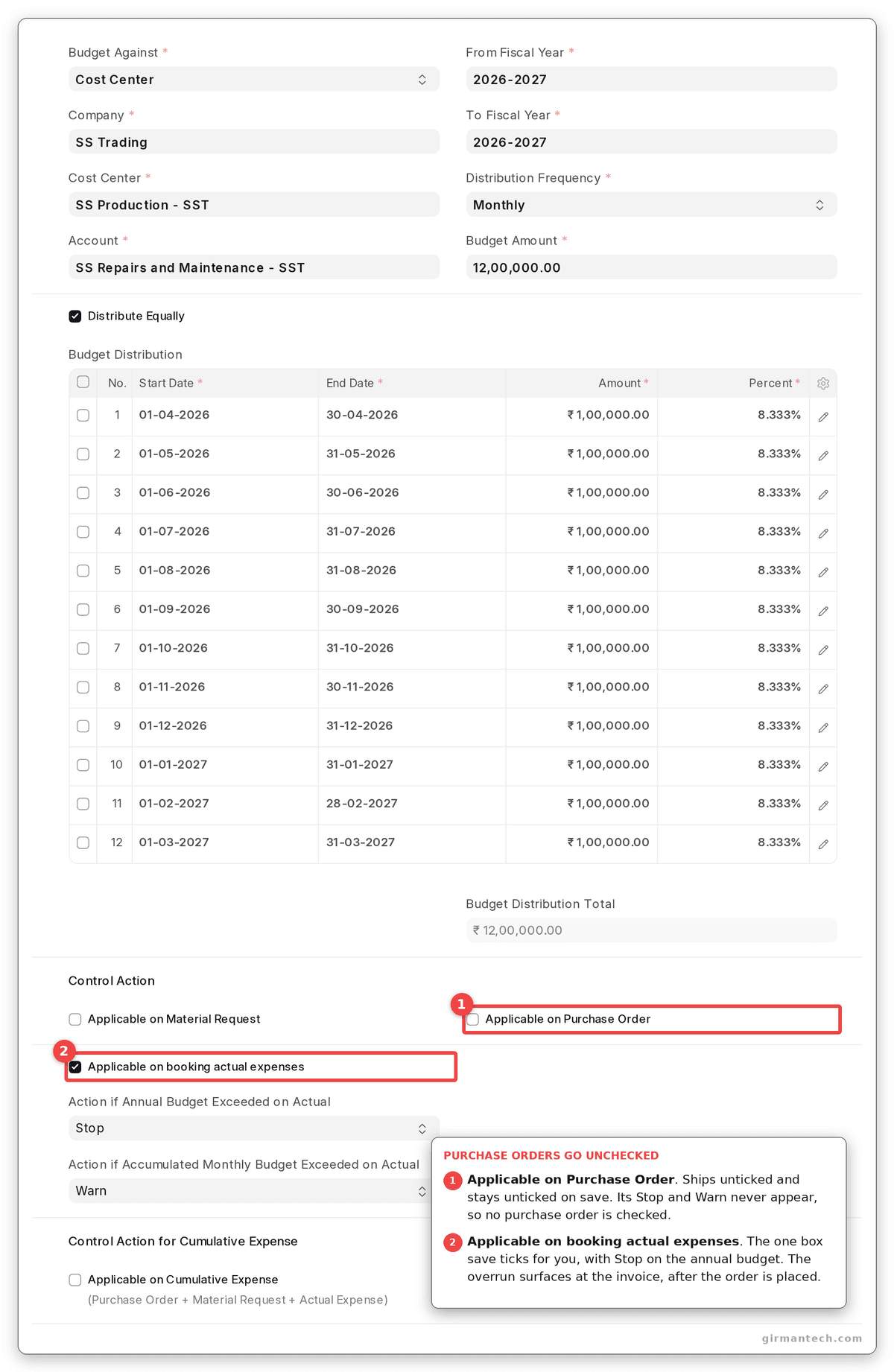
A Budget saved with no box touched: Applicable on Purchase Order unticked, so no purchase order is checked. The only Stop and Warn on the form belong to actual expenses, the box ERPNext ticked on save.
Step 3: Classify Against Frappe's Extension Layers
When a requirement does need more than a setting, Frappe offers five layers. They are not equal.
- Customize Form, Custom Field, Property Setter. Configure. Stored as data and upgrade-safe.
- Workflow, Print Format, Report Builder, Dashboard, Number Card, Notification, Assignment Rule. Configure. A workflow transition carries a Python Condition, so value-based approval routing, such as sending anything over ₹5 lakh to finance, is configuration, not code.
- Client Script. Extend. Runs in the browser only. Data imports, the REST API and background jobs never execute it, so it cannot enforce a control.
- Server Script. Extend. Sandboxed server-side Python, written in the desk. Disabled by default.
- Custom app. Your own code, in its own repository, loaded through hooks. The only correct home for a Build verdict.
Every generic answer to this question recommends Server Scripts as the light middle step. On v16, is_safe_exec_enabled() in frappe/utils/safe_exec.py reads server_script_enabled from common_site_config.json and nowhere else, so the switch is bench-wide.
Frappe's own Server Script page gives both instructions. Its opening note says bench set-config -g server_script_enabled true, which works. Section 2.1 says server scripts "must be enabled via site_config.json", with a per-site command that on v16 does nothing. The same page says shared Frappe Cloud benches do not allow server scripts at all. There, a requirement needing server-side logic goes straight from configuration to a custom app.
Step 4: Check Each Requirement Against What Ships
These are requirements we routinely see written up as customization for Indian businesses. Each one ships, so each is a Fit or Configure verdict, not a Build.
| Requirement as usually written | What ships | Where to find it |
|---|---|---|
| Stop a purchase order that exceeds budget | Budget with Stop, Warn or Ignore on material requests, purchase orders and actual expense, against a Cost Center or Project | Budget.applicable_on_purchase_order (default 0) |
| Route approvals by amount or department | Workflow with a Python condition on each transition | Workflow Transition.condition |
| Sales targets by territory and salesperson, with commission | Targets table on Sales Person and on Territory; commission rate on Sales Person | Sales Person.targets, commission_rate |
| Separate schemes for distributors, dealers and retailers | Pricing Rule and Promotional Scheme, applicable for a Customer Group, Territory or Sales Partner, with price and product discount slabs | Pricing Rule.applicable_for |
| Volume discount across several orders in a quarter | Cumulative pricing rule summing quantity and amount across transactions inside its validity window | Pricing Rule.is_cumulative |
| Flag supplier invoices that do not match GSTR-2B | India Compliance Purchase Reconciliation Tool, against GSTR-2B or both 2A and 2B | purchase_reconciliation_tool |
| Job-work challans and ITC-04 | India Compliance GST Job Work Stock Movement report, with an ITC-04 JSON download | gst_job_work_stock_movement |
| Branch-wise profit and loss | Accounting Dimension on any doctype, Branch included | Accounting Dimension.document_type |
| Spread shared overheads across cost centres | Cost Center Allocation by percentage, effective from a date | cost_center_allocation |
| Process loss, co-products and by-products | BOM process loss percentage; Secondary Items (from v16.13.0) | BOM.process_loss_percentage, secondary_items |
| TDS under section 194Q once purchases cross a threshold | Tax Withholding Rate with a cumulative threshold | Tax Withholding Rate.cumulative_threshold |
| Match bank narrations to parties automatically | Bank Transaction Rule (from v16.26.0) | bank_transaction_rule |
As at 27 October 2026, general AI assistants were telling Indian businesses that three of these rows need custom development: ITC-04 job-work tracking (Gemini and Google AI Overviews), co-product and by-product costing (AI Overviews), and amount-based approval with a budget check (ChatGPT). On v16.51.1 all three ship in ERPNext and India Compliance.
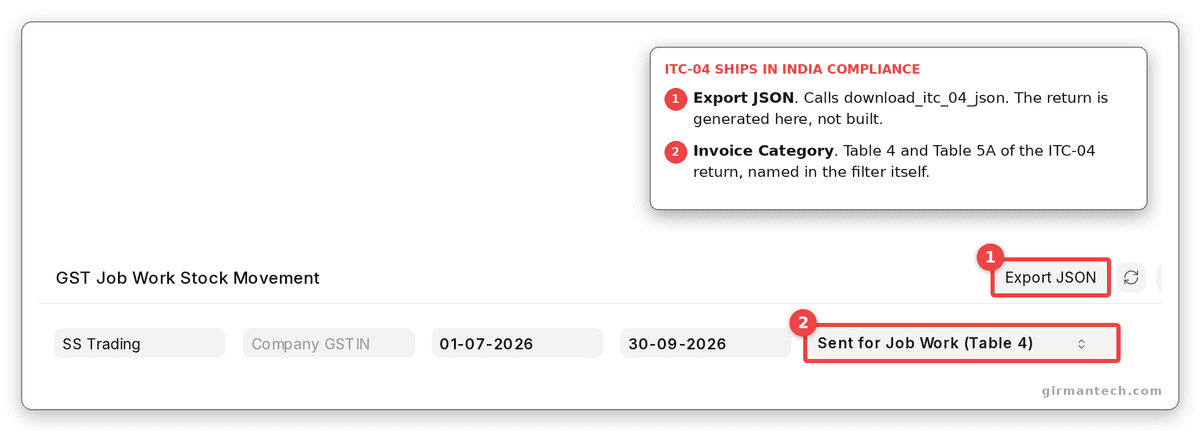
The GST Job Work Stock Movement report in India Compliance. Export JSON downloads the ITC-04 return, and the Invoice Category filter names its Table 4 and Table 5A.
Step 5: Price Only What Survives
What remains after the first four steps is the real gap list. On v16 these are the requirements we still find genuinely need building, each checked for absence in source:
- Live bank feeds from Indian banks. The only bank connector in ERPNext's integrations is Plaid. Bank Statement Import parses Indian statement files; no Indian bank API connector ships.
- Safe re-imports of bank transactions. Transaction ID on Bank Transaction is not unique, so re-importing an overlapping period creates duplicates.
- Device connectors. Nothing in ERPNext or HRMS talks to a biometric terminal or a weighbridge. HRMS ships the check-in endpoint,
add_log_based_on_employee_field; the device side is a build. - Intercompany eliminations. The Consolidated Financial Statement report contains no elimination logic, so a group that sells to itself needs eliminations built or handled outside.
- Secondary sales. No distributor-to-retailer, beat or outlet document exists.
- Retrospective rebates. Cumulative pricing rules discount transactions inside a window. Nothing computes a rebate after returns and issues it as a credit note.
Each item on this list deserves its hours. None of the twelve rows above it does.
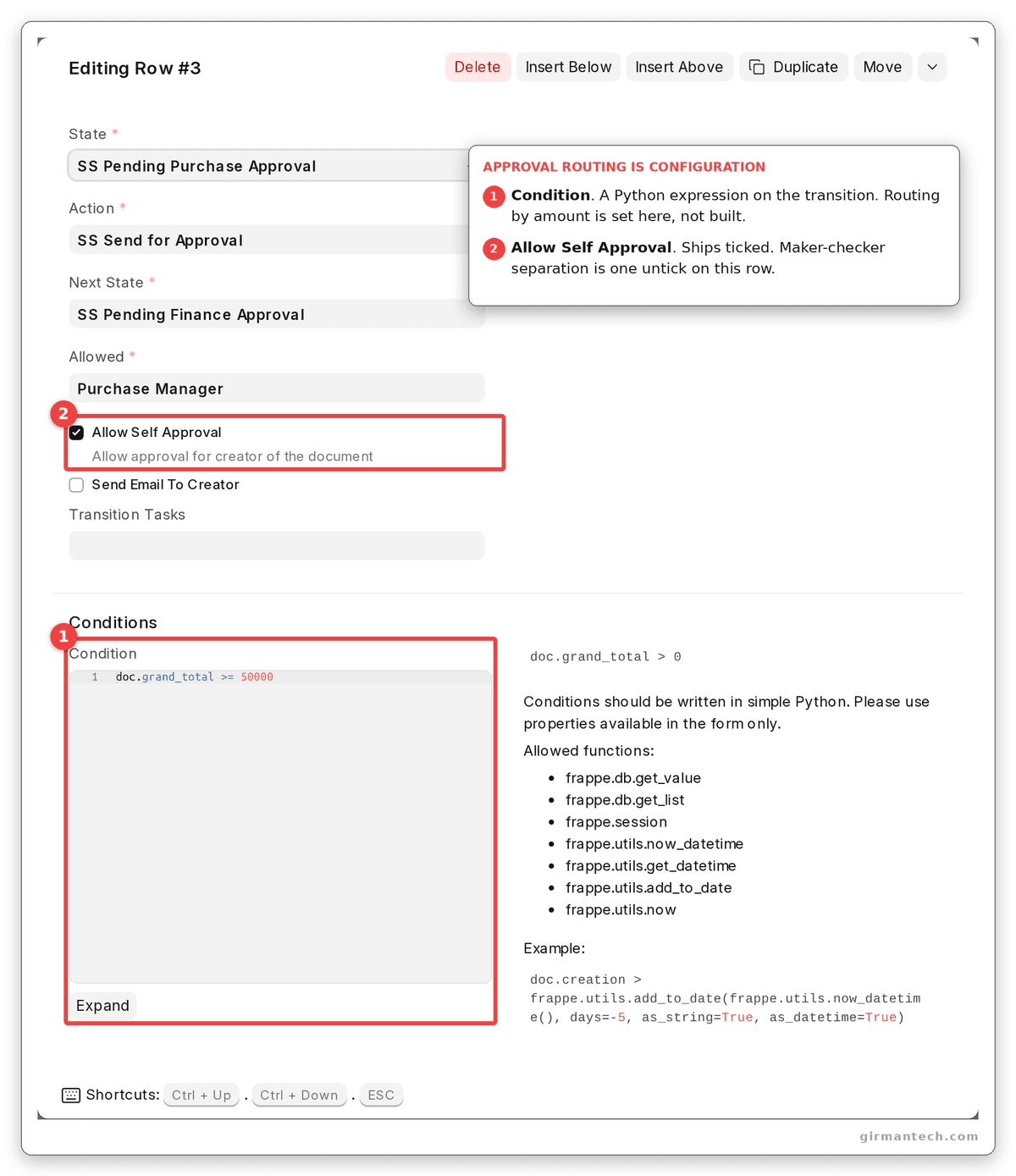
A workflow transition whose condition sends purchase orders of ₹50,000 and above to a second approver.
How ERPNext Compares on Extensibility
| Capability | ERPNext v16 | SAP Business One | Odoo | Oracle NetSuite | Dynamics 365 Business Central | TallyPrime |
|---|---|---|---|---|---|---|
| New fields and form changes without code | Customize Form and Custom Field, stored as data | User-Defined Fields and Tables | Studio (Enterprise only) | SuiteBuilder custom fields, records and forms | Personalization and Designer; new table fields through an AL extension | TDL, which is code |
| Approvals without code | Workflow with a Python condition per transition | Approval Procedures | Approvals app; Studio approval rules (Enterprise) | SuiteFlow | Built-in approval workflows; Power Automate | Through TDL |
| Server-side logic without deploying an app | Server Script, off by default, switched on bench-wide | No; SDK add-ons are installed | Server actions with Python code | SuiteScript, deployed inside the account | No; AL extensions are published apps | TDL files loaded by the client |
| Packaged extension model | Frappe apps attached through hooks | SDK add-ons | Python modules | SuiteApps and SuiteCloud projects | AL extensions; base code cannot be modified in the cloud | TDL |
| Access to core source | Full, GPLv3 | Closed | Community under LGPLv3; Enterprise proprietary | Closed | Extend only, no modification | Closed |
| Licensing model | Open source; no per-user fee | Per-user licence, not publicly listed | Per-user subscription; Studio needs Enterprise | Per-user, not publicly listed | Per-user, Essentials or Premium | Per licence, Silver or Gold |
ERPNext holds 4.5/5 across 140 reviews on Capterra and 4.5/5 across 59 reviews on Gartner Peer Insights (as at September 2026).
Every system here can be extended. What separates them in a fit-gap analysis is whether a verdict can be checked. ERPNext and Odoo Community publish their source, so "it ships" is a claim anyone can verify; ERPNext's no-code layer is free, where Odoo's needs Enterprise. Business Central and NetSuite enforce the cleanest wall between core and extension, the stronger guarantee against upgrade breakage. SAP Business One and Tally ask you to take the vendor's word for what ships.
One Honest Limitation
Configuration made directly on an ERPNext site is invisible to version control. Customize Form, Custom Field and Property Setter changes are database records, and nothing writes them to a repository unless they are exported as fixtures from an app.
On a business running a test site and a live site, the two drift. A field added on live during a busy week never reaches test. The next upgrade is rehearsed on a site that does not match production, and the first sign is a broken print format the morning after go-live. Systems that keep every extension as a packaged, versioned artefact do not have this failure mode.
Design for it before go-live, not after. Decide on day one that configuration lives in a small custom app as fixtures, and that nobody changes live without exporting. It takes an hour to set up. It saves the upgrade weekend you cannot afford to lose.
What Changes in ERPNext v16
v16 closed gaps routinely scoped as custom development on v15, several of them in minor releases:
- Subcontracting Inward Order (v16.0.0) handles the job worker's side: material received from a customer, processed and returned.
- BOM Secondary Items (v16.13.0) add co-product and by-product support, replacing the scrap-only model.
- Bank Transaction Rule (v16.26.0) classifies bank lines by narration, amount and pattern, and assigns party and account.
- Server Scripts are switched on only from
common_site_config.json.
Still missing: an Indian bank API connector, intercompany eliminations and secondary sales tracking.
Frequently Asked Questions
When does an Indian business need ERPNext customization instead of standard ERPNext features? Only when a requirement survives three checks: it does not already ship in ERPNext or India Compliance for your exact release, it cannot be met by changing a setting the demo left at its default, and it cannot be met by configuration such as workflows, pricing rules or accounting dimensions. On v16 the requirements that genuinely survive are usually integrations with Indian banks and devices, intercompany eliminations, secondary sales tracking and retrospective rebates.
Is Customize Form in ERPNext configuration or customization? Configuration. Customize Form writes Property Setter and Custom Field records to the database, and Frappe's own source describes it as a tool to mask the Property Setter. These changes survive upgrades, but they are not in version control unless exported as fixtures from an app.
Why are Server Scripts not working on my ERPNext site? Server Scripts are disabled by default. On v16 they are switched on only by setting server_script_enabled in common_site_config.json, for example with bench set-config -g server_script_enabled true; setting it in one site's site_config.json has no effect. Frappe's documentation states that shared Frappe Cloud benches do not allow server scripts.
Does ERPNext support ITC-04 for job work? Yes, through the India Compliance app. Its GST Job Work Stock Movement report tracks material sent to and received from job workers and downloads the ITC-04 return as JSON. This is shipped functionality, not a customization.
How can ERPNext customizations survive future upgrades? Keep all code in a separate custom app attached through hooks, never in ERPNext's own files, and export Custom Fields and Property Setters as fixtures so configuration is versioned with the code. Re-run your fit-gap check before each upgrade, because releases close gaps: v16.13.0 added co-product and by-product BOMs and v16.26.0 added rule-based bank matching, both of which make earlier custom builds redundant.