



How We Customized ERPNext's Project Module to Run a Fully Remote Engineering Team
We're a fully remote team no shared office, no one glancing over anyone's shoulder. So the question we had to solve wasn't "how do we log tasks," it was: how does a manager know what's happening across 15, 50, or 200 engineers without asking them?
ERPNext's default Project module gave us tasks and timesheets. It didn't give us billing accuracy, client visibility, or a way to catch a slipping deadline before the client did. So we built on top of it.
The problem, in three parts
- Every scope of work item lived in a spreadsheet someone updated by hand
- Weekly client updates meant manually writing an email, every week, for every project
- We had no single view of who was overloaded, who was free, or which project was quietly falling behind
What we built inside ERPNext
Scope of Work → Task → Timesheet, properly linked. Every SOW line item becomes a task; every task is where hours get logged. Nothing floats free of a scope item anymore.
Progress reports that write themselves. One click pulls live data completed items, open tasks, hours into a client ready email. No one types a status update from scratch.
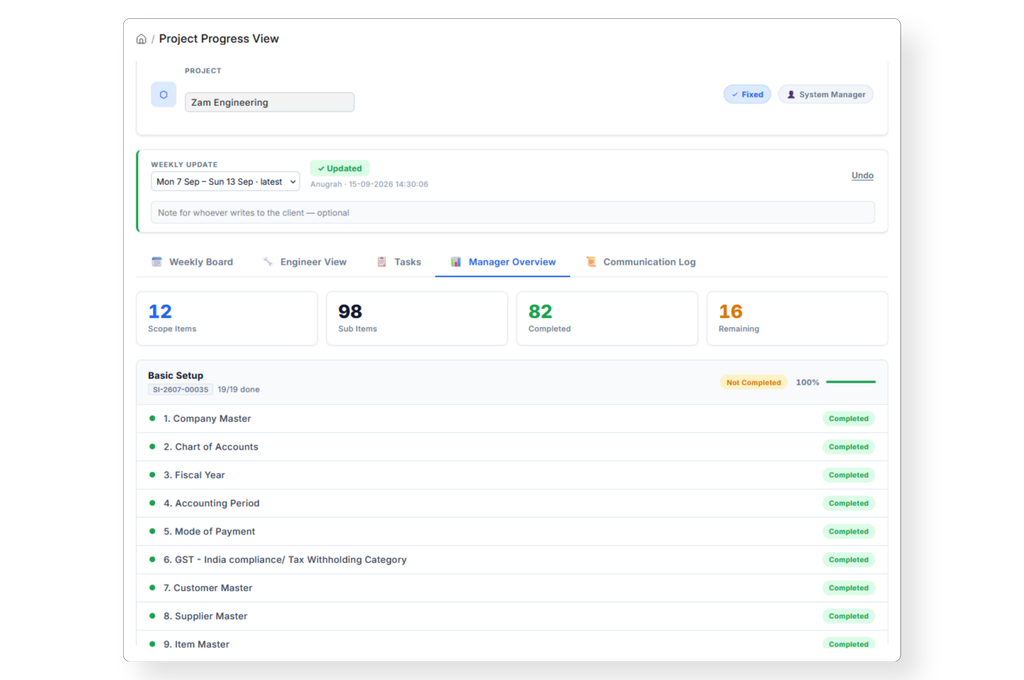
A client portal, so clients don't wait on us. Clients log in and see their own project's hours, tasks, and SOW progress on demand, instead of waiting for our weekly mail.
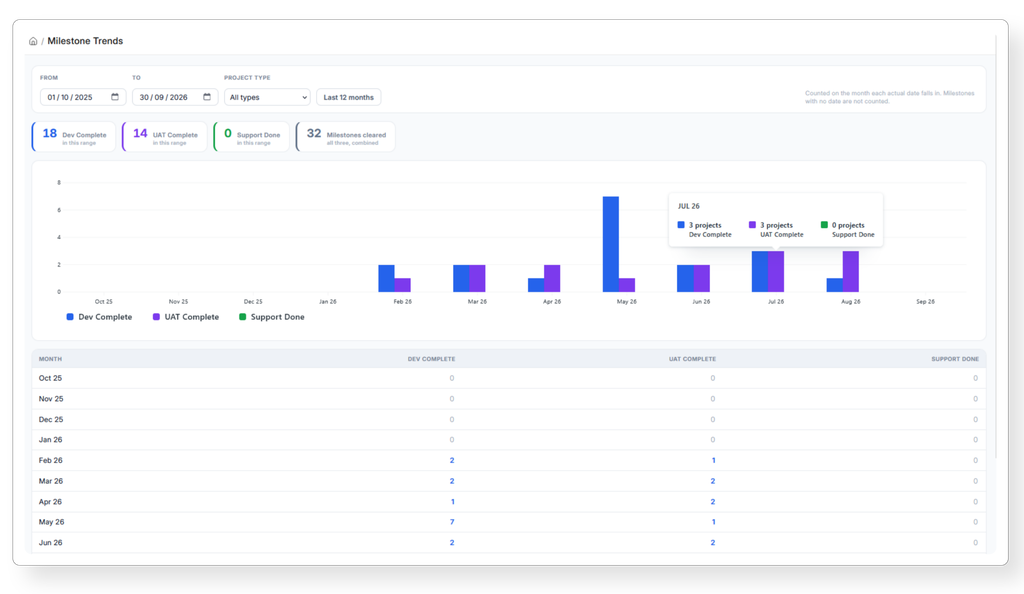
Milestone Trends dashboard. Month over month, how many projects hit Dev Complete, UAT Complete, and Support Done one chart, whole company.
Resource Utilization view. Filterable by engineer, project, and task type, so a manager can see in seconds who's stretched thin and who has room for more work.
Timesheet approval as a real workflow, not an email thread. Managers adjust logged hours against approved hours directly, with a reason captured for every change so billed hours and worked hours never silently drift apart.
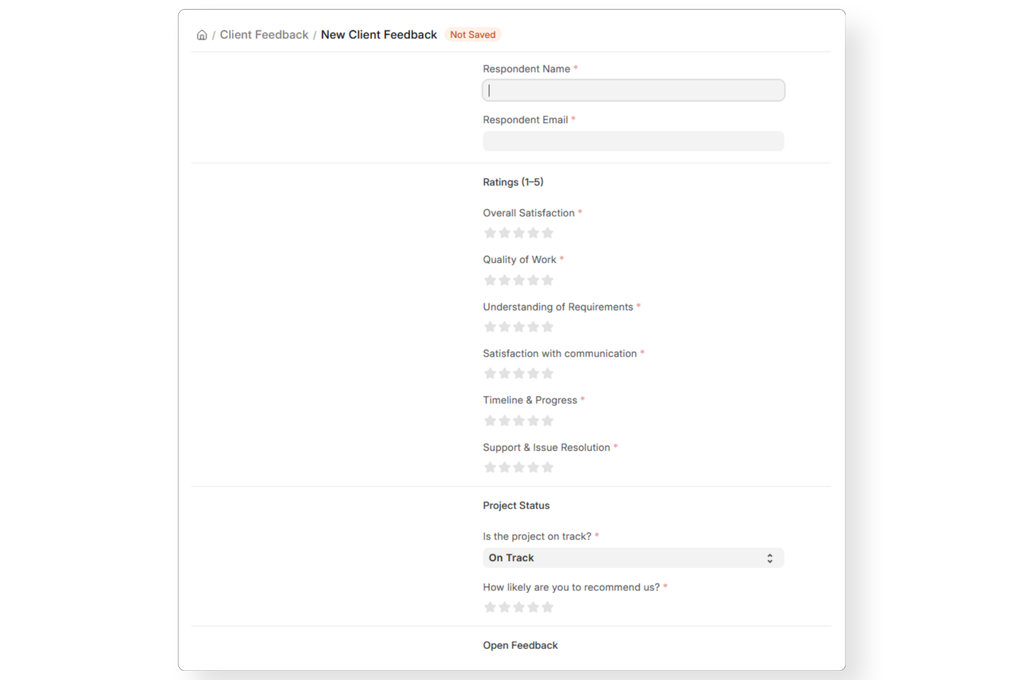
Automated client feedback, monthly. A feedback form goes out on schedule, without anyone remembering to send it, and low ratings automatically flag for root cause analysis.
Delivery Timeliness and Task Overview dashboards. At a glance: average delay by project, how many tasks are overdue vs. on track, and where the bottlenecks actually are.
One click tracker export. The exact Excel format our ops team used to build by hand dashboard, task sheet, SOW, and timesheet generated in one click instead of a day of copy paste.
The user experience, before vs. after
This is the part the team actually feels day to day:
- Weekly status reports: what used to take an engineer 20-30 minutes of writing per project now takes one click — the report is generated from live data, not memory.
- Manual Excel tracking: the spreadsheet Sakshi maintained by hand for every project is now a one click export, cutting what was a recurring multi hour task down to seconds.
- Approvals: managers no longer chase people over Slack or email to approve discounts or timesheets everything sits in one queue, so there's no more waiting on someone to "get to it."
- Visibility: instead of asking "is this project on track?", a manager opens one dashboard and has the answer — turning what used to be a multi day back and forth into a same minute check.
- Overall manual effort: across status reporting, tracker maintenance, and approval follow ups, the team estimates roughly ~70% less manual admin work per project per week.
Why This Mattered
None of this is possible out of the box, the standard Project screens in ERPNext are largely fixed UI you can't extend. Everything above was built as custom doctypes, workflows, and reports on top of the framework. The result: our internal ops moved off spreadsheets entirely, client updates go out without a person typing them, and as we grow past 20 people, the system not someone's memory tells us where things stand.
Related Reads
-
How Apna Mart, another multi location business, used ERPNext to bring 200+ stores across 4 states onto a single, centralized inventory system.
-
A closer look at how Biglilpeople, a growing multi location retail brand, unified operations across 7 stores and 3 kiosks on ERPNext.
-
How PREBO India, a German manufacturing group's India joint venture, automated employee management and payroll on ERPNext.
-
How Gateway Perfumes, a Dubai based retailer, simplified complex, multi warehouse inventory operations with ERPNext.
Read more on the Girman Blog →
Frequently Asked Questions
Can ERPNext's default Project module handle client facing reporting? Not out of the box. Standard ERPNext gives you tasks and timesheets, but sending clients a live status update, a portal view, or an automated weekly report requires custom doctypes and workflows layered on top.
Is this kind of customization difficult to maintain over time? No, because it's built using ERPNext's own framework (Frappe), not a bolt on tool. Custom doctypes, workflows, and reports upgrade along with the rest of the system, so there's no separate software to patch or maintain.
Do we need a large engineering team to build something like this? No. Most of what's described here SOW linked tasks, a progress report generator, a client portal, timesheet approval workflows, and a few dashboards was built incrementally by a small team, as internal requirements came up.
How long does it take to customize the Project module this way? It depends on scope. A single piece (say, an automated progress report) can be a short build. A fuller setup portal, dashboards, approval workflow, feedback loop is usually rolled out in stages over a few weeks, not all at once.
Does this only work for IT/services companies, or can other industries use it too? The same approach applies anywhere work is tracked against a scope and billed by time or milestone services, manufacturing, distribution, or any business managing multiple client projects at once.
What's the difference between this and just using ERPNext's default Project and Timesheet doctypes? Default ERPNext logs tasks and hours but doesn't link them back to a scope of work, generate client ready reports, or flag delays proactively. This customization closes that gap turning raw logs into visibility and (for us) a documented improvement in remote team accountability.
Can clients see project status without asking for an update? Yes, that's the point of the client portal built on top of the module: clients log in and see their own project's hours, tasks, and SOW progress whenever they want, instead of waiting on a weekly email.
Is this approach specific to remote teams? It's most useful for remote or distributed teams, since it replaces informal check ins with a system of record. But the same setup helps any team that manages multiple concurrent client projects, remote or not.