




Material requirements planning (MRP) is the calculation that turns demand for finished goods into a dated list of what to manufacture and what to purchase. It explodes each product's bill of materials into its components, subtracts what you already have or have on order, and offsets the remainder by lead time so that orders are released early enough to arrive when needed. It is the core planning engine in SAP, Oracle NetSuite, Microsoft Dynamics 365 and ERPNext.
The definition is simple. The reason companies get it wrong is that MRP is only as good as three inputs most mid-market manufacturers do not maintain properly: accurate BOMs, accurate on-hand stock, and honest lead times.
The operational problem
A 200-person fabrication business takes a sales order for 400 units. The production manager opens the BOM, works down the levels in a spreadsheet, checks stock for the components he remembers being tight, and raises purchase requisitions.
Three weeks later the line stops. Not for the expensive machined part everyone was watching. For a ₹40 gasket that appears in two different sub-assemblies. Nobody added the two requirements together, and the on-hand figure that looked comfortable was already committed to a different order.
This is the failure MRP exists to prevent, and it is a summation problem, not a judgement problem. The planner was not careless. He was doing arithmetic across four BOM levels and two open orders in his head.
What MRP actually calculates
Every MRP implementation, regardless of vendor, performs four steps:
- Gross requirements. Explode demand through the BOM, level by level, to get total component quantity needed.
- Netting. Subtract projected available stock: on hand, plus on order, minus what is already committed elsewhere.
- Lot sizing. Round the net requirement to something orderable: a minimum order quantity, a pack size, an economic order quantity.
- Lead-time offsetting. Work backwards from the date the material is needed to the date the order must be placed.
The vocabulary is standardised because the arithmetic is standardised. Where systems differ is in how much of steps 3 and 4 they automate, and whether they check capacity as well as material.
How MRP works in ERPNext
ERPNext's MRP engine is the Production Plan DocType. Go to Manufacturing > Production Plan.
Step 1: Pull in demand
Set Company, then Get Items From: either Sales Order or Material Request. Click Get Sales Orders (or Get Material Requests), apply your filters, and select the orders to plan.
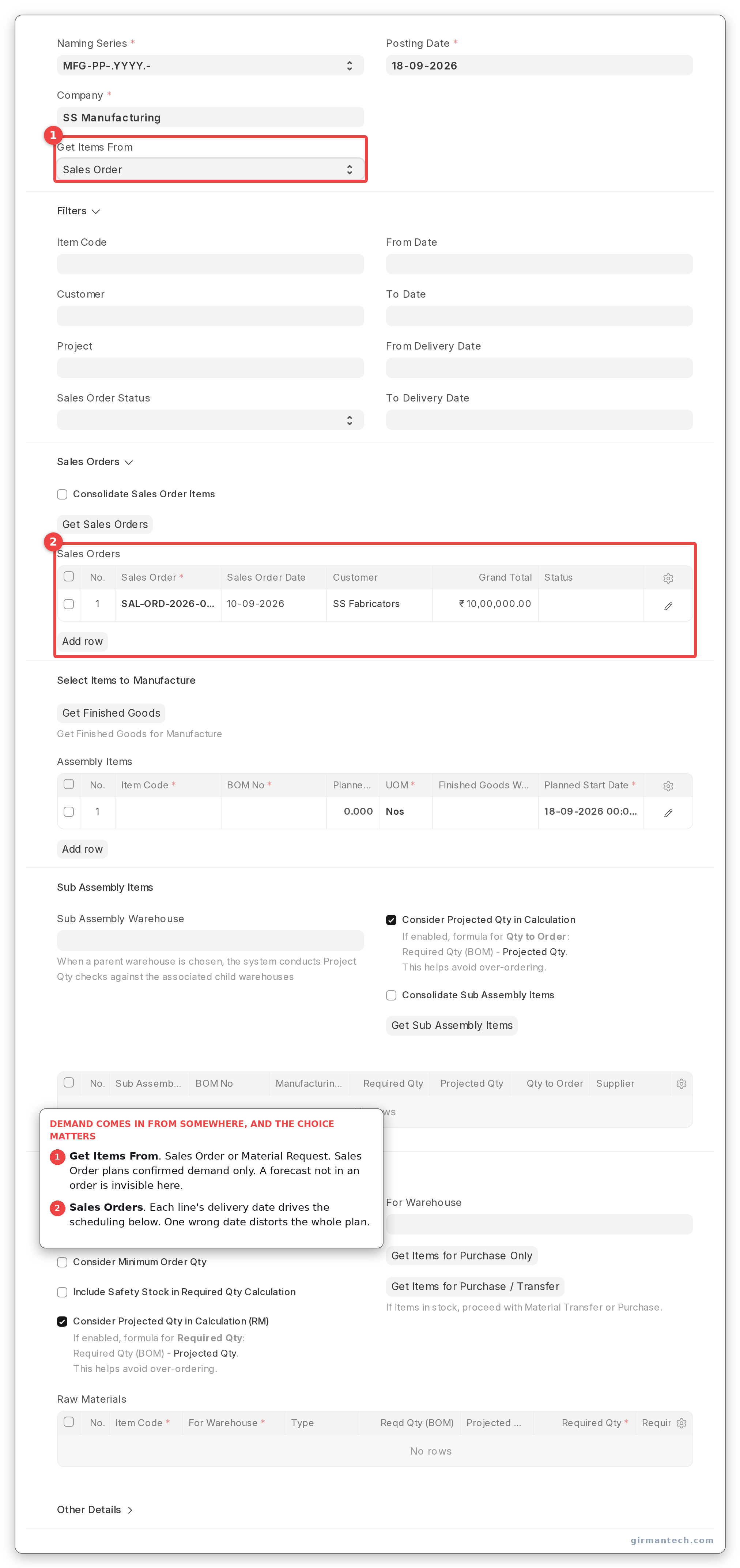
Production Plan with Get Items From set to Sales Order and orders selected.
Step 2: Get the finished goods
Click Get Finished Goods for Manufacture. This populates the Assembly Items table with item code, BOM, planned quantity, finished goods warehouse and planned start date.
If several sales orders contain the same item, tick Consolidate Sales Order Items to merge them into a single production line. ERPNext preserves the link back to each originating sales order in a separate reference table, so traceability survives the merge.
Step 3: Explode the sub-assemblies
Click Get Sub Assembly Items. ERPNext walks the BOM tree and lists every manufactured sub-assembly. The level it sits at is stored on each row as Level (BOM), but that field is read-only and is not one of the grid's columns. Open a row to see it.
Each row carries a Manufacturing Type field (type_of_manufacturing), which controls what gets created downstream:
- In House → a Work Order
- Subcontract → a Purchase Order, grouped by supplier
- Material Request → skipped by Work Order creation entirely
Tick Skip Available Sub Assembly Items (and set the Sub Assembly Warehouse) to suppress sub-assemblies you already have in stock. When a parent warehouse is selected, ERPNext checks stock across all its child warehouses.
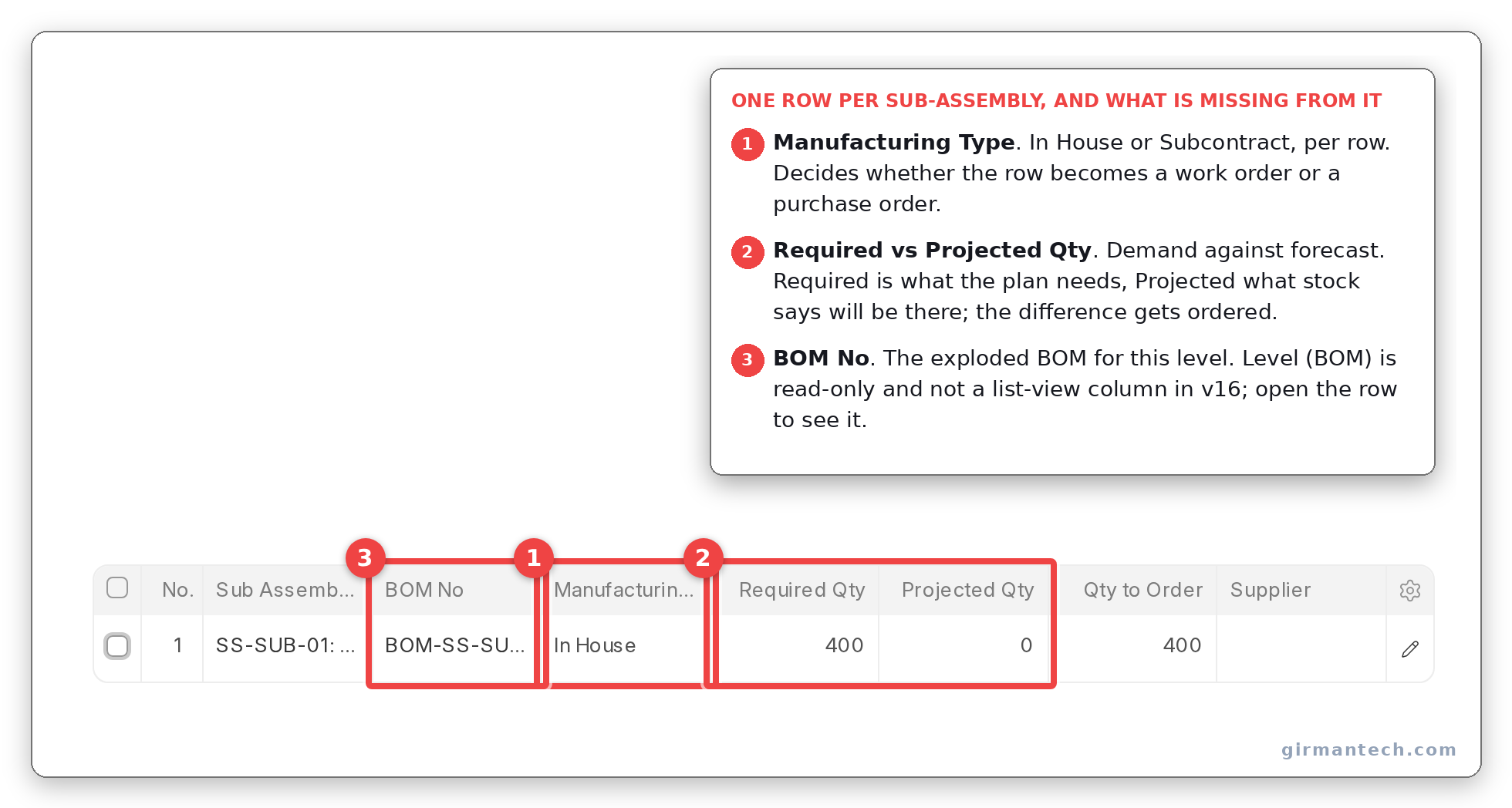
Sub Assembly Items table showing Manufacturing Type, Required Qty and Qty to Order per row. Level (BOM) is read-only and not a grid column. It is inside the expanded row.
Step 4: Calculate raw material requirements
This is the actual netting step, and it is the one planners most often skip.
In the Material Request Planning section, set the Raw Materials Warehouse and click Get Items for Purchase Only (or Get Items for Purchase / Transfer to pull from another warehouse instead of buying). Neither button is called Get Raw Materials for Purchase in v16, though the manual and most tutorials still say so.
The Raw Materials table now shows, per component:
| Column | What it means |
|---|---|
| Reqd Qty (BOM) | Gross requirement from the BOM explosion |
| Projected Qty | Actual + ordered + planned − reserved |
| Minimum Order Quantity | From the Item master |
| Required By | Date the material is needed |
| Required Qty | The answer: what to actually order |
Three labels in this table have moved since v15, and the old ones are what most tutorials still print. There is no Qty As Per BOM column. It is Reqd Qty (BOM). There is no Plan to Request Qty. The net figure is Required Qty, which reads like a gross number and is not. And Qty In Stock is a real field on the row, with exactly that label, but it is not one of the grid's list-view columns: you only see it by opening the row.
The four checkboxes that change the arithmetic:
- Include Non Stock Items (default on): pulls in components where "Maintain Stock" is unticked.
- Include Subcontracted Items (default on): recurses into subcontracted components' raw materials.
- Consider Minimum Order Qty: rounds a shortage up to the item's minimum order quantity.
- Include Safety Stock in Required Qty Calculation: adds safety stock on top of the calculated shortage.
Within a single plan, ERPNext tracks a running allocation per item and warehouse, so the same on-hand stock is never netted twice against two different finished goods. Click Download Required Materials to export the plan for review before committing.
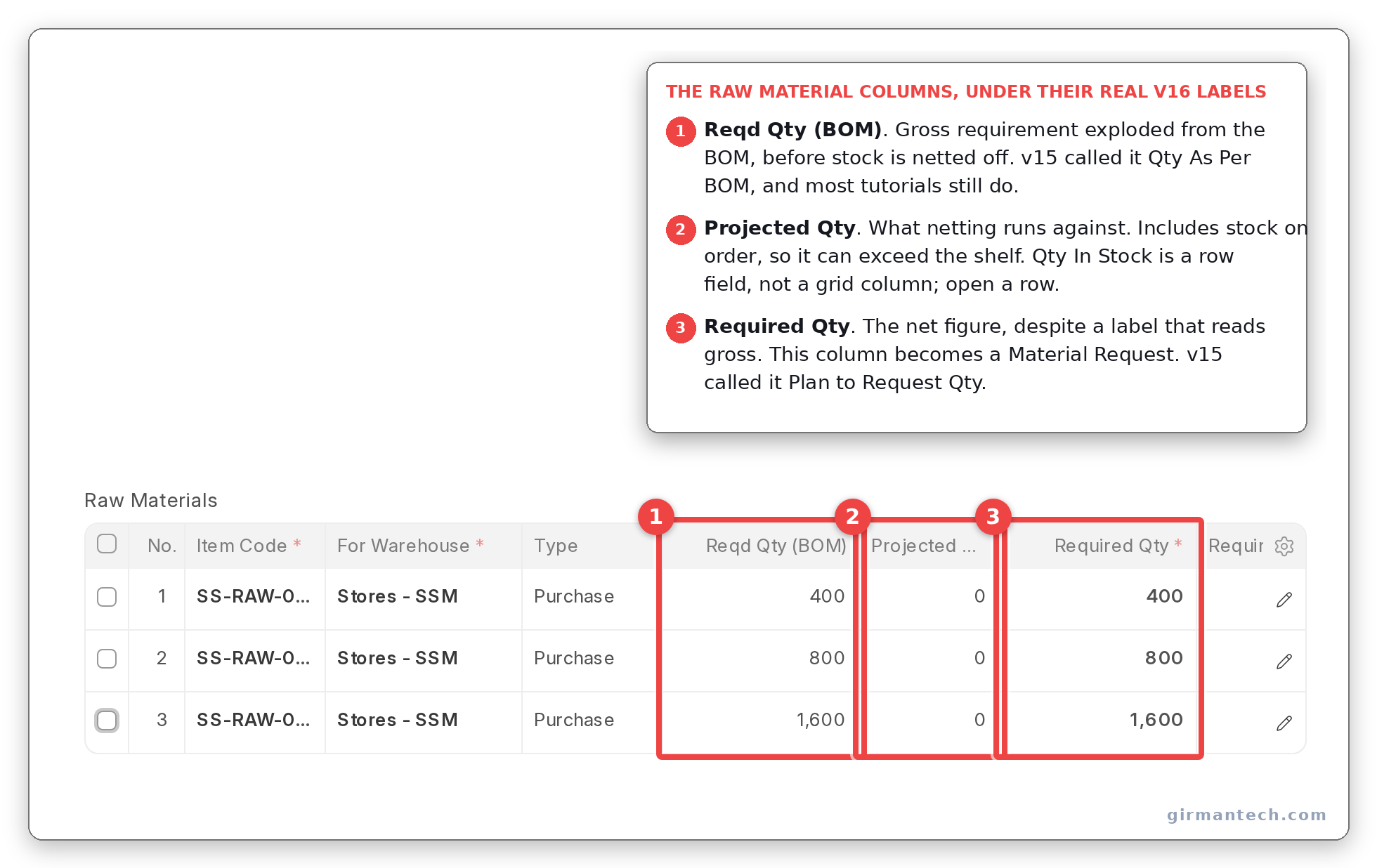
Raw Materials table under its real v16 column names: Reqd Qty (BOM), Projected Qty and Required Qty.
Step 5: Create the orders
Submit the plan, then use Create > Work Order / Subcontract PO for the manufactured items and Create > Material Request for the purchased ones.
One behaviour to understand before go-live: if you have pulled sub-assembly rows, the finished-goods Work Order is created with "Use Multi-Level BOM" switched off. You get one work order per BOM level rather than a single work order that plans material for the whole tree. This is deliberate (it gives you level-by-level visibility), but it surprises teams migrating from a flat work-order model.
Step 6: Understand the cross-plan reservation
Once a plan is submitted, its raw material requirements reserve stock against a dedicated bin field, so a second plan created the next day nets against what is genuinely left.
This reservation only exists if you completed step 4. If a planner creates a plan, pulls finished goods and sub-assemblies, but never clicks Get Items for Purchase Only, nothing is reserved and the next plan will happily net against the same stock. This is the single most common cause of "ERPNext double-ordered material", and it is a process gap, not a bug.
Capacity: what ERPNext does and does not do
MRP plans material. Scheduling plans time. ERPNext handles the second through Work Order operations and Job Cards.
In Manufacturing Settings, under Capacity Planning:
- Disable Capacity Planning: turns scheduling off entirely
- Capacity Planning For (Days): default 30; how far ahead to look for a slot
- Allow Overtime: permits scheduling outside workstation working hours
- Allow Production on Holidays
- Time Between Operations (Mins): default 10
When a Work Order is submitted, ERPNext chains its operations forward: operation one starts at the planned start date, each subsequent operation starts after the previous one ends plus the gap. Job Cards are then slotted into the workstation's working hours, respecting the Job Capacity field, which sets how many job cards can run in parallel at that workstation. If a slot cannot be found within the capacity planning window, ERPNext raises an error telling you to extend it.
So ERPNext's scheduling is finite. It will not double-book a workstation beyond its job capacity. But it is greedy and forward-only: work orders are scheduled in the order they are submitted, not by delivery date priority, and when several identical workstations exist, ERPNext takes the first matching one rather than the least loaded.
For a make-to-order shop with a handful of work centres, this is adequate. For a plant that needs to sequence by due date or level load across parallel lines, it is not, and you should plan for a dedicated scheduling layer.
ERPNext vs. SAP vs. NetSuite vs. Dynamics 365 BC vs. Odoo
| Capability | ERPNext v15 | ERPNext v16 | SAP S/4HANA | Oracle NetSuite | Dynamics 365 BC | Odoo |
|---|---|---|---|---|---|---|
| Multi-level BOM explosion | Yes | Yes | Yes (MRP Live) | Yes | Yes | Yes |
| Master Production Schedule | No | Yes (new) | Yes | Yes | Yes | Enterprise edition only |
| Statistical demand forecasting | Standalone report only, not connected to planning | Manual entry (Sales Forecast) | Separate product (IBP) | Requires Advanced Inventory Management | Included (Azure AI) | Manual entry only |
| Time-phased planned order release | No | Yes, in the MRP report | Yes | Yes | Yes | Via reordering-rule lead times |
| Net-change / regenerative planning run | No (plans are manual documents) | No | Yes | Yes | Yes (both modes) | Scheduler-driven |
| Finite capacity scheduling | Per-workstation, greedy, forward-only | Core MRP assumes infinite; requires PP/DS | Requires Advanced Manufacturing SuiteApp | Routing-based | Included in Community | |
| Licensing | Open source, no per-user fee | Enterprise licence | Per-user + SuiteApps | Per-user | Free tier; MPS needs Enterprise | |
ERPNext holds 4.3/5 across 51 reviews on G2 and 4.5/5 across 140 reviews on Capterra (as at September 2026).
What changes in ERPNext v16
Version 16 adds a genuine second planning layer alongside Production Plan:
- Master Production Schedule: aggregates demand from sales forecasts, sales orders and material requests into one planning document.
- Sales Forecast: a periodic demand document that generates an MPS. Note it is manual: it creates placeholder rows for a planner to fill in. It is not statistical forecasting.
- Item Lead Time: purchase time, buffer time, and a rough-cut daily capacity calculation from workstation count, shift hours and yield.
- Material Requirements Planning Report: the significant addition. It does real time-phasing, calculating a release date by subtracting lead time from the delivery date, and rolling lead times up through multi-level BOMs. It buckets by day, week or month, and can create purchase and work orders directly from the report.
If you are evaluating ERPNext for a planning-heavy operation, evaluate v16, not v15. The gap between them on this specific capability is larger than any other module.
One upgrade warning: the Ignore Available Stock checkbox reverses meaning between v15 and v16. In v15, ticking it means ignore stock and order the full BOM quantity. In v16 the equivalent field means use projected quantity to net. Defaults were flipped so out-of-the-box behaviour is unchanged, but if you deliberately ticked that box in v15, re-check it after upgrading.
One honest limitation
ERPNext does not do statistical demand forecasting, and it does not have a net-change planning run.
There is an Exponential Smoothing Forecasting report, but it writes to nothing: no production plan, material request or work order consumes its output. It is a report you look at, not an input to planning. Even v16's Sales Forecast generates placeholder quantities for a human to overwrite.
And ERPNext has no scheduled MRP job. A Production Plan is a document a person creates. When demand changes, nothing recalculates automatically and nothing tells you that an order placed last week should now be pulled in or pushed out. Net-change planning and action messages, standard in systems built for forecast-driven manufacturing, have no ERPNext equivalent.
For make-to-order manufacturers this matters little. Demand arrives as a sales order and you plan against it. For make-to-stock businesses running on forecast, with hundreds of SKUs and seasonal demand, this is a real gap. Either you accept a disciplined manual planning cycle, or you plan for forecasting outside ERPNext and feed the numbers in.
To be fair on the scope of it: this gap is common rather than unique. Several comparable products either share the limitation, license forecasting separately, or gate it behind a higher tier. But if forecast-driven planning is your core requirement, satisfy yourself on it before committing, because it is not a configuration away.
Frequently asked questions
Does ERPNext have MRP? Yes. The Production Plan DocType performs multi-level BOM explosion, nets against projected stock, applies minimum order quantities and safety stock, and generates work orders, subcontracting purchase orders and material requests. ERPNext v16 adds a Master Production Schedule and a time-phased MRP report.
Is ERPNext good for manufacturing? It is well suited to make-to-order and mixed-mode manufacturers up to a few hundred employees, covering BOMs, multi-level production planning, subcontracting, job cards and workstation scheduling. It is weaker for forecast-driven make-to-stock operations that need statistical forecasting and automatic replanning.
Does ERPNext do capacity planning? Yes, within limits. Job Cards are scheduled into workstation working hours and respect each workstation's parallel job capacity, so a workstation is not overbooked. However, scheduling is forward-only and first-come-first-served. There is no sequencing by delivery date and no load levelling across identical workstations.
What is the difference between a Production Plan and a Work Order in ERPNext? A Production Plan is the planning document: it takes demand, explodes BOMs, and calculates what to make and buy. A Work Order is the execution document for manufacturing one item against one BOM. One Production Plan typically generates several Work Orders plus Material Requests.
Does ERPNext support demand forecasting? Not in a way that drives planning. ERPNext includes an Exponential Smoothing Forecasting report, but its output is not consumed by the Production Plan. The Sales Forecast document added in v16 requires a planner to enter quantities manually.