



Landed cost is the total cost of getting a unit of stock onto your shelf: the supplier's price plus freight, insurance, customs duty, clearing charges, port handling and anything else spent between the supplier's gate and yours. It is implemented as landed cost estimation in Oracle NetSuite, as landed costs with multiple allocation bases in SAP Business One, and as the Landed Cost Voucher in ERPNext. Without it, your gross margin is wrong on every imported item, and wrong by more on the cheap ones.
Companies rarely discover this in the accounts. They discover it when a product that shows 22% margin in the system turns out to have been sold at a loss all year.
The operational problem
A Chennai distributor imports electrical fittings. One container, 40 line items, invoice value ₹38 lakh. Against it: ₹2.4 lakh ocean freight, ₹6.1 lakh basic customs duty, ₹48,000 insurance, ₹1.15 lakh clearing and forwarding, ₹22,000 port handling. Just over ₹10 lakh of cost that is not on the supplier's invoice.
The team does what teams do. Freight and duty go to an expense account. The stock goes in at supplier price. Everyone knows the real cost is "about 25% higher" and the sales team is told to price accordingly.
The problem is that 25% is an average across 40 items, and the actual spread runs from 9% to 60%. Duty is item-specific and follows the HSN code. Freight follows volume, and the bulky low-value items eat most of it. So the heavy, cheap, high-duty items are priced as though they carry the average, and they are the ones the customer buys on price comparison, which is exactly why they sell well.
The cost is not the misstated stock value on the balance sheet, which the auditor will adjust in aggregate anyway. It is a year of pricing decisions and a product mix that has quietly optimised itself towards the items you lose money on. This is an allocation problem, not a discipline problem. The team was not being careless, they were being asked to do per-item cost accounting in their heads.
What landed costing actually requires
Three things, in any system.
Capture the charges against the receipt, not the period. A freight bill that arrives three weeks after the container has to attach to that container's goods, not to whatever month it was booked in.
Allocate on a basis that matches the cost driver. Duty follows value. Ocean freight follows volume. Insurance follows value. Handling often follows weight. One allocation basis for all of them is an approximation, and the size of the error is the spread between your items.
Push the result into inventory valuation retroactively, because the charges almost always arrive after the goods, and often after some of them have been sold.
The third one is where systems differ most, and it is the one that matters for the accounts.
How landed cost works in ERPNext
Step 1: Receive the goods first
The Landed Cost Voucher attaches to an existing Purchase Receipt, Purchase Invoice or Subcontracting Receipt. It cannot exist on its own, and it is not something you fill in at the purchase order stage.
If you want to attach it to a Purchase Invoice, that invoice must have Update Stock ticked. Otherwise ERPNext throws:
Row 1: Purchase Invoice PINV-00042 has no stock impact.
and tells you to use a receipt instead. The check is explicit in landed_cost_voucher.py, and it catches most people once.
Step 2: Pull the items in
Stock > Landed Cost Voucher > New. Add the receipt in Purchase Receipts, click Get Items, and the items table fills with item code, quantity and rate, all read-only.
The button's label is two words. Its fieldname is get_items_from_purchase_receipts, and that longer string is what most documentation calls it (including, until we drove this form with a script and watched the click miss, an earlier draft of this post).
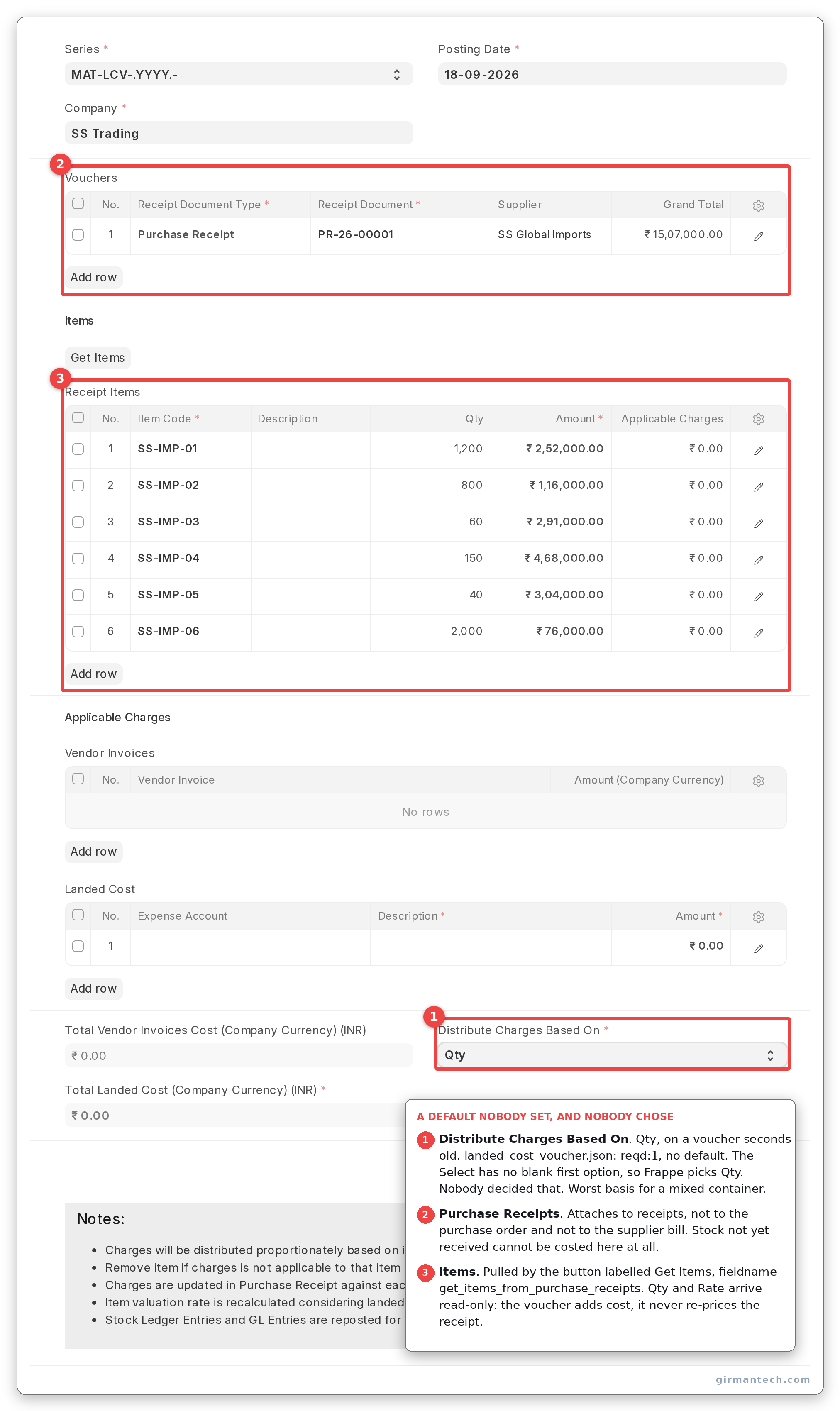
Landed Cost Voucher with the Purchase Receipts table populated and the items pulled in, showing the read-only qty and rate columns.
Step 3: Enter the charges
The Taxes and Charges table takes one row per cost (freight, duty, insurance, clearing), each against an expense account. This is where the ₹10 lakh goes.
Step 4: Choose the distribution basis, carefully
Distribute Charges Based On offers exactly three options: Qty, Amount, Distribute Manually.
It is mandatory and has no default in the doctype JSON: reqd is set, default is not. You would expect a blank field. You get Qty.
The options are Qty\nAmount\nDistribute Manually with no empty first entry, so Frappe's Select control selects the first one. On a voucher created seconds ago, df.default is null and cur_frm.doc.distribute_charges_based_on is already Qty. That is worse than a blank field, not better. A blank mandatory field stops you and makes you decide. This one answers for you, does not record that it answered, and quantity is the wrong basis for exactly the case this post is about: a mixed container, where the bulky cheap items carry the freight. Nobody chose it, and nothing in the form suggests a choice was made.
The arithmetic is a straight proportion:
applicable_charges = item_value × (total_charges ÷ total_of_all_item_values)
where item_value is the item's qty or amount depending on what you chose.
Then the part worth knowing. Once every row is computed and rounded, ERPNext compares what it actually allocated against the total charge, and adds the entire difference to the last row of the table:
if total_charges != self.total_taxes_and_charges:
	diff = self.total_taxes_and_charges - total_charges
	self.get("items")[item_count - 1].applicable_charges += diff
The remainder is small: paise, on a well-behaved voucher. But it always lands on whichever item happens to be last, and row order is the order the items came off the receipt. On a 40-line container it is noise. On a three-line receipt with a large charge and an awkward ratio, it is visible, and it is not distributed.
A second guard runs at submission with a tolerance of 2 / 10^precision. Inside that, the last row is silently plugged again. Outside it, you get "Total Applicable Charges in Purchase Receipt Items table must be same as Total Taxes and Charges", which in practice only appears when you have used Distribute Manually and your numbers do not add up.
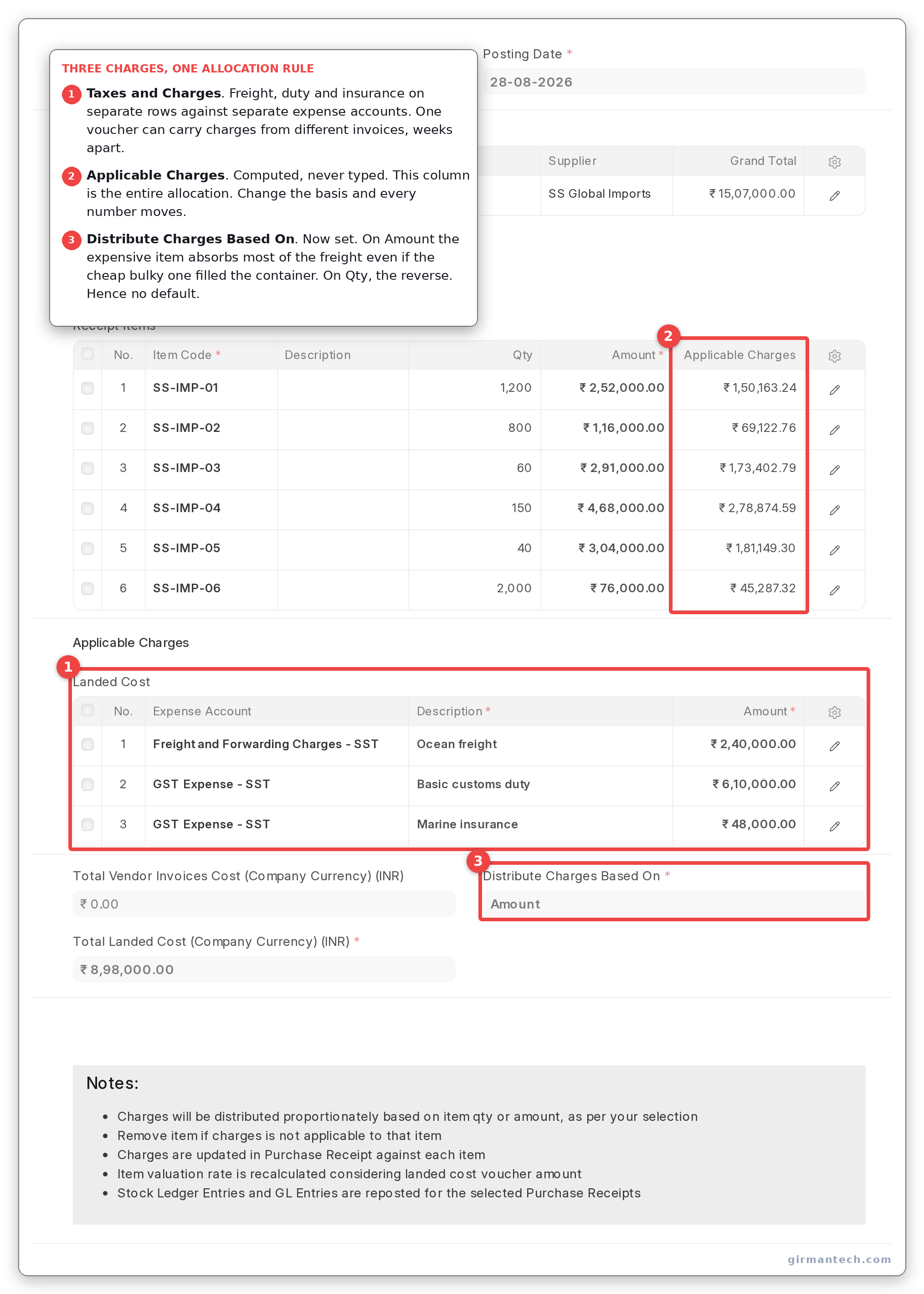
Taxes and Charges table with freight, duty and insurance rows, and the items table below showing the computed Applicable Charges column.
Step 5: Submit, and understand what that does
Submitting does not post an adjustment journal. It rewrites the receipt.
update_landed_cost sets the landed cost amount on each receipt item, recalculates the valuation rate as
valuation_rate = (net_rate + item_tax_amount + landed_cost_voucher_amount
                  + amount_difference_with_purchase_invoice) ÷ qty_in_stock_uom
and then does something that surprises people reading the code for the first time: it sets the Purchase Receipt's docstatus to 2, reverses its stock ledger entries and GL entries, sets docstatus back to 1, and posts them again with the new valuation. Synchronously, inside your submit.
Only the downstream consequences are deferred: repost_future_sle_and_gle queues a Repost Item Valuation job to walk forward through everything that consumed the stock after the receipt date.
Two practical consequences. First, submitting a landed cost voucher against an old receipt on a busy site can queue a substantial repost; do it outside business hours. Second, cancelling the voucher runs the identical path with the landed cost amount reset to zero, so the reversal is clean. This is one of the better-behaved parts of ERPNext stock accounting.
One thing you cannot check from the receipt. valuation_rate on Purchase Receipt Item carries hidden: 1 in v16, so the field the formula above computes is not rendered on the form at all. The receipt line shows the landed cost amount and the supplier's rate side by side and never adds them up for you. The Stock Ledger is where the result surfaces.
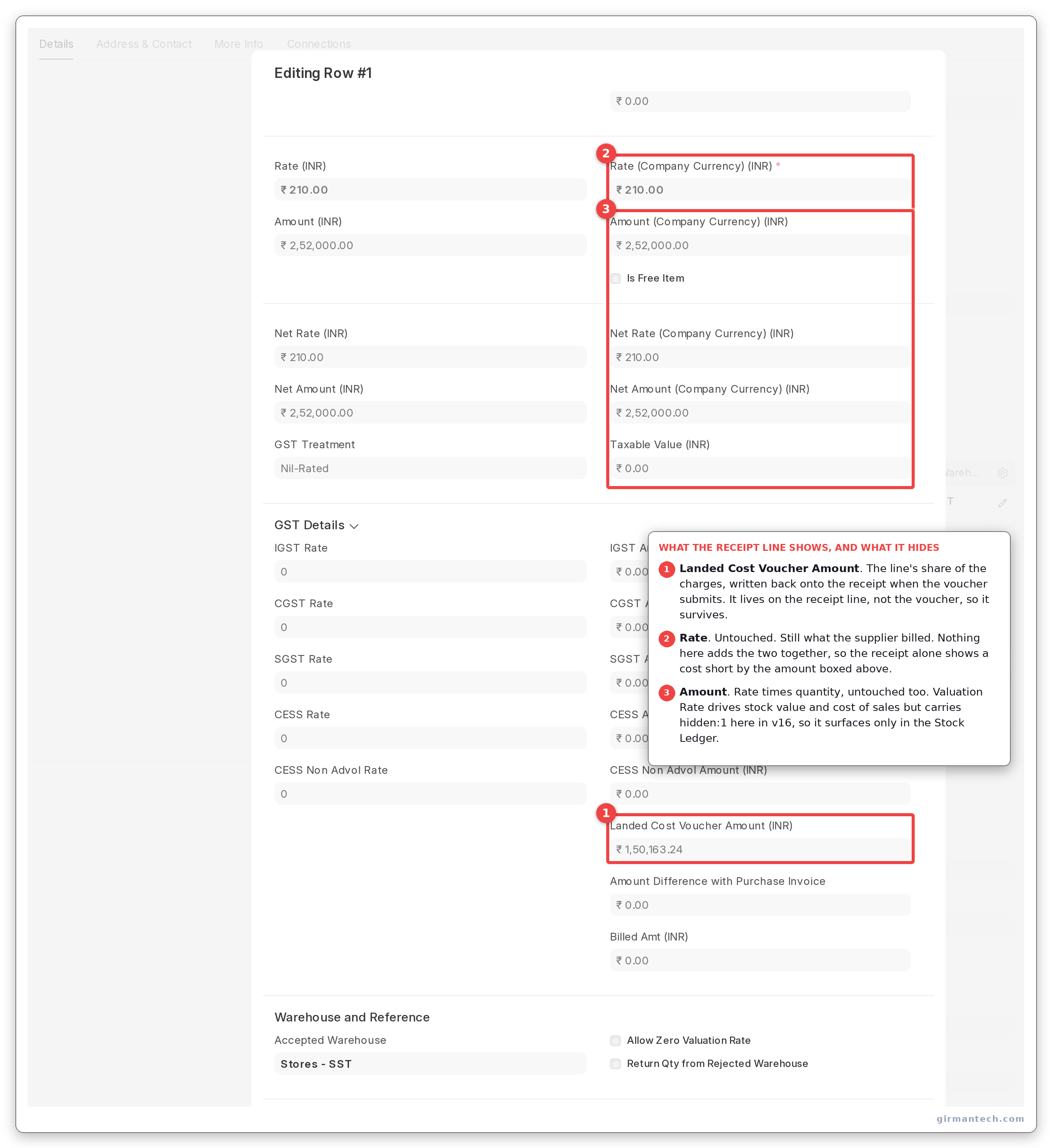
Purchase Receipt item after the voucher: Landed Cost Voucher Amount populated beside the untouched Rate and Amount. Valuation Rate is hidden on this doctype and cannot be shown here.
Step 6: Check what did and did not get updated
Serial numbers get their purchase_rate rewritten, by direct SQL, for non-asset items. Batches do not. No batch-level valuation field is touched by this code path.
Fixed assets are gated rather than updated: if an item is marked as a fixed asset, ERPNext refuses to submit unless Assets have been created and linked for the full quantity, and refuses outright if any of those Assets is already submitted. The message tells you to remove the item from the table, which is correct but reads as a dead end the first time.
The revaluation is retroactive and in place, which has a consequence for evidence as well as for accounting: after the voucher there is no "before" left to photograph. The receipt's own ledger entry has been rewritten. What the ledger can show is the rate the stock now carries, and (if anything left the warehouse afterwards) that the outward movement was costed at the landed rate rather than the invoice rate.
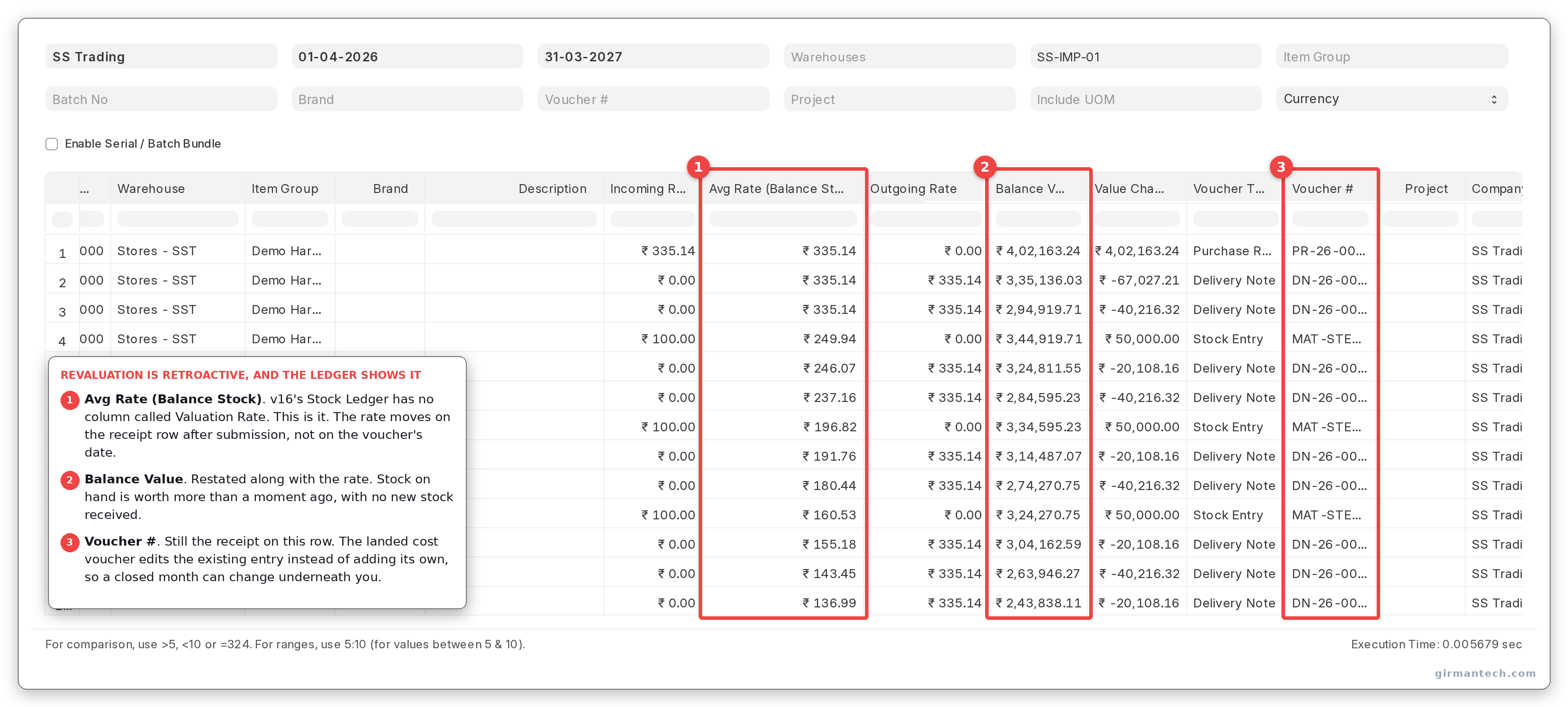
Stock Ledger for the item. v16 labels the column Avg Rate (Balance Stock), not Valuation Rate, and it reflects the landed cost on the receipt row itself.
Where landed cost meets the invoice
The voucher carries a second table, Vendor Invoices, which is the mirror image of the main flow: it links the Purchase Invoices that billed these charges, and it filters for invoices with update_stock = 0 (the freight bill from the shipping line, not the goods invoice from the supplier). Submitting the voucher writes a claimed_landed_cost_amount back onto those invoices, and cancelling resets it to zero.
This is how you reconcile "charges I have capitalised into stock" against "charges I have been billed for", and it is the part of the feature that most implementations never switch on.
ERPNext vs. SAP Business One vs. NetSuite vs. Odoo vs. Dynamics 365 BC
| Capability | ERPNext v16 | SAP Business One | Oracle NetSuite | Odoo | Dynamics 365 BC |
|---|---|---|---|---|---|
| Landed cost document | Landed Cost Voucher against a receipt | Landed Costs document | Landed cost on item receipt | Landed Costs entry | Item Charge on a purchase document |
| Allocation bases | Qty, Amount, Manual only | Qty, value, weight, volume, equal | Qty, value, weight | Qty, value, weight, volume | Qty, value, weight, equal |
| Allocate by volume | No | Yes | No | Yes | No |
| Estimate at PO / in-transit accrual | No | Yes | Yes, landed cost estimation | Limited | Via item charges on order |
| Retroactive revaluation after sale | Yes, via queued repost | Yes | Yes | Yes | Yes |
| Applies to serialised stock | Yes, purchase rate rewritten | Yes | Yes | Yes | Yes |
| Applies to batches | No batch-level update | Yes | Yes | Yes | Yes |
| Reconcile charges to vendor invoices | Yes, Vendor Invoices table | Yes | Yes | Partial | Yes |
| Licensing | Open source, no per-user fee | Per-user licence | Per-user | Enterprise edition | Per-user |
ERPNext holds 4.5/5 across 140 reviews on Capterra and 4.5/5 across 59 reviews on Gartner Peer Insights (as at September 2026). Ratings go stale. Re-check them at publication.
The practical read: ERPNext's landed costing is mechanically sound and its retroactive revaluation is genuinely good. Its allocation model is the weakest in this table, and for importers that is the part that decides whether the numbers are right.
One honest limitation
ERPNext can only allocate landed cost by quantity or by value. It cannot allocate by weight or by volume, and freight follows volume.
This is the gap, and it is not a configuration you have missed. The field offers three options and two of them are proportional bases. For a container of similar goods it does not matter. For a mixed container of light expensive items and bulky cheap ones, allocating ocean freight by value moves cost off exactly the items that caused it. The distributor in the example above has a 9%-to-60% real spread; allocating by value would report it as flat.
The escape hatch is Distribute Manually, which lets you type each item's share. That means computing the volumetric allocation in a spreadsheet and keying 40 numbers back in, per container, forever (which is the process the ERP was bought to replace).
Other mid-market products treat weight and volume as first-class allocation bases alongside quantity and value. If you are a serious importer with mixed containers, that difference is worth more than everything else on the comparison table, and you should weigh it before choosing.
The second constraint is timing. There is no landed cost estimation and no in-transit accrual: you cannot book expected freight and duty when the container ships, only when the charge is known. Between the goods arriving and the clearing agent's bill landing, usually two to four weeks, your stock is valued at supplier price and every sale in that window reports an inflated margin. The repost corrects the ledger afterwards, but the management reports that went out in the meantime were wrong, and nobody re-reads them.
What we implement: a standing "Estimated Landed Cost" percentage per supplier or item group used for pricing decisions only, kept deliberately outside the valuation, plus a monthly reconciliation of estimated against actual so the estimate stays honest. It is a workaround. Budget for it at implementation rather than discovering it in month three.
What changes in ERPNext v16
Nothing structural in this feature, and it is worth saying so plainly rather than manufacturing a section.
The distribution logic, the allocation options, the rounding-to-the-last-row behaviour and the cancel-and-repost mechanism are all the same code they have been. The one meaningful change in the surrounding area is that item-based reposting can be turned on in Stock Reposting Settings, which changes how the downstream revaluation is queued, item by item rather than as a single job. On a site with heavy landed cost activity that is the difference between a repost that finishes overnight and one that does not.
We could not check v15 on this bench, so this section describes what v16 does rather than what changed.
Frequently asked questions
What is a Landed Cost Voucher in ERPNext? It is the document that distributes freight, customs duty, insurance and other post-purchase charges across the items on a Purchase Receipt, Purchase Invoice or Subcontracting Receipt, so those costs land in inventory valuation instead of sitting in an expense account. It attaches to an existing receipt and cannot be created on its own.
How does ERPNext distribute landed cost across items?
By quantity, by amount, or manually. Each item's share is its quantity or value as a proportion of the total, multiplied by the total charge. After rounding, any remainder is added in full to the last row of the items table rather than spread across rows. The doctype defines no default basis, but the form pre-selects Qty because it is the first option in the list, so the choice is made for you on every voucher unless somebody changes it.
Can ERPNext allocate freight by weight or volume? No. The Distribute Charges Based On field offers only Qty, Amount and Distribute Manually. Allocating by volume, which is how ocean freight is actually charged, requires computing each item's share outside the system and entering it manually. SAP Business One supports weight and volume as native allocation bases.
What happens if stock was already sold before the Landed Cost Voucher is posted? ERPNext corrects it retroactively. Submitting the voucher reverses and re-posts the receipt's own stock ledger and GL entries immediately, then queues a Repost Item Valuation job that walks forward through every later transaction that consumed the stock, recalculating valuation and cost of goods sold. On an old receipt with a lot of downstream movement this can be a long job. Run it outside business hours.
Can I apply a Landed Cost Voucher to a Purchase Invoice instead of a Purchase Receipt? Yes, but only if that invoice was created with Update Stock enabled. An invoice without stock impact is rejected with an error directing you to use a receipt. Separately, the voucher's Vendor Invoices table serves the opposite purpose: linking the non-stock invoices that billed you for the freight and duty, so capitalised charges can be reconciled against what was actually invoiced.