



Inventory accuracy is the degree to which the quantity and value an ERP reports for an item match what is physically in the building and what was actually paid for it. SAP calls the controls around it inventory management configuration, Oracle NetSuite calls them inventory preferences, Microsoft Dynamics 365 Business Central splits them across inventory setup and item policies, and ERPNext puts them on one page called Stock Settings. Without them the stock report is a number nobody will defend in a meeting.
Most teams do not discover an inventory accuracy problem in the stock report. They discover it when a stock valuation figure goes into a set of accounts, and the auditor asks why an item shows a negative quantity on a date three months ago.
The operational problem
A Nashik engineering distributor turning over ₹85 crore runs about 1,200 stock transactions a month across four warehouses. Goods are physically received before the paperwork catches up, which is normal, so the storekeeper is told to issue material anyway and let the receipt follow.
To make that work, somebody enabled negative stock during go-live. It solved the immediate problem and nobody revisited it.
Eighteen months later the stock ledger contains periods where an item sat at minus forty units. Every valuation calculated in those periods is wrong, because a moving average divided across a negative quantity is not a price. The figures feed the monthly accounts. Nothing flagged it, because allowing negative stock is a setting, not an error.
The cost is not the wrong valuation. It is that the correction is retrospective across eighteen months of ledger, and that the person who ticked the box did so for a sound operational reason. This is a defaults problem, not a discipline problem.
What inventory accuracy controls actually govern
Three questions, which every ERP answers separately.
May the quantity go below zero? Allowing it keeps the warehouse moving and makes every valuation in the negative period unreliable. Refusing it stops the warehouse when paperwork lags. There is no third option, only a choice about which failure you prefer.
Is a batch valued as itself, or as part of a pool? If two batches of the same item cost 100 and 300, batch-wise valuation issues them at 100 and 300. Pooled valuation issues both at 200. Both are defensible. Only one matches what you actually paid for the units that left.
What happens when a reservation cannot be met in full? Refuse it, or quietly grant a smaller one. The second is friendlier and is the kind of thing that turns into a short shipment nobody predicted.
An ERP that answers these with checkboxes is being honest about the trade-offs. An ERP whose checkboxes have preconditions, exemptions and per-record overrides that are not on the page is being less so.
How inventory accuracy controls work in ERPNext
All of the following live at Stock > Stock Settings, verified against ERPNext v16.51.1.
Step 1. Turn on the capability before anything else
enable_serial_and_batch_no_for_item, default 0.
This reads like a feature toggle. It is a gate. With it off, the Item form will not save an item with Has Batch No or Has Serial No ticked at all:
ValidationError: Cannot enable Has Batch No as Activate Serial / Batch No
for Item is disabled in Stock Settings
Nothing batch-related or serial-related on this page has any effect until it is on, because the records those settings govern cannot be created. This was found by a fixture script failing to build, not by reading the field description.
The gate in both states: the Item form refusing Has Batch No while it is off, then the identical tick accepted once it is on. The field lives in a collapsed Serial Nos / Batches section on the Inventory tab.
What the setting does afterwards is the part worth planning for, and it is not what most teams expect. Turning batch tracking on does not force anyone to name a batch on a stock movement. Issue ten units of a batch-tracked item with the batch field left empty and the entry submits.
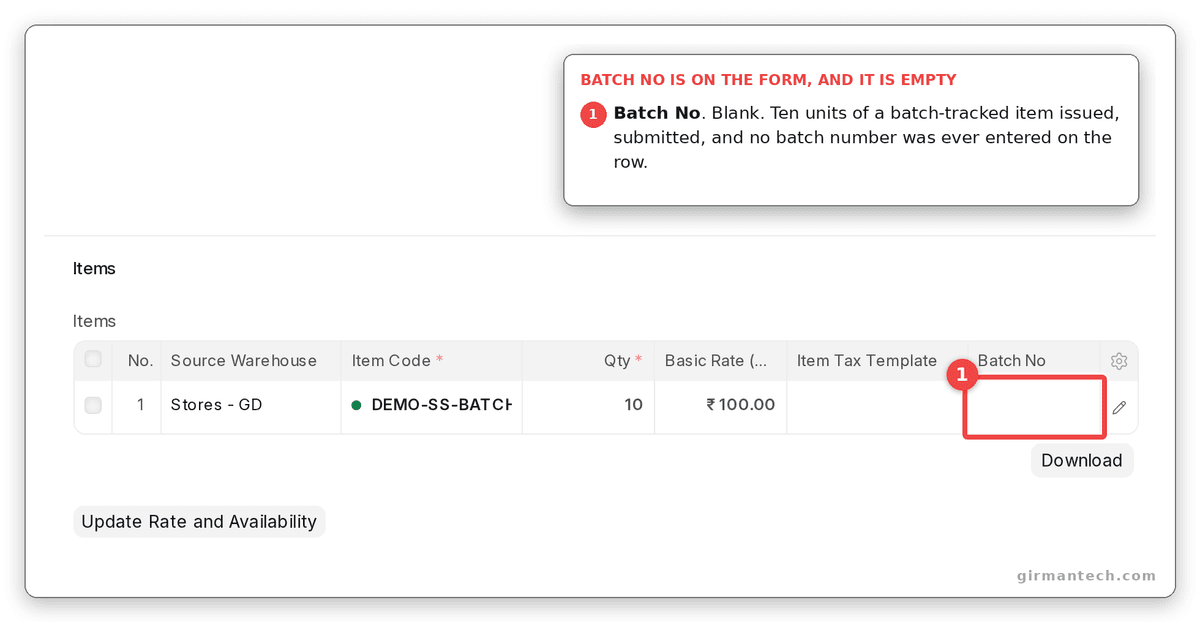
A Material Issue of ten units against a batch-tracked item, with no batch number anywhere on the row.
ERPNext builds a Serial and Batch Bundle and chooses for you, on pick_serial_and_batch_based_on, which ships as FIFO.
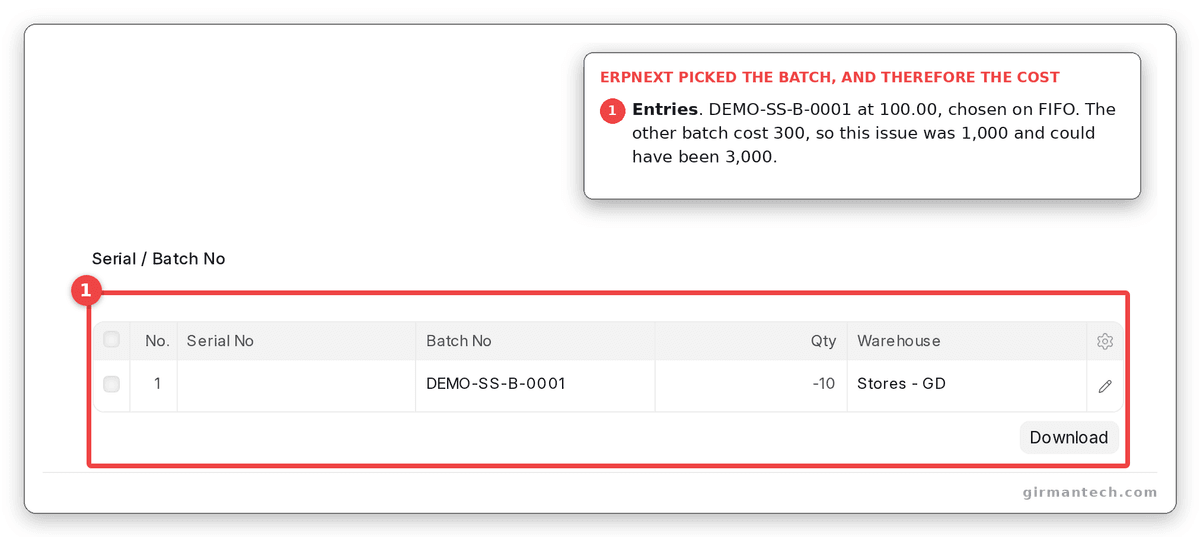
The bundle ERPNext created, naming DEMO-SS-B-0001 at 100.00.
On the demo fixture the two batches cost ₹100 and ₹300. The batch that gets picked is therefore the cost of the issue: ₹1,000 here, and ₹3,000 had the other batch been chosen. Nobody typed either number. If batch selection matters to your costing, the control is pick_serial_and_batch_based_on, not this setting, and leaving it at FIFO is a costing decision made by default.
Step 2. Decide whether quantity may go below zero
allow_negative_stock, default 0.
With 100 units on hand and an issue of 150:
| setting | outcome |
|---|---|
0, the default | NegativeStockError: 50.0 units of Item DEMO-SS-MA needed in Warehouse Stores - GD |
1 | Submitted. Stock now -50 |
The whole thing end to end, on our own demo site: the refusal naming fifty units short, the setting, the warning ERPNext raises against itself, the identical entry posting, and the ledger left at minus fifty.
The second row is the part worth looking at, because it is not an error message. It is a posted document and a stock balance below zero, sitting in the ledger where a valuation will later be calculated from it.
The item description notes this can also be set per item. What it does not note is that a negative balance makes every subsequent moving-average valuation on that item unreliable until the balance returns to positive, because the divisor is wrong.
Step 3. Decide whether a batch is valued as itself
do_not_use_batchwise_valuation, default 0.
Two preconditions decide whether this flag does anything, and neither is on the page.
It only applies to Moving Average items. On a site left at the shipped FIFO default, this flag does nothing whatsoever. A team that ticks it and sees no change has not misconfigured anything; the flag is simply inert for them.
It only applies to new batches. is_new() means an existing batch keeps whatever it was created with, for ever. Toggling the setting on a live site produces a ledger where some batches are valued one way and some the other, with nothing on the batch record explaining why.
Run against two existing batches and a probe batch created under each state:
existing batches before:
  DEMO-SS-B-0001   use_batchwise_valuation=1
  DEMO-SS-B-0002   use_batchwise_valuation=1

do_not_use_batchwise_valuation=0  ->  new batch  use_batchwise_valuation=1
do_not_use_batchwise_valuation=1  ->  new batch  use_batchwise_valuation=0

existing batches after both toggles:
  DEMO-SS-B-0001   use_batchwise_valuation=1   unchanged
  DEMO-SS-B-0002   use_batchwise_valuation=1   unchanged
The toggle that never reaches your data: an existing batch stays ticked after the setting is turned on, and only a batch created afterwards comes out unticked. One item, two batches, two costing methods, and nothing on either record explaining why.
The same field on a batch of the same item, created minutes later with the setting on:
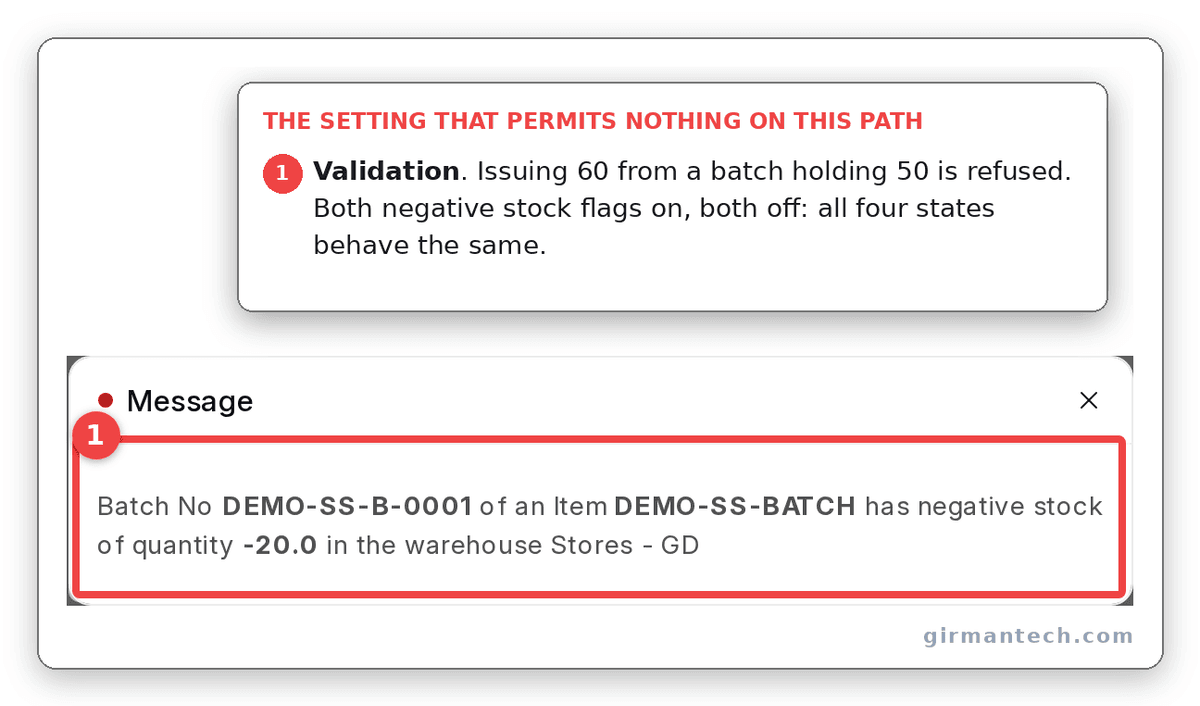
Issuing 60 from a batch holding 50, refused. The same refusal appears with both negative-stock flags on and with both off.
Step 4. Know that a Batch can overrule the page
allow_negative_stock_for_batch, default 0.
Open any Batch record and there is a second checkbox with almost the same name. When it is ticked, ERPNext reads it first and never looks at Stock Settings at all for that batch.
The Batch wins. A single batch record with its own flag set is exempt from the global setting, so unticking this page guarantees nothing. If you are auditing why a batch went negative, the Stock Settings page is not where the answer is.
To be fair to ERPNext, the Batch form says so. Its help text reads "overriding the 'Allow negative stock for Batch' setting in Stock Settings. This may lead to incorrect valuation rates, so it is recommended to avoid using this option." That is an honest description and a clear warning. It is simply not visible from the page that appears to be in charge, which is the Stock Settings page people audit first.
Step 5. Decide what happens when a reservation falls short
allow_partial_reservation, default 1, and hidden.
The field carries depends_on: eval: doc.enable_stock_reservation, and enable_stock_reservation defaults to 0. So on a fresh site this checkbox is not on the page at all. The moment someone enables stock reservation it appears, already ticked, and partial reservation is in force before anyone has read the line.
It does not warn. The requested quantity is overwritten with whatever was available. You asked to reserve 100 and you have a reservation for 60, recorded as though 60 is what you wanted. With the flag off you get an error naming the available quantity instead, which is the louder and usually more useful outcome.
auto_reserve_serial_and_batch is hidden behind the same condition and also defaults to 1.
Requesting 80 against 30 available, with the flag off:
The field that is on by default and invisible until Enable Stock Reservation is ticked, then both outcomes: 100 reserved against a request for 150, and the identical request reserving nothing at all. ERPNext shows word-for-word the same message either way.
And with it on:
Step 6. Know what the transfer validation actually validates
validate_material_transfer_warehouses, default 0.
Left unticked, which is the default, a transfer from a warehouse to itself posts. The ledger takes both rows, ten out and ten in, and the balance ends where it started.
Both states on our own demo site: the same-warehouse transfer posting while the box is unticked, and the identical entry refused by row number once it is ticked.
Ticked, the same entry is refused at save.
The name suggests it stops a transfer whose source and target are the same warehouse. It does, but only on a site with no Inventory Dimensions configured. Where any dimension exists, a same-warehouse transfer is permitted as long as a dimension differs between the two rows. The behaviour is reasonable. The label gives no hint that it depends on an unrelated feature being unconfigured.
Step 7. Know how many exits the serial validation has
allow_existing_serial_no, default 1.
Left at its default, a serial number already seen can be received again. Turning it off is the strict choice, and the check it enables exits early in three cases: outward transactions, any voucher that is not a Purchase Receipt, Purchase Invoice or Stock Entry, and Stock Entries whose purpose is Material Transfer, Send to Subcontractor or Material Transfer for Manufacture.
Those exemptions are defensible individually. Together they mean the setting governs less than its name implies.
The pair is worth seeing. Issue a serial out, then receive the same number back. At the default the receipt submits, and the Serial No record shows the number sitting in the warehouse again with a status of Active. Nothing marks it as a number that has been through once already.
Both states, with the setting ticked and then unticked: the used serial received back in without comment, and the identical receipt refused by serial number, naming the bundle that already consumed it.
Untick the setting and the same document is refused.
Step 8. Know that reordering is a scheduled job
auto_indent, default 0.
Stock at 30 against a reorder level of 40, scheduler run, flag off:

Unticked: no Material Request found.
Same stock, same scheduler run, flag on:
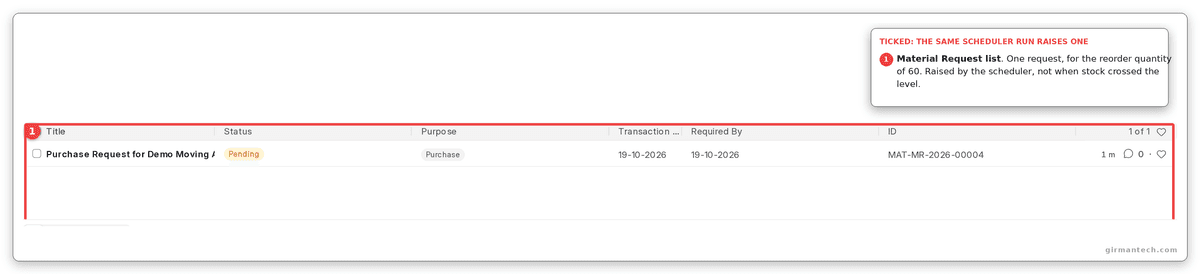
Ticked: one request, for the reorder quantity of 60.
reorder_item() is a scheduler task, so this flag gates a background job rather than anything that happens while you are in a transaction. Stock crossing a reorder level does not raise a Material Request at that moment; it raises one the next time the scheduler runs. On a site where the scheduler is paused, which is common on staging, nothing happens at all and the setting looks broken.
Where inventory accuracy meets purchase controls
Stock Settings decides what your inventory is worth. Buying Settings decides what you were billed for it, and the two meet on rejected material: a rejected quantity is valued by one page and invoiced by the other, with different defaults on each.
The practical consequence is that a rejected-goods problem cannot be diagnosed from either page alone.
Comparison
| Capability | ERPNext v16 | SAP Business One | Odoo 17 | NetSuite |
|---|---|---|---|---|
| Negative stock | Global and per-item | Global, with document-level block | Per-product | Per-location preference |
| Batch-level valuation | Per batch, Moving Average only | Per batch, all methods | Per lot | Per lot |
| Per-record override of a global rule | Yes, on Batch | No | No | No |
| Partial reservation | Silent by default | Warns | Warns | Configurable |
| Licence | GPLv3, self-host free | Per user | Per user per app | Annual subscription |
SAP Business One wins the valuation row outright. Batch-level valuation works under every valuation method there, where ERPNext restricts it to Moving Average. A business running FIFO and expecting batch-level costing cannot have it without changing valuation method, which is not a small change.
ERPNext holds 4.5/5 across 140 reviews on Capterra and 4.5/5 across 59 reviews on Gartner Peer Insights (as at September 2026). NetSuite carries 2,069 and 442 reviews on the same two sites. Read those with the counts in view: a 4.5 from 59 self-selected reviewers is a weaker claim than a 4.3 from 442, and the sample sizes are the more useful column. G2 figures are absent by decision. G2 serves bot detection to automated requests, we do not defeat bot detection to source a statistic, and the search-snippet numbers contradicted each other. Ratings go stale. Re-check them at publication.
The takeaway. ERPNext gives you more inventory control than the comparison set, and less visibility into which control is actually in force. SAP Business One and NetSuite expose fewer switches and tell you unambiguously what each one does. A team that reads settings pages and trusts them will be better served elsewhere; a team that will check the records has more to work with here.
One honest limitation
Several Stock Settings are weaker than they appear, and the page does not say so.
Three of the eight above have a precondition or an override that is invisible from the settings page: batch-wise valuation silently requires Moving Average, transfer validation silently requires no Inventory Dimensions, and negative stock for a batch can be overridden on the batch itself.
The effect is that reading this page does not tell you how the system will behave. You have to read it alongside the item master, the batch records, and whether Inventory Dimensions exist.
There is no fix for this in v16 and no way to detect it from the interface. The mitigation is procedural: when an inventory figure looks wrong, check the record before you check the setting, because the record can overrule the setting and not the other way round.
What changes in ERPNext v16
allow_negative_stock_for_batch and the Batch-level override that outranks it are both v16. So is do_not_use_batchwise_valuation in its current form, with the Moving Average precondition written into set_batchwise_valuation.
auto_map_raw_materials_to_finished_goods is new, mapping unmapped serial and batch numbers on a Manufacture or Repack entry at submit time rather than requiring them in the draft.
What has not changed: the settings page still shows no indication of which flags have preconditions, and is_new() still means a toggle never reaches existing records.
Frequently asked questions
Why does Allow Negative Stock not stop my batch going negative? Because the Batch record has its own allow_negative_stock_for_batch field, and it is checked first. If it is set on the batch, that batch is exempt from the Stock Settings value entirely. The Batch form warns about this; the Stock Settings page does not mention it.
Why did ticking Do Not Use Batchwise Valuation change nothing? Most likely because your items use FIFO. The setting is only consulted when the item's valuation method is Moving Average. It also only applies to batches created afterwards, so existing batches never change.
Does ERPNext warn me if a stock reservation is reduced? No. allow_partial_reservation defaults to on and silently rewrites the requested quantity down to whatever was available. It is also hidden until stock reservation is enabled, so it is usually already in force by the time anyone sees the checkbox. Turn it off to get an error naming the shortfall.
Why can I not tick Has Batch No on an item? Activate Serial / Batch No for Item is off in Stock Settings. It is a gate rather than a preference, and no batched or serialised item can be saved until it is enabled.
Does crossing a reorder level create a Material Request immediately? No. auto_indent gates a scheduled job, so the request is created the next time the scheduler runs. If the scheduler is paused, nothing is created at all.