



Intercompany accounting is the practice of recording transactions between legal entities under common ownership (one group company selling to another, lending to another, or absorbing another's costs) and then removing those transactions from the group's published accounts so that the consolidated statements show only business done with the outside world. It is implemented in SAP S/4HANA, Oracle NetSuite, Microsoft Dynamics 365 and ERPNext. Without it, a group reports revenue it never earned and assets it does not have.
The mechanics are not difficult. What makes intercompany accounting expensive is that it fails quietly, in a period you have already closed, and the person who finds it is usually your auditor.
The operational problem
A group runs three entities on one ERP: a trading company that imports, a manufacturing company that converts, and a services company that installs. Stock moves between them constantly, and manufacturing bills trading at cost plus 12%.
At year end the CFO builds a group P&L by adding the three trial balances together. Turnover comes to ₹184 crore. The auditor asks how much of that was sold to the group's own companies, and the answer takes eleven days, because nothing in the system distinguishes an internal sale from a real one after the fact.
Group turnover is ₹152 crore. Thirty-two crore was the group selling to itself. And ₹1.4 crore of the 12% margin sits in closing stock on the trading company's balance sheet: profit recognised on goods the group has not sold to anybody.
Neither number is an error in any single entity. Each company's books are correct. A group is simply not the sum of its entities, and nothing about adding three correct trial balances together produces a correct fourth one.
What intercompany accounting actually requires
Every implementation, regardless of vendor, has to do four things.
Identify the transaction as internal when it is recorded. By a flag on the document, not by report logic afterwards. If you cannot filter internal from external in the ledger, nothing can be eliminated without a manual schedule.
Mirror it in the counterparty entity. A sale in Company A is a purchase in Company B, same amount, same period, and the two documents must be linked rather than merely equal.
Eliminate on consolidation. Intercompany revenue against cost, receivable against payable, and (the one people forget) unrealised profit in stock that one entity bought from another and has not yet sold onward.
Reconcile intercompany balances before close. A says B owes it ₹40 lakh; B says ₹38 lakh. That difference is real work, every period.
The first two are transaction processing. The second two are consolidation. Different problems, and ERPNext is good at the first pair while not attempting the second.
How intercompany transactions work in ERPNext
Step 1: Build the company tree
ERPNext's Company DocType is a nested set. Set Parent Company on each subsidiary and tick Is Group on the holding entity. Group reporting walks this tree by left and right values, so an entity that is not correctly parented drops silently out of consolidated reports.
Two other Company fields matter. Allow Account Creation Against Child Company defaults to off and should usually stay off. That forces a shared chart of accounts structure, which is what makes cross-entity reporting comparable. (The field only appears once a parent company is set.) Unrealized Profit / Loss Account is required before you can submit an internal transfer; what it actually does is covered below, and it is not what the name suggests.
Step 2: Create internal customers and suppliers
This is the mechanism that flags a transaction as internal.
On the Customer master, tick Is Internal Customer and set Represents Company to the group entity the customer is. Populate Allowed To Transact With with the companies permitted to sell to it. Mirror it on the Supplier master: Is Internal Supplier, Represents Company, Allowed To Transact With.
ERPNext enforces uniqueness (no two enabled internal customers may represent the same company) and selling from a company outside the Allowed To Transact With table throws rather than warns.
A transaction counts as internal only when the party is flagged and represents_company equals the billing company. Both conditions, every time.
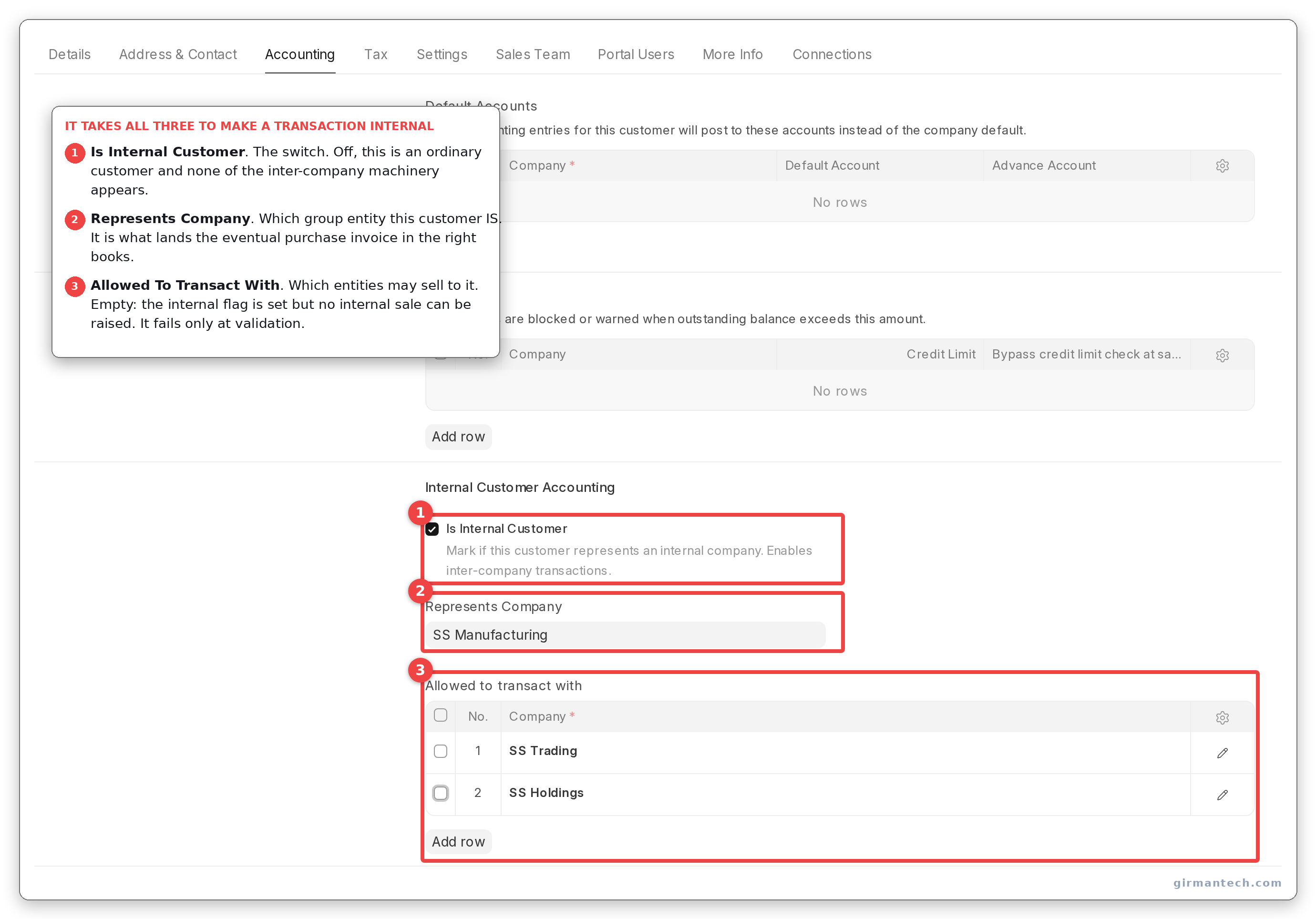
Customer master with Is Internal Customer ticked, Represents Company set, and the Allowed To Transact With table populated.
Step 3: Raise the sale, then generate the purchase from it
Create the Sales Invoice in the selling company against the internal customer as normal. On submission, use Create > Inter Company Purchase Invoice. ERPNext resolves the counterparty from the internal customer's represents_company, finds the matching internal supplier there, and maps the document across.
Do not create the purchase invoice independently and link it afterwards. validate_inter_company_reference runs on Purchase Invoice and Purchase Receipt only, throwing "Internal Sale or Delivery Reference missing. Please create purchase from internal sale or delivery document itself" if the reference is absent, and requiring a sales_invoice_item reference on every line. A purchase-first workflow fails at submission, after your team has keyed the whole document.
Note what that validation does not cover: returns are exempt, and it only fires when the document qualifies as an internal transfer (party flagged and represents_company equal to the billing company). Misconfigure the second condition and the document sails through as an ordinary purchase, unflagged and unlinked. That is much harder to find later than a validation error.
One more thing to design around: where a company has more than one internal customer or supplier, ERPNext disambiguates by address, reading the Dynamic Link on Company Address, falling back to Shipping Address. If neither is set, or the lookup returns nothing, it silently takes the first party in the list. No warning. Multi-location groups must keep those addresses maintained, or transactions post against the wrong entity and look entirely normal doing it.
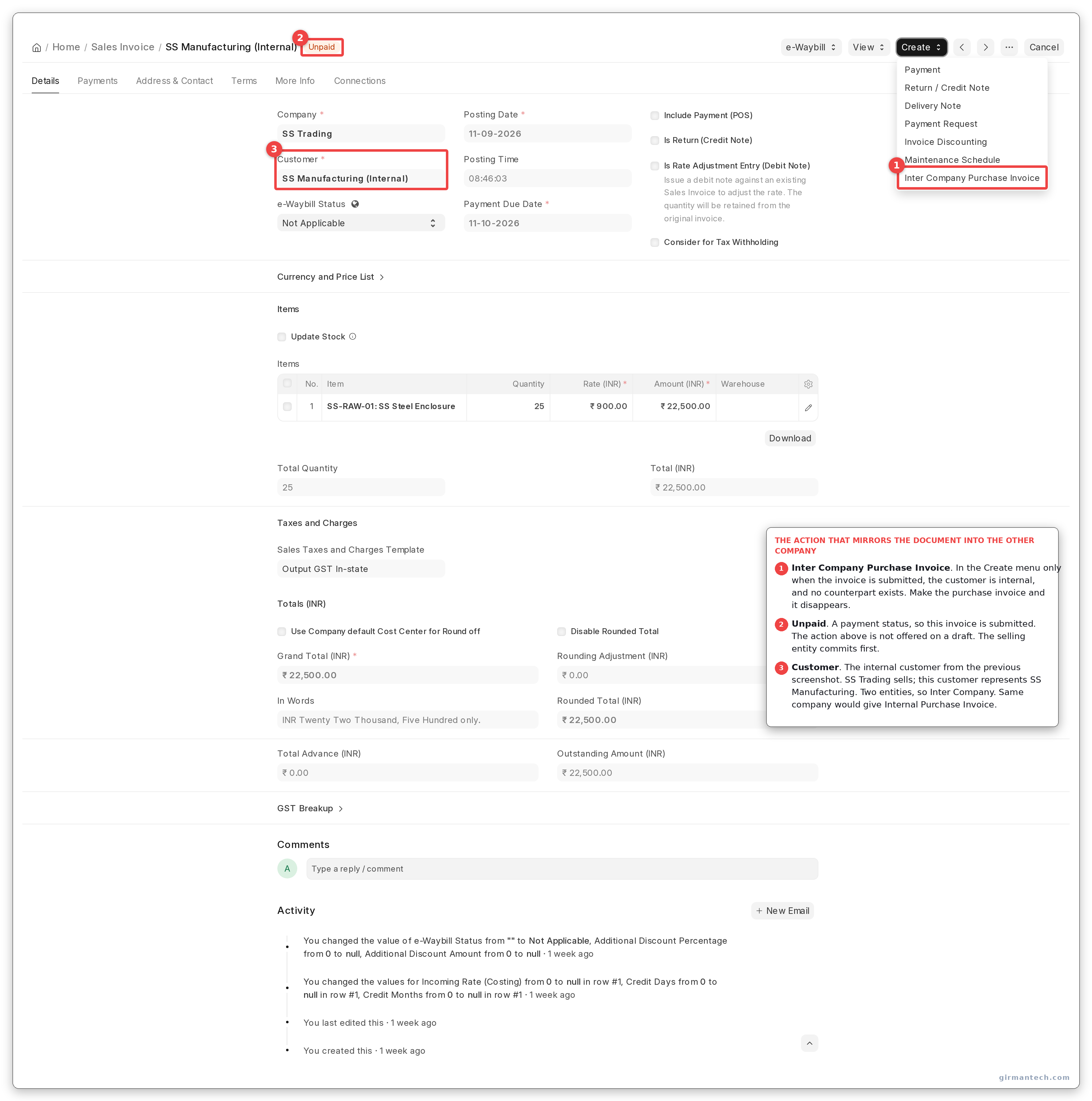
Sales Invoice submitted against an internal customer, showing the Create > Inter Company Purchase Invoice action.
Step 4: Know that ERPNext rewrites your transfer price
This is the behaviour most likely to surprise a group with a transfer pricing policy, and it is announced with a dismissible alert rather than a validation.
On an internal transfer into stock, ERPNext zeroes discount_percentage, discount_amount and margin_rate_or_amount on every line, then overwrites the rate with the sending entity's valuation rate, "Row 1: Item rate has been updated as per valuation rate since its an internal stock transfer", as an alert you can dismiss without reading. Bill your subsidiary at cost plus 12% and ERPNext will quietly bill it at cost.
The switch is in Stock Settings: Allow Internal Transfers at Arm's Length Price, default 0. Turn it on and your rate stands, and from that moment the group carries unrealised profit in stock that nothing in ERPNext removes.
That is the real shape of this problem. ERPNext does not compute intercompany margin badly; the default avoids the question by suppressing margin, and the setting that lets you price properly is the same setting that creates a consolidation problem. Groups with a real transfer pricing policy need it on, and need to plan the elimination separately.
Two smaller changes happen alongside, both alert-only: pricing rules are switched off (ignore_pricing_rule forced to 1) and tax-inclusive pricing is switched off (any tax row with Included In Print Rate ticked is reset to 0). Both are correct behaviour, and both are worth knowing, because a user who built a pricing rule and watched it not apply will file a bug that is not one.
The Unrealized Profit / Loss Account is also stamped from the Company default here, and submission is blocked if neither the document nor the company has one.
Step 5: Turn on the rate-consistency guard
In Accounts Settings, Maintain Same Rate Throughout Internal Transaction is a checkbox, and its default is 0 (off).
With it off, the buying entity can book the internal purchase at a different rate from the one the selling entity invoiced. Nothing objects. The two sides of the same transfer carry different values, and the difference surfaces at consolidation as a mismatch nobody can trace to a document.
Switch it on, set Action if Same Rate is Not Maintained Throughout Internal Transaction to Stop (already the default), and nominate a Role Allowed to Override Stop Action for genuine exceptions. The tolerance is a hard 0.01 on the line rate. A two-minute change that prevents an entire class of month-end investigation, and off in every fresh installation.
You cannot see the action selector or the override role in that screenshot, and that is the finding rather than a gap in the screenshot. Both fields carry depends_on conditions keyed off the checkbox: maintain_same_rate_action on the checkbox itself, role_to_override_stop_action on the checkbox and the action being set to Stop. On a default install they are not disabled, they are absent. An evaluator looking for rate enforcement in Accounts Settings sees one unticked box and nothing behind it.
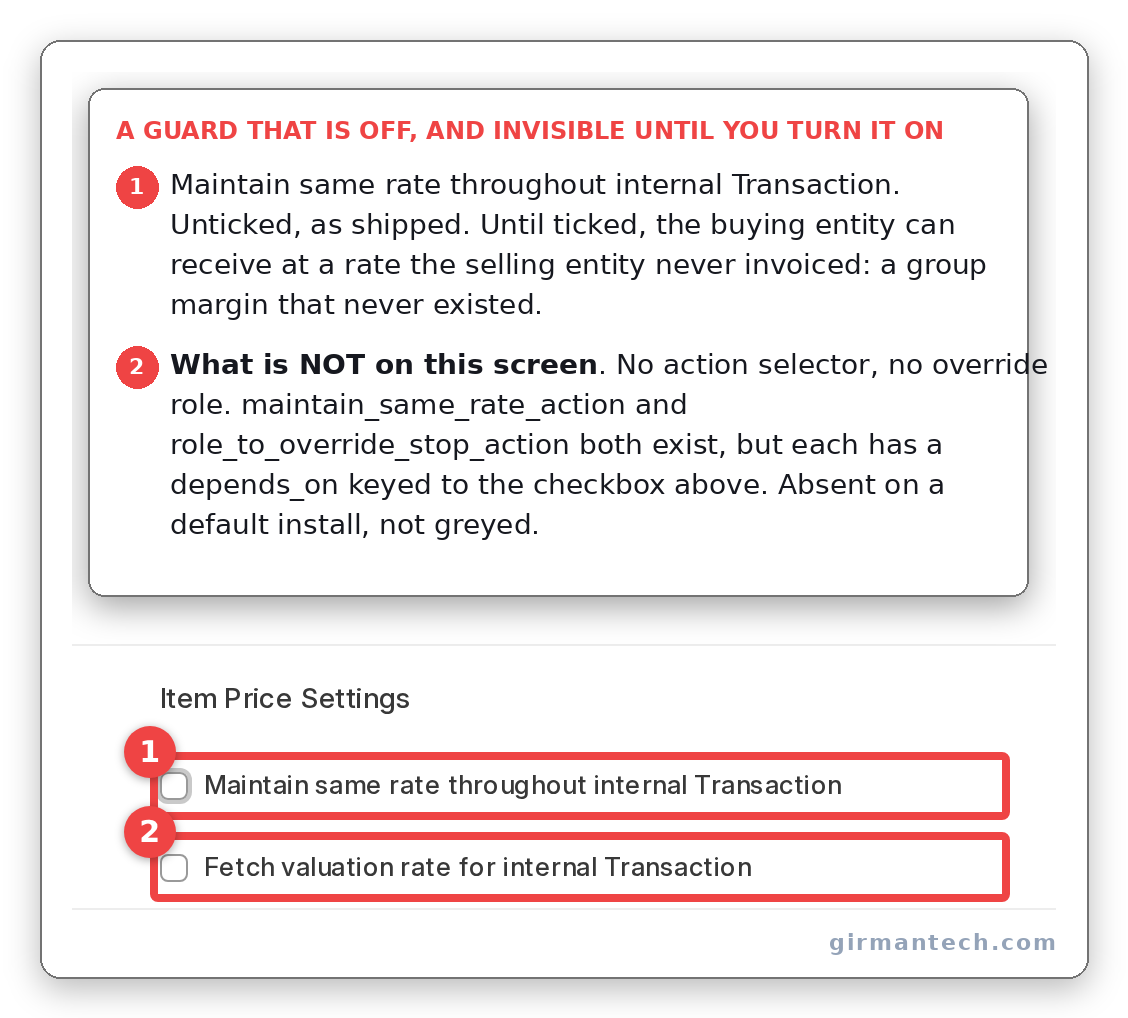
Accounts Settings with Maintain same rate throughout internal Transaction at its shipped default: unticked, with the action selector and override role not yet rendered.
Step 6: Inter Company Journal Entries
For transactions with no goods behind them (a management fee, a cost recharge, an intercompany loan) use Journal Entry with Entry Type set to Inter Company Journal Entry, then Create > Inter Company Journal Entry for the counterpart. The two documents hold each other's names in inter_company_journal_entry_reference, and unlinking clears both sides.
Two constraints the documentation does not mention. The counterpart is created empty. ERPNext sets the voucher type, company, posting date and reference, and the account lines are yours to key. This is not a mapped document like the invoice flow.
And the mirror validation, total debit on one side equalling total credit on the other, runs only when both companies share a default currency. In the code the comparison sits inside an if account_currency == previous_account_currency block. A group reporting in INR and AED gets no balance check at all on its intercompany journals, so schedule that reconciliation as a manual control rather than assuming it.
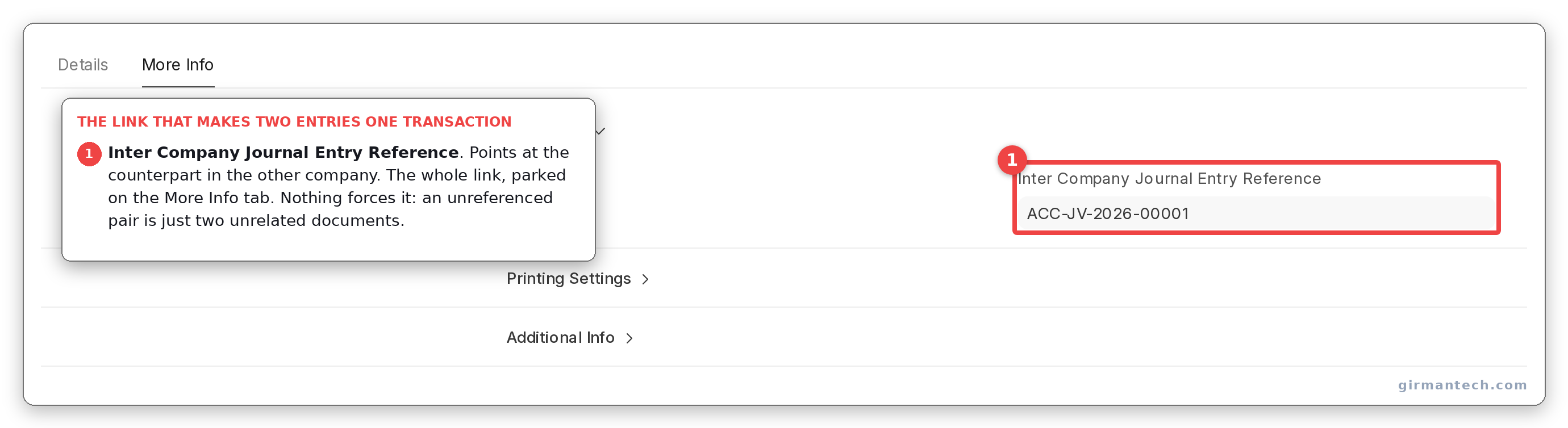
Inter Company Journal Entry with Inter Company Journal Entry Reference populated. The field sits on the More Info tab, away from both the Entry Type that enables it and the accounts that carry the money.
What "Unrealized Profit / Loss Account" actually does
The field name promises unrealised profit elimination. It does not deliver it.
make_internal_transfer_gl_entries runs on both sides (a credit on the internal Purchase Invoice, the mirror debit on the Sales Invoice) and both are guarded by the same condition: the document's total taxes and charges must be non-zero. With no taxes on the transfer, nothing is posted. When there are, the amount equals total_taxes_and_charges.
The account parks the tax and freight element of an internal movement so it does not inflate stock valuation in the receiving entity. Useful, and correctly implemented. But it never touches margin, and the only reason most installations have no margin to worry about is the rate overwrite in Step 4, not this account. Anyone reading the field label alone will conclude the problem is solved.
ERPNext vs. NetSuite vs. SAP vs. Dynamics 365 BC vs. Odoo
| Capability | ERPNext v15 / v16 | Oracle NetSuite OneWorld | SAP S/4HANA | Dynamics 365 BC | Odoo |
|---|---|---|---|---|---|
| Internal party flagging | Internal Customer / Supplier with Represents Company | Intercompany customer/vendor per subsidiary | Trading partner on the business partner | Intercompany partner codes | Inter-company rules per company |
| Auto-generated counterparty document | Yes, sales → purchase, mapped line by line | Automated intercompany order flow | Yes | Yes, via intercompany inbox | Yes |
| Intercompany journals | Inter Company Journal Entry, counterpart created blank | Automated with elimination tagging | Yes | Intercompany general journals | Yes |
| Rate consistency enforcement | Optional, off by default | Enforced via transfer pricing | Enforced | Enforced | Not enforced |
| Automatic elimination on consolidation | No | Elimination subsidiary, automatic | Yes | Yes, consolidation eliminations | Enterprise consolidation app |
| Intercompany margin on stock | Suppressed by default: rate overwritten to valuation | Priced at transfer price | Transfer pricing | Transfer pricing | Priced |
| Unrealised profit in stock | Not calculated once margin is allowed | Automated | Yes | Manual entries | Manual |
| Multi-currency consolidation | Presentation currency conversion in the report | Full, with CTA tracking | Full | Full | Full |
| Cross-currency intercompany JE validation | Skipped | Validated | Validated | Validated | Validated |
| Licensing | Open source, no per-user fee | Per-user + OneWorld module | Enterprise licence | Per-user | Enterprise edition for consolidation |
ERPNext holds 4.5/5 across 140 reviews on Capterra and 4.5/5 across 59 reviews on Gartner Peer Insights (as at September 2026).
The practical read: ERPNext is strong on the transaction half of this problem and absent on the consolidation half. For a group that records internal transactions cleanly and consolidates annually with its auditors, that trade is usually fine. For one publishing consolidated management accounts monthly, it is not.
One honest limitation
ERPNext's Consolidated Financial Statement report does not eliminate anything.
This is not a configuration gap. The report walks the Company nested set to collect subsidiaries, pulls GL entries per company, and presents them as columns with a total. There is no elimination logic in erpnext/accounts: not for intercompany revenue, not for receivables and payables, not for unrealised profit in stock. We checked v15 and the develop branch that becomes v16. Same behaviour.
What you get is an aggregation with per-company columns and optional presentation-currency conversion. A useful working paper, but not a consolidated financial statement in the sense your auditor means, and describing it as one to a group CFO will cost you credibility in the second meeting. v16's Consolidated Trial Balance adds currency translation and a translation reserve (real progress), and it eliminates nothing either.
Products built for statutory consolidation handle this properly: elimination subsidiaries, automatic elimination at each consolidation level, unrealised profit handling. If consolidation with automated elimination is a hard requirement, ERPNext is the wrong tool for that part of the job and you should plan around it.
The workable ERPNext pattern, and the one we implement: dedicate an accounting dimension to intercompany activity, post every internal transaction against it, and eliminate through consolidation-only journals in a separate elimination company created as a sibling in the group tree. The report then nets that company against the operating ones. It works and it is auditable, but it is a designed workaround, not a feature, and it belongs in the implementation budget rather than in month three.
The second constraint is the currency gap in intercompany journal validation above: groups reporting in different currencies need intercompany balance reconciliation as a scheduled monthly control.
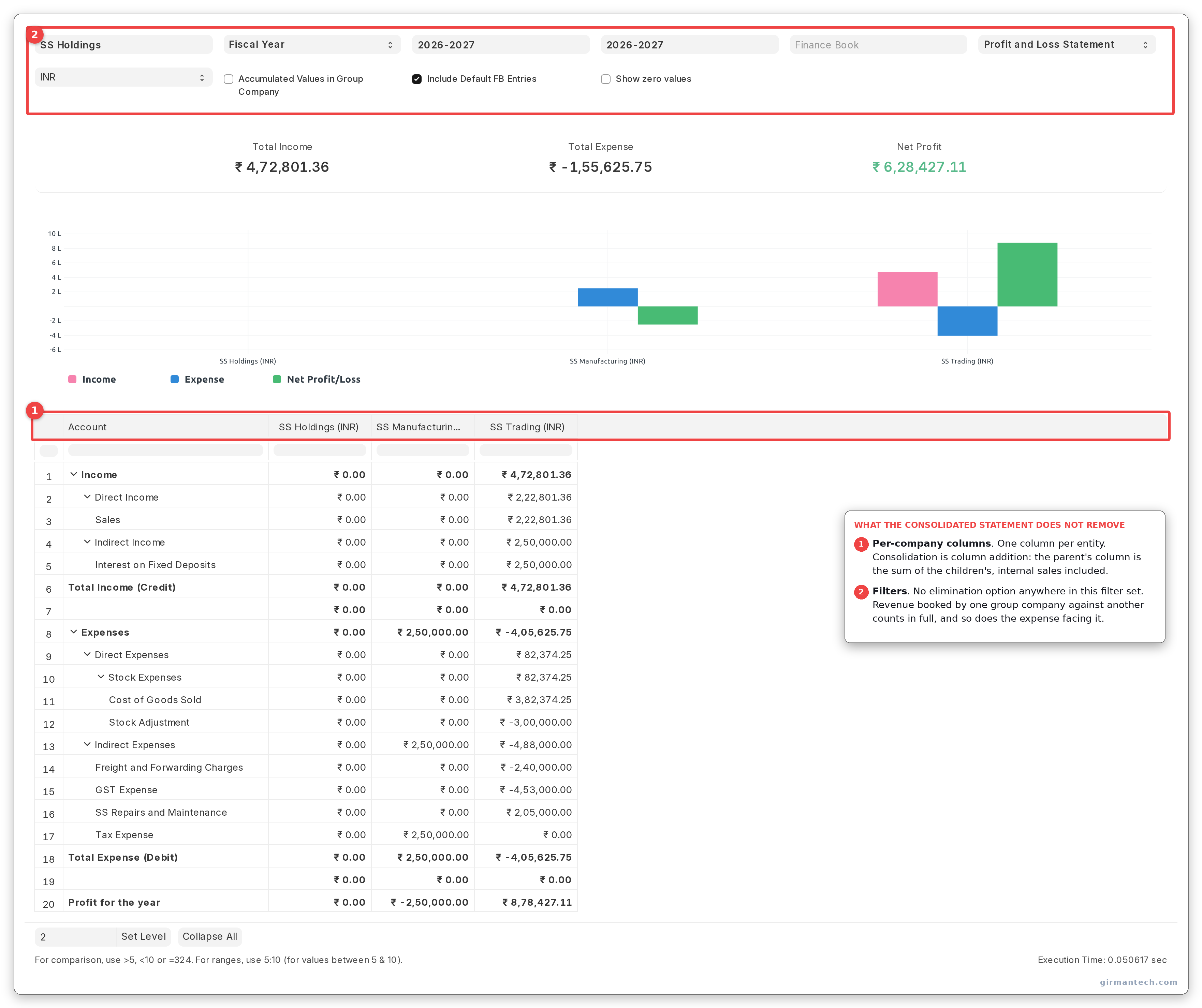
Consolidated Financial Statement across the group: one column per entity, and no elimination option anywhere in the filters.
What changes in ERPNext v16
More than the release notes suggest, though not the thing you want.
A new Consolidated Trial Balance report, with multi-company selection validated against the root company's subtree, per-company translation at opening and closing exchange rates, and a foreign currency translation reserve calculation. Genuine progress: a cross-currency group previously computed its translation reserve outside the system. It still eliminates nothing.
The Consolidated Financial Statement's total column is fixed. With Accumulated Values in Group Company enabled, v15 summed every company column into the total, double-counting the group company's own figures; develop takes the total from the group company's column instead. Reconciling a v16 consolidated report against a v15 one, expect the totals to differ. That is the fix, not a regression. Per-company cash flow and presentation-currency conversion were corrected in the same pass.
Intercompany logic has moved. The internal transfer predicate, rate validation and reference checks are refactored out of accounts_controller.py into erpnext/accounts/services/internal_transfer.py, with document mapping split into per-doctype mapper.py and gl_composer.py modules. Behaviour is unchanged, but any customisation patched against the old controller methods breaks on upgrade. Audit your custom app before planning the migration.
Unchanged: internal customer and supplier setup, the Accounts Settings defaults, the arm's-length pricing default, and the absence of elimination.
Frequently asked questions
Does ERPNext support intercompany transactions? Yes. Flag a Customer as an Internal Customer and a Supplier as an Internal Supplier, set Represents Company on each, and list the permitted counterparties in the Allowed To Transact With table. Submitting a Sales Invoice to an internal customer then offers Create > Inter Company Purchase Invoice, which generates the linked document in the counterparty company.
Can ERPNext produce consolidated financial statements? ERPNext has a Consolidated Financial Statement report that aggregates the balance sheet, profit and loss and cash flow across a parent company and its subsidiaries, with per-company columns. It does not perform intercompany elimination. Internal revenue, internal balances and unrealised profit in stock are not removed. Groups requiring statutory consolidation handle elimination through a dedicated elimination company or accounting dimension.
What is the Unrealized Profit / Loss Account in ERPNext? Despite the name, it does not eliminate unrealised profit on intercompany margin. On an internal transfer it books the tax and freight component of the transaction, on both the sales and the purchase side, and only where the document carries taxes and charges. Margin elimination is not calculated by ERPNext.
Can I bill one group company to another at a markup in ERPNext? Not in the default configuration. On an internal stock transfer ERPNext zeroes any discount and margin fields and overwrites the rate with the sending entity's valuation rate, warning only through a dismissible alert. Enable Allow Internal Transfers at Arm's Length Price in Stock Settings to keep your own rate, and plan for eliminating the resulting unrealised profit yourself, because ERPNext will not. Separately, enable Maintain Same Rate Throughout Internal Transaction in Accounts Settings, also off by default, so the two sides of a transfer cannot drift apart.
Does ERPNext validate that both sides of an intercompany journal balance? Only when both companies share the same default currency. Where the two entities report in different currencies, ERPNext skips the debit-versus-credit comparison entirely, so cross-currency groups need a manual intercompany reconciliation control each period.