




Deferred revenue is money you have been paid but have not yet earned. It sits as a liability until you deliver the thing you were paid for, and it is released into income across the period of delivery rather than on the day the invoice was raised. It is implemented as revenue arrangements in Oracle NetSuite, as revenue accounting contracts in SAP, and as a per-line schedule on the invoice in ERPNext. Without it, a business that bills annually reports a spectacular April and eleven months of decline.
Most companies do not get this wrong out of ignorance. They get it wrong because the invoice is a single number and the obligation behind it is not.
The operational problem
A 120-person IT services company sells annual maintenance contracts. April is renewal month: ₹4.6 crore of AMC invoices go out in the first fortnight, covering the year to 31 March.
The books show ₹4.6 crore of revenue in April. The March quarter looks flat, Q1 looks extraordinary, and the year is 40% front-loaded against a cost base that is perfectly even: the same engineers, the same salaries, every month.
Nobody is confused about what happened. Everyone in the room knows the April spike is a billing artefact. The damage is in the decisions made around it: a Q1 that justifies hiring, a Q3 that looks like a downturn and triggers a freeze, and a sales incentive plan paid on a number that does not correspond to work done. Somewhere in year two, a bank or an investor asks for monthly management accounts and the conversation becomes expensive.
This is a timing problem, not a bookkeeping problem. The entries were all correct. They were just all in April.
What revenue recognition actually requires
Three things, in any system.
Identify what was sold and over what period. An invoice line is not automatically a twelve-month obligation; some lines are delivered on day one and some run for three years.
Hold the unearned portion as a liability, so the balance sheet shows what you still owe in delivery, not just what you have collected.
Release it on a basis that matches delivery. For a maintenance contract, time. For a construction contract, progress. For a support plan with a fixed number of incidents, consumption. The basis is a judgement about how the obligation is actually discharged.
The third one is where systems separate, and the gap is wider than most comparison tables admit.
How deferred revenue works in ERPNext
Step 1: Turn it on for the item, and ignore the help text
Open the Item and tick Enable Deferred Revenue. Set No of Months (Revenue) if the item has a standard term, and set the deferred revenue account per company in the Item Defaults table.
Now the trap. On v16.25.0 the two checkboxes carry each other's descriptions:
| Field | Label | Shipped description |
|---|---|---|
enable_deferred_revenue | Enable Deferred Revenue | "Expense for this item will be recognized over a period of months. Eg: prepaid insurance or annual software license" |
enable_deferred_expense | Enable Deferred Expense | "Income from this item will be recognized over a period of months instead of all at once. Eg: annual subscription paid upfront." |
The labels are correct. The help text under each one belongs to the other. Configure by label and the result is right; configure by the example (and the example is the more useful-looking guidance) and you have enabled deferred expense on a revenue item.
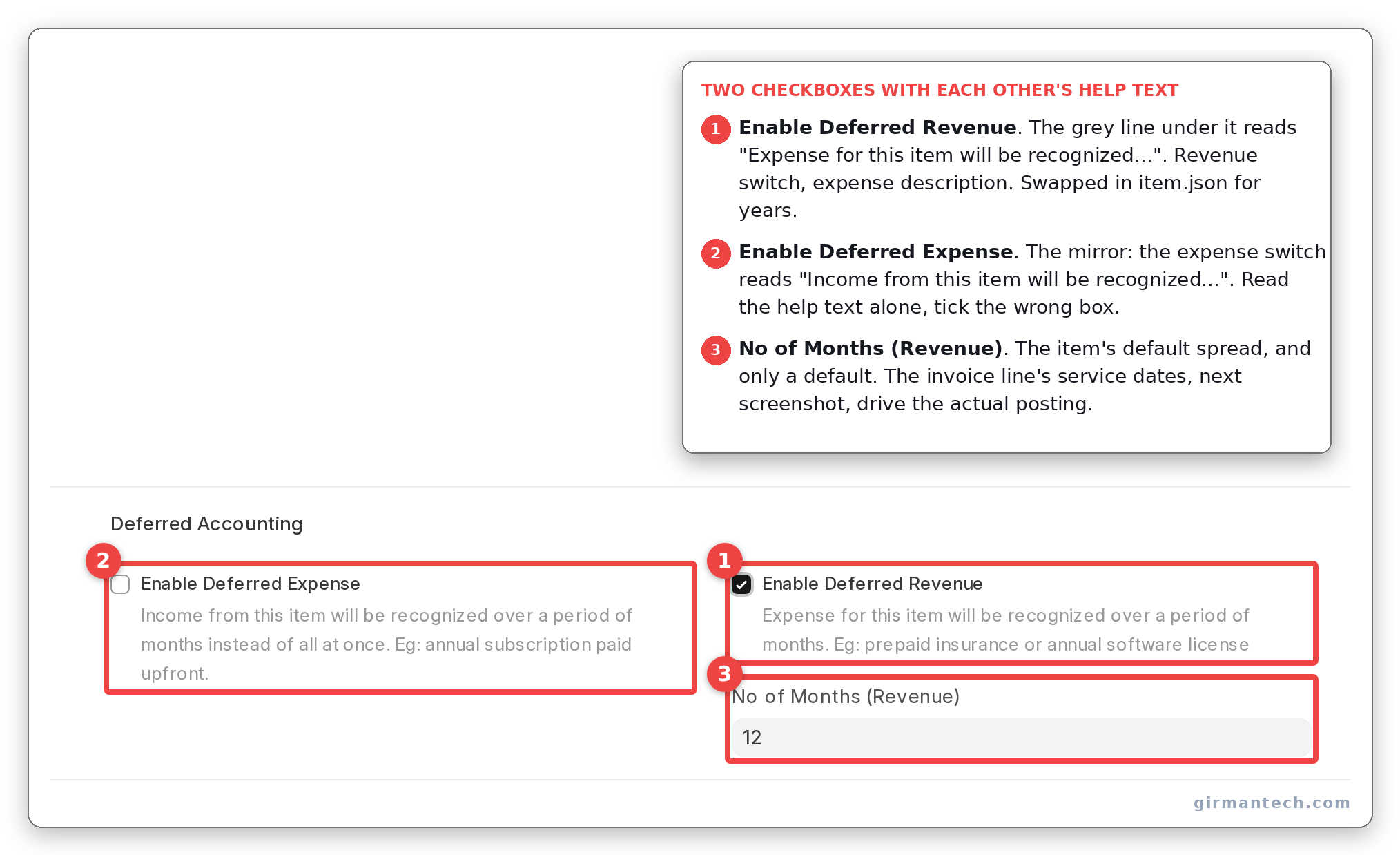
Item master with Enable Deferred Revenue ticked, the description text visible beneath it, and No of Months (Revenue) set.
Step 2: Set the service dates on the invoice line
On the Sales Invoice, expand the item row and set Service Start Date and Service End Date. This is the schedule, not the item's No of Months, which only pre-fills.
Neither date is mandatory. Neither field carries reqd or mandatory_depends_on in the doctype JSON, and there is no validation that catches a missing one at submission. The invoice posts, the deferred account is credited, and nothing is wrong until the monthly job tries to compute a date difference against an empty field, on a document submitted weeks ago that nobody is looking at.
If you take one configuration decision from this post: make those two fields mandatory when deferred revenue is enabled, with a customisation or a client script, on day one.
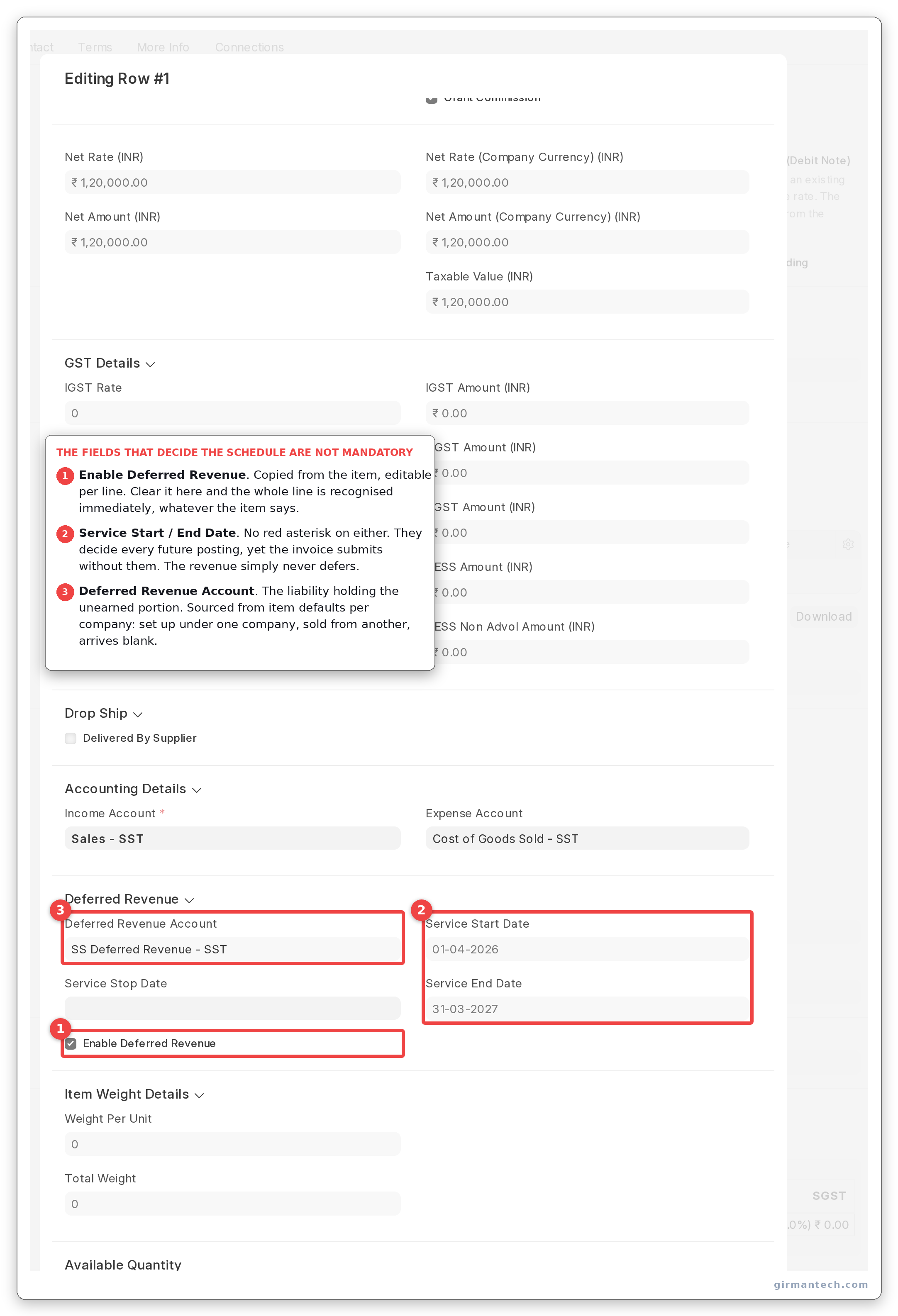
Sales Invoice item row expanded, showing Enable Deferred Revenue, Service Start Date, Service End Date and the Deferred Revenue Account.
Step 3: Understand what the default schedule actually does
Accounts > Accounts Settings > Book Deferred Entries Based On takes Days or Months, and defaults to Days.
That is not the behaviour most people assume. A ₹1,20,000 contract running 1 April to 31 March does not book ₹10,000 a month. On the Days basis it books ₹1,20,000 × (days in the month ÷ 365), so February earns about ₹9,205 and March about ₹10,192. The year totals correctly and no month equals another.
Switch it to Months and you get the equal-twelfths behaviour, with proration only for partial first and last months. Neither is wrong. But Days is the shipped default, and a controller comparing ERPNext's output against a spreadsheet built on equal twelfths will find a variance in every single month and go looking for a bug.
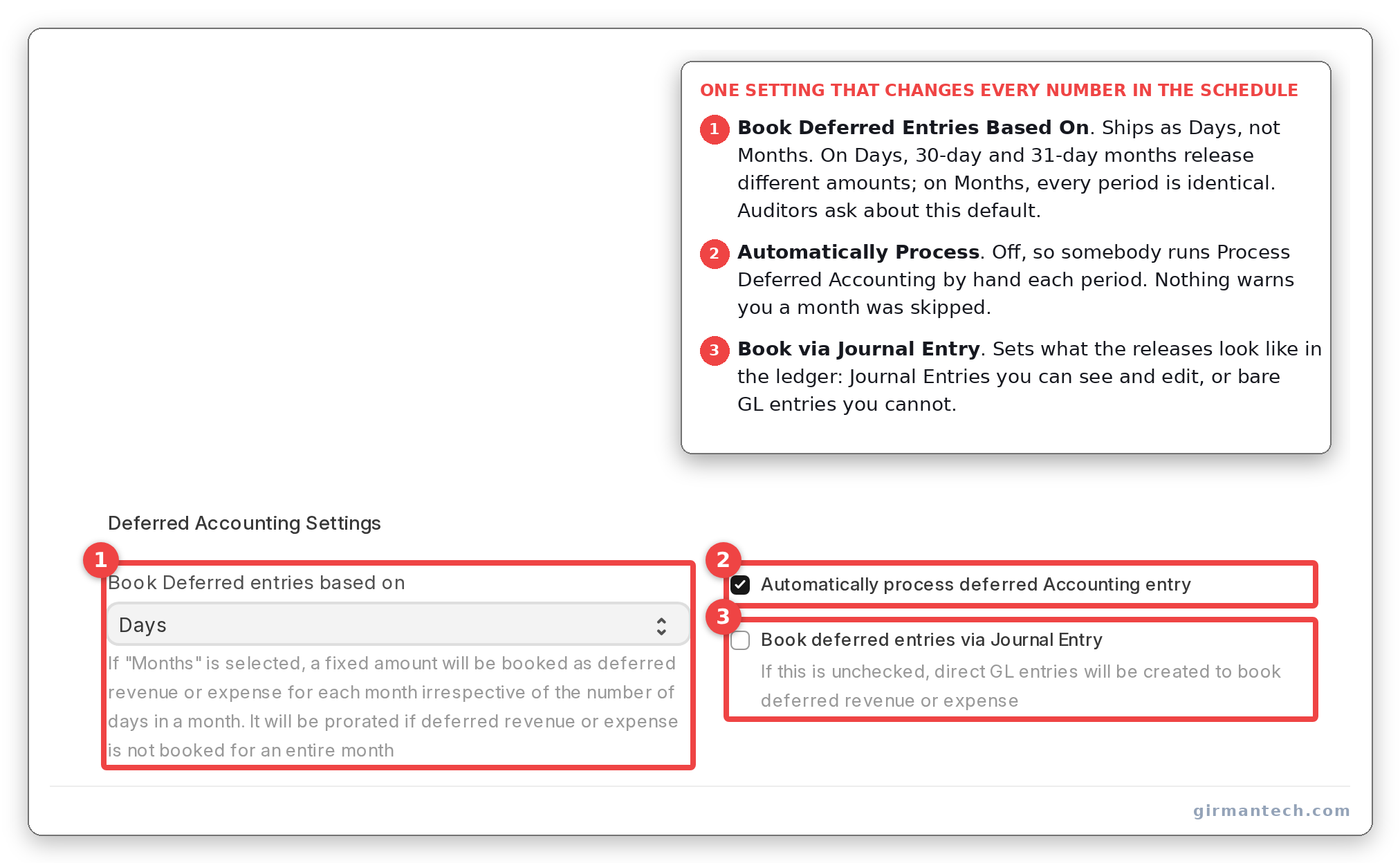
Accounts Settings showing Book Deferred Entries Based On set to Days, with Automatically Process Deferred Accounting Entry and Book Deferred Entries via Journal Entry visible in the same frame.
Step 4: Let the scheduler run, or run it yourself
Automatically Process Deferred Accounting Entry is on by default. A monthly scheduled job creates and submits a Process Deferred Accounting document per company, for income and for expense, covering the previous month.
Process Deferred Accounting is a stored, submittable document, not a single-use tool, which means each run is auditable and, importantly, cancellable. Cancelling it finds every GL entry raised against it and reverses them.
Running it twice for the same period is safe. Each calculation subtracts what has already been booked, so a second run finds nothing left to recognise. That is worth knowing because the instinct when a month looks wrong is to avoid re-running it, and here the instinct is unhelpful.
By default the entries are posted straight to the GL. Turn on Book Deferred Entries via Journal Entry if you want a reviewable document per month instead, and note that Submit Journal Entries is separately off, so with only the first setting on you will accumulate draft journals waiting for someone to submit them.
Step 5: Know where the rounding goes
Every period except the last is computed from the schedule. The last one is not computed at all. It is booked as the total net amount minus everything already recognised.
The final month is a plug. That is the right design: it guarantees the schedule sums exactly to the invoice and never leaves a stray rupee in the deferred account. But it means accumulated rounding drift lands in the closing month rather than being spread, so the last month of a long contract can differ visibly from its neighbours. If a reviewer queries it, that is the answer.
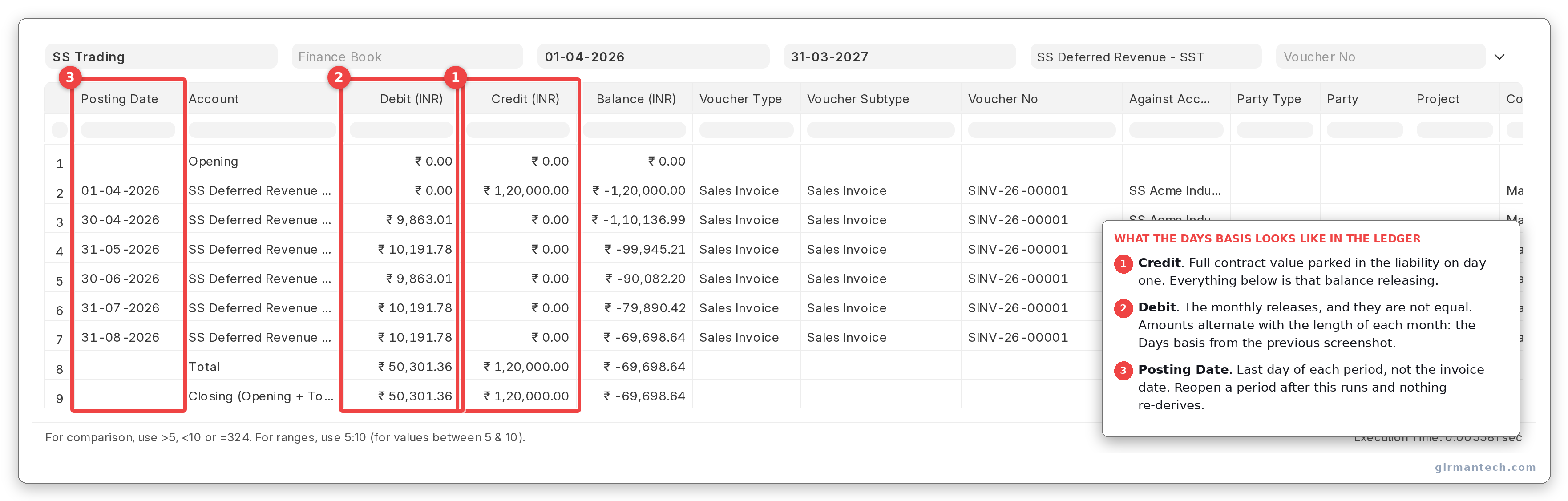
GL entries for one deferred item across the contract, showing the monthly releases and a visibly different final-month amount.
The same machinery, pointed the other way
Enable Deferred Expense on the Item and Service Start Date / Service End Date on a Purchase Invoice line give you prepaid expense amortisation on identical logic: annual insurance, a software licence, a rented facility paid up front.
One asymmetry worth planning for: Service Stop Date exists on both, is editable after submission, and cannot be changed once set. It is how you handle a contract that terminates early. Setting it truncates the schedule and makes that period the final one, so the whole unrecognised remainder is released at once. Get it wrong and you cannot correct it on the document. You cancel and amend.
Returns are the other asymmetry. Deferred recognition is skipped outright on a credit note; ERPNext relies on the original invoice's entries being reversed rather than building a negative schedule. For a cancelled contract mid-term, that means the mechanism is Service Stop Date, not a credit note.
ERPNext vs. NetSuite vs. SAP vs. Odoo vs. Zoho Books
| Capability | ERPNext v16 | Oracle NetSuite | SAP S/4HANA | Odoo | Zoho Books |
|---|---|---|---|---|---|
| Deferred schedule on an invoice line | Yes, service start/end dates | Yes, revenue recognition schedules | Yes | Deferred revenue on the account | Yes |
| Basis options | Days or Months only | Straight line by several conventions, plus custom | Multiple, incl. event-based | Straight line | Straight line |
| Recognise on milestone / % complete | No | Yes | Yes, RAR | No | No |
| Recognise on usage or consumption | No | Yes | Yes | No | No |
| Multi-element allocation to standalone selling price | No | Yes, ARM | Yes | No | No |
| Contract asset / contract liability tracking | No | Yes | Yes | No | No |
| Reviewable document per period | Optional, via Journal Entry | Yes | Yes | Yes | Yes |
| Early termination handling | Service Stop Date, one-way | Full modification handling | Full | Manual | Manual |
| Licensing | Open source, no per-user fee | Per-user plus ARM module | Enterprise licence | Enterprise edition | Per-organisation subscription |
ERPNext holds 4.5/5 across 140 reviews on Capterra and 4.5/5 across 59 reviews on Gartner Peer Insights (as at September 2026). Ratings go stale. Re-check them at publication.
The practical read: for time-based obligations ERPNext does the whole job, cleanly and with a decent audit trail. For anything where revenue is earned by an event rather than by the calendar, it does not compete.
One honest limitation
ERPNext apportions revenue by date. It does not recognise revenue against performance obligations, and those are not the same thing.
The deferred revenue feature answers one question: how much of this line has elapsed? That is the right answer for a maintenance contract, a subscription, a rental, an insurance premium. It is the wrong answer for a fixed-price implementation billed 40% up front, 40% at UAT and 20% at go-live, where revenue is earned as milestones are met and not as weeks pass.
There is no performance obligation object anywhere in erpnext/accounts. No allocation of a bundled price across elements at their standalone selling prices. No contract asset or contract liability distinct from the deferred balance. No usage-based release. For a company whose contracts are bundles (licence plus implementation plus support, sold as one number), that allocation is the substance of revenue recognition under Ind AS 115 and ASC 606, and ERPNext has no view on it at all.
The workaround is to split the invoice into lines that each map to one obligation and give each its own dates, converting a recognition judgement into a data entry convention. It works for simple bundles. It fails the moment recognition depends on something other than the calendar, and it puts the judgement in the hands of whoever raises the invoice.
Dedicated revenue-recognition engines handle this properly: revenue arrangements, performance obligations, fair-value allocation, event-driven release. If you are a product company with bundled contracts and a statutory audit under Ind AS 115, that gap is the deciding factor and no amount of ERPNext configuration closes it. We would say so before the evaluation rather than after.
What we implement for companies whose contracts are genuinely time-based: mandatory service dates enforced at the form level, Months rather than Days where finance thinks in equal twelfths, journal-entry mode so each month is reviewable, and a monthly reconciliation of the deferred revenue account balance against the sum of unexpired contract terms. That last one is the control that catches the missing-date invoices before the auditor does.
What changes in ERPNext v16
Nothing structural in this feature.
The proration arithmetic, the final-period plug, the Days-versus-Months switch, the Process Deferred Accounting document and its cancellation path are all the code they have been. The swapped field descriptions are still swapped. The v16.25.0 doctype JSON carries them exactly as quoted above, which is worth stating plainly because "it was fixed in the new version" is the natural assumption.
We could not check v15 on this bench, so this section describes v16 rather than claiming a delta. If your upgrade plan assumed the deferred revenue behaviour would change, it does not appear to.
Frequently asked questions
Does ERPNext support deferred revenue? Yes. Enable Deferred Revenue on the Item, set a deferred revenue account in Item Defaults, then set Service Start Date and Service End Date on the Sales Invoice line. A monthly scheduled job creates a Process Deferred Accounting document that releases the earned portion from the deferred liability account into income. The same machinery handles deferred expense on Purchase Invoices.
Why are my ERPNext deferred revenue amounts different every month? Because Book Deferred Entries Based On in Accounts Settings defaults to Days rather than Months. On the Days basis each month is apportioned by its actual number of days, so February books less than March. Switch the setting to Months for equal monthly amounts with proration only on partial first and last periods. Note also that the final period is always calculated as the total minus everything already booked, so it absorbs accumulated rounding and can differ from its neighbours under either setting.
Are service dates mandatory for deferred revenue in ERPNext? No, and this is the most common configuration failure. Neither Service Start Date nor Service End Date carries a mandatory flag in the doctype, even when deferred revenue is enabled on the line, so an invoice missing them submits without complaint. The failure surfaces later, when the monthly deferred accounting job tries to compute a schedule and cannot. Enforce both fields with a client script or a customisation before go-live.
Can ERPNext recognise revenue on project milestones instead of by date? No. ERPNext's deferred revenue apportions an invoice line across a date range and offers no milestone, percentage-of-completion or usage-based recognition, and there is no performance obligation or contract asset concept in the accounts module. Milestone-based contracts have to be handled by invoicing at each milestone, which changes when revenue is recognised but also changes when the customer is billed. Oracle NetSuite's Advanced Revenue Management and SAP RAR handle this natively.
What happens if a customer cancels a contract part-way through in ERPNext? Set Service Stop Date on the invoice line. The schedule truncates at that date and the entire unrecognised remainder is released in that final period. The field is editable after submission but cannot be changed once it has been set, so an incorrect stop date means cancelling and amending the invoice. A credit note will not do the job. Deferred recognition is skipped on returns entirely.