


Budgetary control is the practice of checking a proposed commitment against an approved spending limit before it is made, and refusing it if the limit is breached. It is distinct from budget reporting, which tells you afterwards what you spent. It is implemented as Funds Management in SAP, as budget control with encumbrances in Microsoft Dynamics 365 Finance, and as the Budget doctype in ERPNext. Without it, a budget is a forecast that somebody types into a spreadsheet in March and nobody consults again.
The distinction sounds academic until you notice that almost every mid-market ERP implementation sells the second thing and calls it the first.
The Operational Problem
A ₹180 crore auto components manufacturer runs eleven cost centres. Each department head gets an annual budget in April. The maintenance budget is ₹2.4 crore.
By November, maintenance has spent ₹2.9 crore. Nobody hid it. Every purchase order was raised in the ERP, approved by the right person, and posted to the right cost centre. The overspend was visible in a report the whole time: a report the finance team runs monthly and the department head does not read, because his job is keeping the line running and the report arrives eleven days after month end.
The conversation in December is the expensive part. Not the ₹50 lakh, which was mostly legitimate emergency spend. The problem is that finance cannot say which ₹50 lakh should not have happened, because at no point did the system distinguish a commitment that fitted the budget from one that did not. Every transaction looked identical going in.
This is a control-timing problem, not a discipline problem. The department head was never told "no" at a moment when "no" would have meant something.
What Budgetary Control Actually Requires
Four things, in any system.
A limit tied to a dimension. A number attached to a cost centre, a project, a department: something transactions already carry, so no extra data entry is needed to apply it.
A check at commitment, not at payment. The moment that matters is when you promise a supplier money, which is the purchase order. Checking at the invoice is checking after the commitment is legally made.
A graduated response. Some breaches should block. Some should warn and let a human decide. A control that only blocks gets switched off in week three.
Coverage of every route to spending. A control with one unguarded door is not a control; it is a queue that people learn to walk around.
The fourth one is where this gets interesting.
How Budgetary Control Works in ERPNext
Step 1: Create the Budget Against a Dimension
Accounting > Budget > New. Set Company and Budget Against, which offers exactly two options (Cost Center or Project) and defaults to Cost Center.
Then set Account and Budget Amount. Both are single mandatory fields on the document, not a table.
This is a change worth pausing on, because most ERPNext material still describes the old shape. Through v15 a Budget carried a Budget Accounts child table, so one Budget record could hold separate limits for consumables, contract labour and spares. In v16 there is no such table: one Budget document covers exactly one account. A maintenance cost centre with three limits is three Budget records, not one record with three rows.
The period changed with it. There is no Fiscal Year field any more: v16 has From Fiscal Year and To Fiscal Year, plus Budget Start Date and Budget End Date, so a budget can span more than one year.
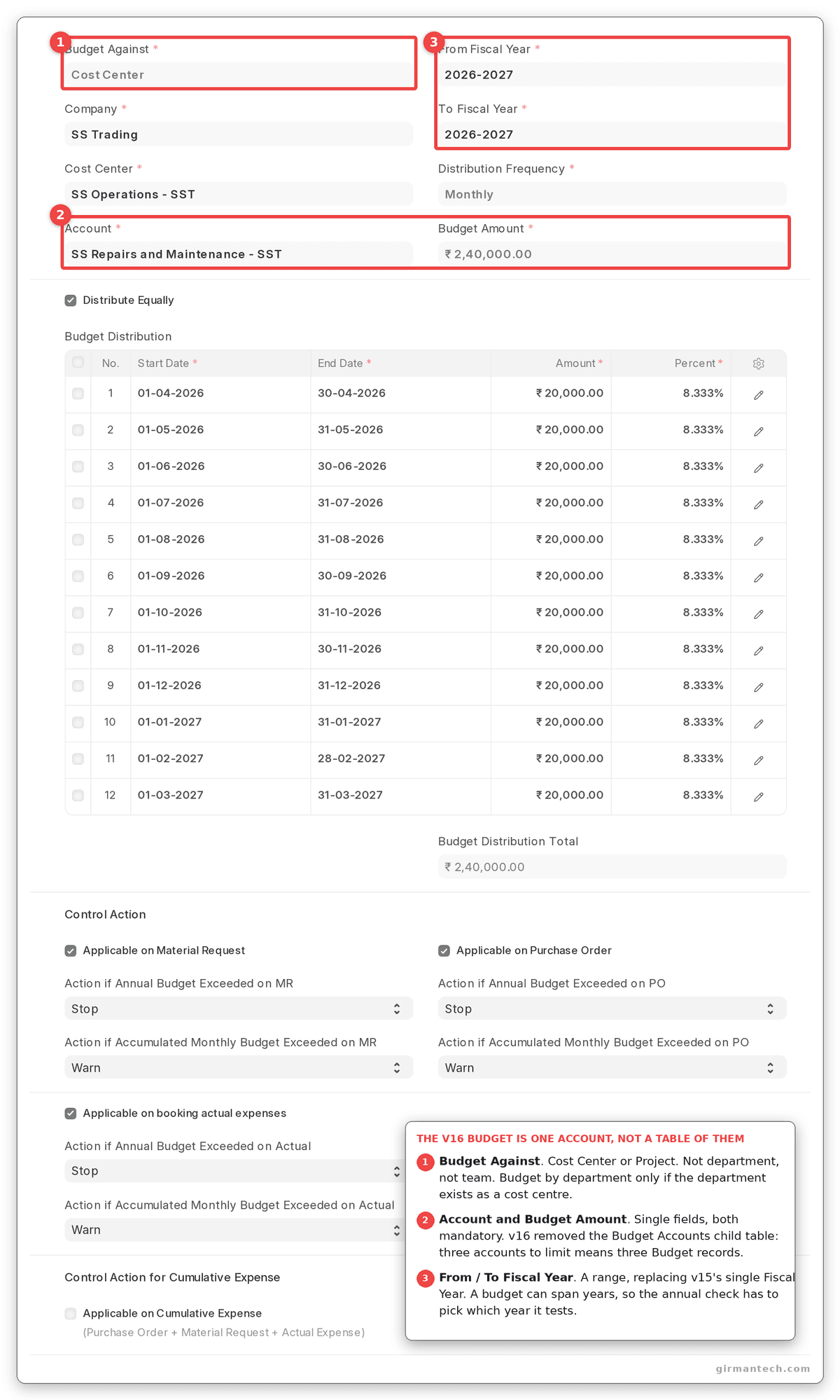
Budget form with Budget Against set to Cost Center, the cost centre selected, and the single Account and Budget Amount fields.
Step 2: Choose What the Budget Applies to, and Check What It Did
Three checkboxes control where the budget bites: Applicable on Material Request, Applicable on Purchase Order, and Applicable on Booking Actual Expenses.
All three default to 0.
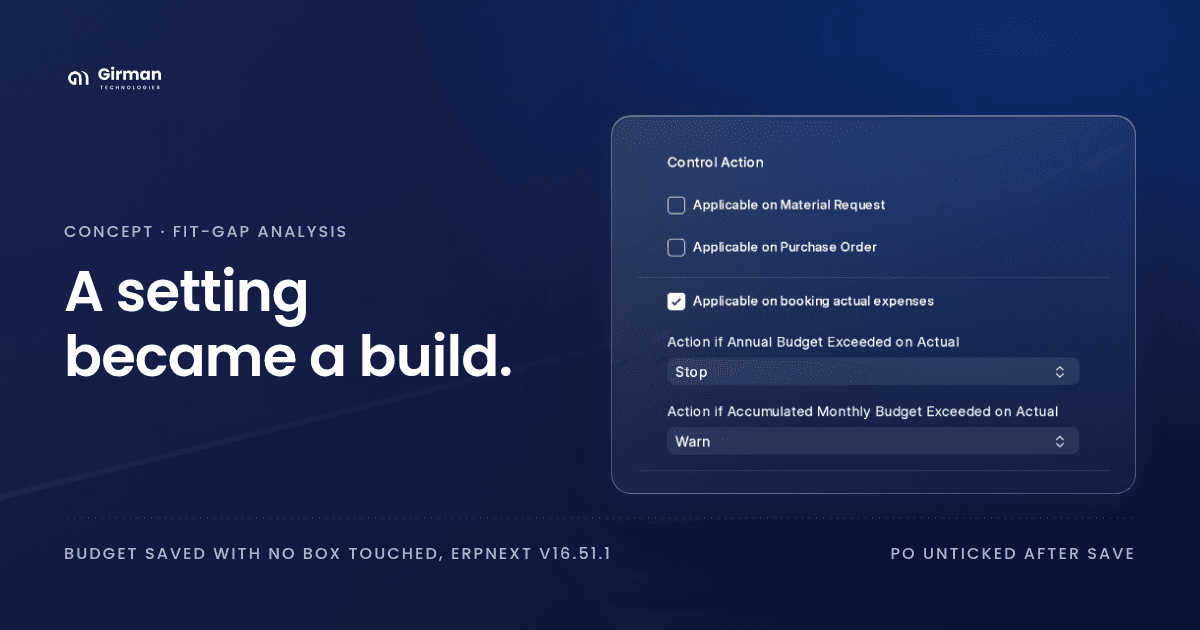
And if you save with all three unticked, ERPNext turns one of them back on:
elif not (
	self.applicable_on_material_request
	or self.applicable_on_purchase_order
	or self.applicable_on_booking_actual_expenses
):
	self.applicable_on_booking_actual_expenses = 1
There is no message. A budget you created intending to monitor only will silently be enforcing on actual expenses. Re-open the record after saving and look at the checkboxes. That is the only way to know what you have built.
Step 3: Set the Actions, and Notice the Asymmetry
Each applicable-on flag brings its own pair of actions: one for the annual budget, one for the accumulated monthly budget. Each takes Stop, Warn or Ignore.
The defaults are not symmetric:
| Field | Shipped default |
|---|---|
| Action if Annual Budget Exceeded (all three) | Stop |
| Action if Accumulated Monthly Budget Exceeded (all three) | Warn |
| Action if Annual Exceeded on Cumulative Expense | none set |
| Action if Accumulated Monthly Exceeded on Cumulative Expense | none set |
A fresh budget hard-blocks on the annual figure and only grumbles on the monthly one. That reads as defensible (the annual number is the commitment, the monthly one is a pacing guide) until you look at what each is measured against.
Both checks run over the same spending. They differ only in the denominator. The annual check compares it to the whole year's budget; the monthly check compares it to get_accumulated_monthly_budget, the sum of the distribution rows up to the posting date. In September that is six months of budget against twelve. So the limit set to Stop is the loosest one on the document and fires last, often not until the year is nearly spent, while the limit set to Warn is the one a manager actually runs against.
We reproduced this rather than inferred it. A ₹1,00,000 material request against a cost centre already carrying ₹2,05,000 of posted actuals, under a ₹2,40,000 annual budget with a September posting date: the accumulated monthly check fires ("is ₹1,20,000.00. It will be exceeded by ₹85,000.00"), the annual Stop stays silent, and the request submits. One budget, one breach, and the control that was supposed to block it never spoke. The asymmetry is not that one action is stricter than the other. It is that the strict one is pointed at the number least likely to trip.
The cumulative-expense pair are the only action fields on the doctype with no default at all. Tick Applicable on Cumulative Expense and you have switched on a control whose response to a breach is blank until someone picks one.
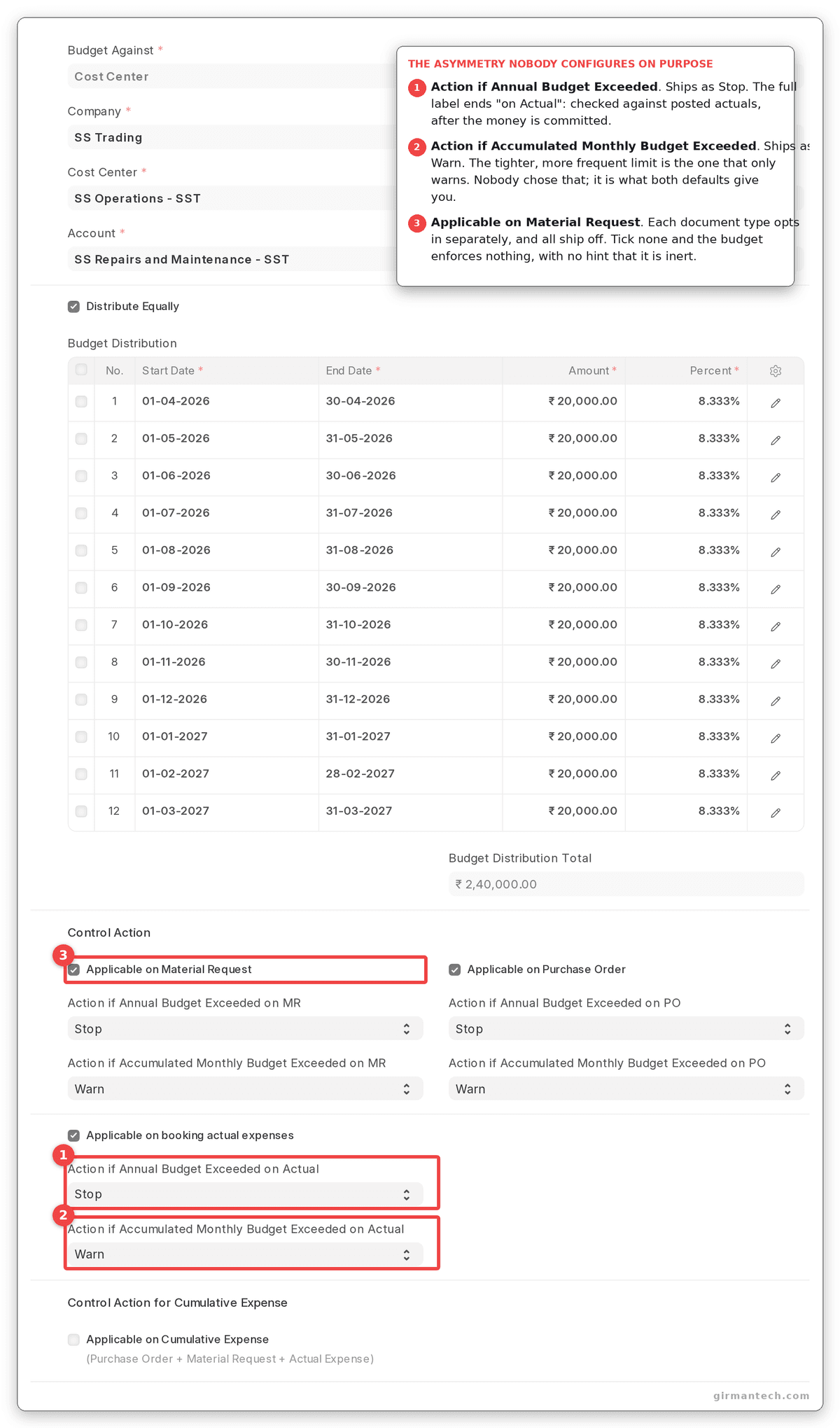
Budget form's Control Action section. Four applicable-on checkboxes, each with its own pair of actions, and every annual action shipping as Stop against every monthly action shipping as Warn.
Step 4: Understand What "Accumulated Monthly" Means
It does not mean this month.
The seasonal split is built into the document in v16 rather than linked to it. Set Distribution Frequency (Monthly, Quarterly, Half-Yearly or Yearly, defaulting to Monthly) and leave Distribute Equally ticked, and ERPNext generates the Budget Distribution rows itself. Untick it to weight the periods by hand. (Through v15 this was a link to a separate Monthly Distribution record, which is what most existing write-ups still describe.)
ERPNext then computes the limit by summing every distribution row whose start date is on or before the posting date. The comparison is year-to-date budget against year-to-date spend.
So a department that underspent in April and May has genuinely banked that headroom, and can spend it in June without tripping the monthly action. This is the right behaviour for a real budget and it is not what "monthly budget exceeded" sounds like.
The distribution rows must total 100%. ERPNext throws if they are off by more than 0.10, naming the actual total, which is a small mercy when you are weighting twelve periods by hand.
Step 5: Know That Cost Centre Budgets Inherit Downwards
Cost Center is a tree. A budget on a parent cost centre is enforced against every descendant, using the nested-set lft/rgt bounds to gather actuals from the whole subtree.
That is powerful and it is easy to configure by accident. A budget on a group cost centre near the root of the tree will constrain departments nobody intended to constrain, and nothing on the transaction says which budget it is being measured against.
The message itself is better than that makes it sound. We put a budget on a parent cost centre and raised a request against its child, and the warning named the child, the cost centre actually on the transaction, along with the account and the amount by which it would be exceeded. That is the useful half. The half it leaves out is which budget record produced the limit, and on a deep tree that is the part you need.
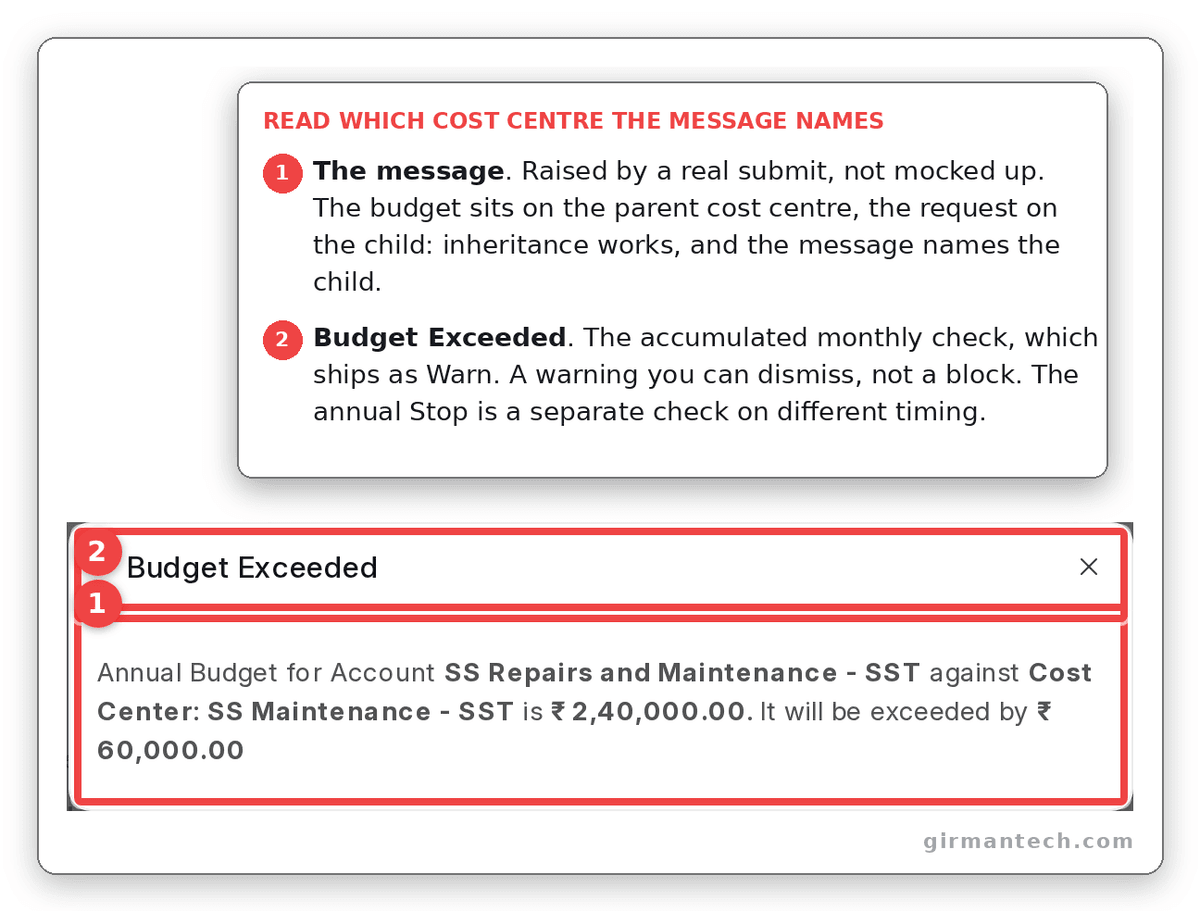
The real Budget Exceeded message raised on submission, naming the account, the cost centre on the transaction, the accumulated limit and the overshoot.
Step 6: Watch the Budget Consume Itself
Accounting > Budget Variance Report gives budget against actual by cost centre and account, by month or quarter. This is the reporting half, and it is competent, but it is the half almost every ERP has.
The half that matters is Steps 2 and 3, which is why they are worth this much of the post.
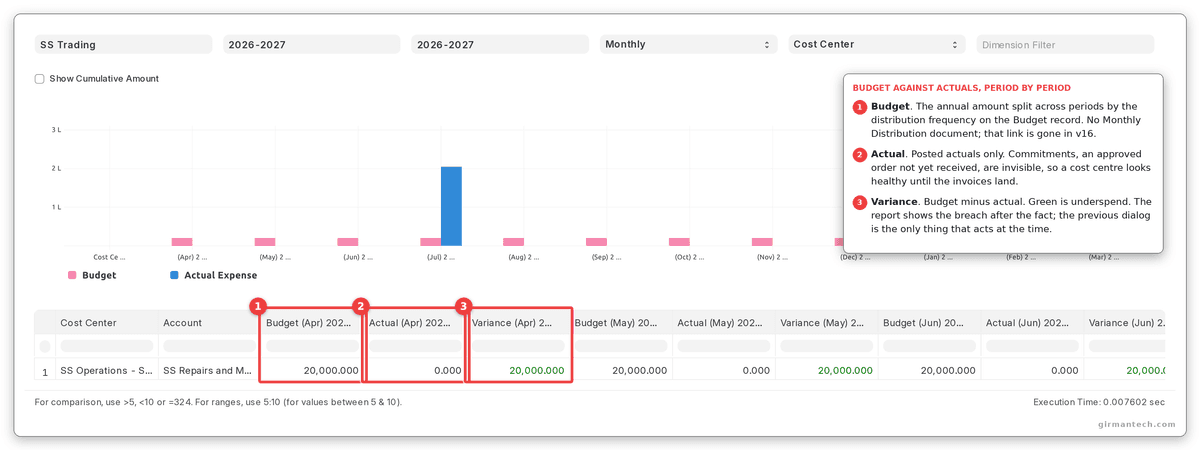
Budget Variance Report for one cost centre showing budgeted, actual and variance columns across several months.
The Doors This Control Does Not Cover
Budget checking is wired into three places: Material Request submission, Purchase Order submission, and GL entries posted through the general ledger path.
It is not wired into Journal Entry. There is no budget validation call anywhere in journal_entry.py. It is not wired into Stock Entry either.
A Journal Entry is the most direct way to book an expense in ERPNext. It requires no supplier, no item, no purchase order and no receipt. It posts straight to the account and the cost centre. And no budget, however configured, will stop it or warn about it.
This is not obscure. Accruals, provisions, expense reallocations, month-end adjustments, correcting entries and inter-department recharges are all journal entries, and in most companies they are a material share of departmental spend.
There is a second gap in the same family. The budget check only fires when the account's root type is Expense, an explicit equality test in the code. Capital expenditure posted to a fixed asset account is outside budgetary control entirely, which is usually the spending a board most wants controlled.
And a third: the check requires the transaction to carry the budgeted dimension. A GL entry with no cost centre and no project is skipped, silently, because there is nothing to match the budget against.
ERPNext vs. SAP vs. Dynamics 365 vs. NetSuite vs. Odoo
| Capability | ERPNext v16 | SAP S/4HANA | Dynamics 365 Finance | Oracle NetSuite | Odoo |
|---|---|---|---|---|---|
| Budget by cost centre / dimension | Yes, Cost Center or Project | Funds Management, full dimensions | Budget control by dimension set | Yes | Analytic budgets |
| Block at purchase order | Yes, configurable per budget | Yes | Yes | Yes | Warn only |
| Block at requisition | Yes | Yes | Yes | Yes | No |
| Journal entries checked | No | Yes | Yes | Yes | No |
| Capital / non-expense accounts | No, expense root type only | Yes | Yes | Yes | No |
| Encumbrance / commitment ledger | No | Yes, funds commitment | Yes, budget register entries | Partial | No |
| Graduated actions | Stop / Warn / Ignore | Full tolerance tiers | Full | Configurable | Limited |
| Budget carry-forward | No | Yes | Yes | Yes | No |
| Budget revisions | Yes, revision_of on the doctype | Full versioning | Budget register entries | Yes | Manual |
| Licensing | Open source, no per-user fee | Enterprise licence | Per-user | Per-user | Enterprise edition |
ERPNext holds 4.5/5 across 140 reviews on Capterra and 4.5/5 across 59 reviews on Gartner Peer Insights (as at September 2026). Ratings go stale. Re-check them at publication.
The practical read: ERPNext's budget engine is better than its reputation, and the purchase-order-time blocking is genuinely useful. Its coverage is the problem, not its mechanics.
One Honest Limitation
A journal entry walks straight past budgetary control, and journal entries are how a lot of spending actually gets booked.
This is the gap that decides whether the feature is a control or a speed bump. Configure everything correctly (annual Stop, monthly Warn, applied at requisition and purchase order) and a user with permission to post a Journal Entry can book any amount to any cost centre without the budget being consulted. Not overridden with a warning. Not logged as an exception. Consulted at no point.
For most companies this is not an abuse route, it is ordinary business. Month-end accruals, provisions, recharges between departments and expense reclassifications are all journals. If your maintenance cost centre's ₹50 lakh overspend arrived partly as recharges from another department, budgetary control was never in the conversation.
Compounding it: capital expenditure is outside the control entirely, because the check only fires on expense-root accounts. The two exclusions together mean the spending most likely to be large and most likely to need approval (capex, and anything booked by journal) is the spending ERPNext's budget module cannot see.
Systems built around a commitment ledger handle this differently: the ledger sits separate from the general ledger, every document that consumes budget writes an encumbrance whatever its type, and the check reads that ledger rather than being bolted onto particular controllers. That is an architectural difference, not a configuration one, and it is not closeable by settings.
What we implement: budgetary control at requisition and purchase order as designed, plus a restriction on Journal Entry submission to a small finance group, plus a monthly exception report of journal entries posted to budgeted cost centres that would have breached had they been checked. That last report is the compensating control, and it is the thing an auditor will ask for. It is a report where a competitor has a ledger. Say that plainly to the client rather than describing the module as complete.
What Changes in ERPNext v16
More than usual, and some of it is under the surface.
There are now two budget engines. v16 ships a BudgetValidation controller class and keeps the older validate_expense_against_budget path alive behind Accounts Settings > Use Legacy Budget Controller. The new one is the default. If you are upgrading and your budget behaviour changes in ways you did not expect, that flag is the first thing to check, and if you have customisations patched against the old function, they are now sitting on a code path that is off by default.
One account per Budget. The accounts child table is gone. account and budget_amount are single mandatory fields, so a Budget record now covers exactly one account and a department with three limits needs three records. If you maintain scripts, imports or reports built against the old child table, this is the change that breaks them.
Budget revisions. The doctype carries a revision_of field, and a budget created as a revision of another skips the existing-expense validation that would otherwise reject it. Worth tempering: revision_of is a Data field rather than a Link, so it records the predecessor without enforcing that it exists. It makes mid-year re-budgeting possible rather than governed.
Multi-year budgets and a built-in distribution. from_fiscal_year and to_fiscal_year replace the single fiscal year field, with explicit budget start and end dates, so a budget can span a range. The seasonal split moved onto the document too: distribution_frequency and distribute_equally generate the budget_distribution rows, where v15 linked out to a Monthly Distribution record.
Cumulative expense control. A budget can now assess material requests, purchase orders and actual expenses together against one limit, rather than each in isolation, which is what most people assumed the earlier behaviour already was. This is the one to look at if you have previously found ERPNext's budget checking too permissive. Note the missing action defaults above before switching it on.
We could not check v15 on this bench, so these are described as what v16 contains rather than as a verified delta.
Frequently Asked Questions
Does ERPNext stop a purchase order that exceeds the budget? Yes, if you configure it to. Create a Budget against a Cost Center or Project, tick Applicable on Purchase Order, and set Action if Annual Budget Exceeded to Stop. ERPNext then blocks submission of any purchase order that would take year-to-date spend past the annual figure for that account and cost centre. The equivalent monthly action defaults to Warn rather than Stop, so check both.
Are journal entries checked against budgets in ERPNext? No. Budget validation is wired into Material Request submission, Purchase Order submission and general ledger postings made through the standard path, but there is no budget check in the Journal Entry controller at all. Since accruals, provisions, recharges and reclassifications are all journal entries, this is the largest gap in ERPNext's budgetary control and needs a compensating control: typically restricting who may submit journals, plus a monthly exception report.
Does a budget on a parent cost centre apply to its children in ERPNext? Yes. Cost Center is a tree, and budget checking gathers actuals across the whole subtree using the nested-set boundaries, so a budget on a group cost centre constrains every cost centre beneath it. The warning names the cost centre on the transaction (the child) together with the account and the overshoot, but not which budget record set the limit, so on a deep tree you still have to go looking for the parent that owns it.
What does "accumulated monthly budget" mean in ERPNext? It means year-to-date, not this month. ERPNext sums every Budget Distribution row up to the posting date and compares that against spend for the same period, so unspent budget from earlier months remains available later in the year. A department that underspends in April can use that headroom in June without triggering the monthly action. In v16 those rows are generated on the Budget itself from a Distribution Frequency setting rather than linked from a separate Monthly Distribution record.
Can ERPNext budget for capital expenditure? Not through budgetary control. The check only fires on accounts whose root type is Expense, so purchases posted to a fixed asset account are never compared against a budget regardless of how the Budget record is configured. Capital spending has to be controlled through the purchase approval workflow instead, or tracked outside the budget module.