



A backorder is the part of a customer's order that a shipment did not cover. They ordered 100, you shipped 60, and 40 remain owed: still sold, still promised, not delivered. SAP calls the remainder a schedule line, Oracle NetSuite marks the order Back Ordered, Odoo raises a separate backorder document. Without something tracking it, the gap between what was sold and what left the warehouse survives only in somebody's memory.
Nobody discovers a backorder problem by looking at backorders. They discover it when a customer asks where the rest of their order is and three people give three different answers.
This post builds a part-delivered order in ERPNext v16 and follows the outstanding quantity through it.
The operational problem
A distribution business in Pune moves auto components: 400 sales orders a month, 3,000-odd lines, average line value ₹18,000. Stock is tight on a fifth of the catalogue, so around 500 lines a month ship short. That is not a failure; the customer would rather have 60 now than 100 next week.
Each leaves a remainder, and the only record of it is a number no document holds.
The month-end pending list runs to 500-odd lines. Some are genuinely awaiting stock. Some were abandoned when the customer reordered elsewhere. Some were settled by a second shipment raised against a new order. The report shows the same thing for all three: ordered minus delivered.
So it gets checked manually, then partially, then not at all. Within two quarters the list is understood internally as "roughly right", and the real answer to what you owe comes from ringing the warehouse.
The cost is not the ₹90 lakh of undelivered lines on that report. It is that the report stopped being evidence. A shortfall that matters now surfaces exactly like one that does not (a customer phone call), and by then whoever picked first has decided who gets the scarce stock.
This is a bookkeeping problem, not a discipline problem. Nobody failed to record anything. The quantity owed was never a record in the first place.
What backorder management actually does
Four jobs. Judge any system claiming to manage backorders on all four.
Capture the shortfall at shipment. Something records that 40 remain, ideally without anyone deciding to.
Hold it as a commitment, not an inference. It should be a fact the system stores, not a result it recomputes. That matters the moment somebody wants to change it: you can cancel a stored commitment, and you cannot cancel a subtraction.
Decide priority when stock arrives. Two customers are owed the same item. Oldest line, biggest account, first to order. The rule matters less than having one.
Close the loop deliberately. An outstanding quantity ends one of two ways: it ships, or somebody decides it never will. Both need recording, and the second is the one systems drop.
Two terms get conflated. A partial delivery is an event. A backorder is a state, the quantity still owed afterwards. Odoo draws that line in the product; ERPNext draws it conceptually only.
This is also distinct from safety stock and reorder levels. Reorder logic asks what to buy so shortfalls stop happening. Backorder management asks what you owe once one already has.
How backorder management works in ERPNext
Step 1: Ship short, and watch where the remainder goes
Selling > Sales Order, then Create > Delivery Note. ERPNext pre-fills the outstanding quantity (flt(source.qty) - flt(source.delivered_qty), sales_order.py:1234) and skips lines already delivered in full. Reduce it to what is going out, and submit.
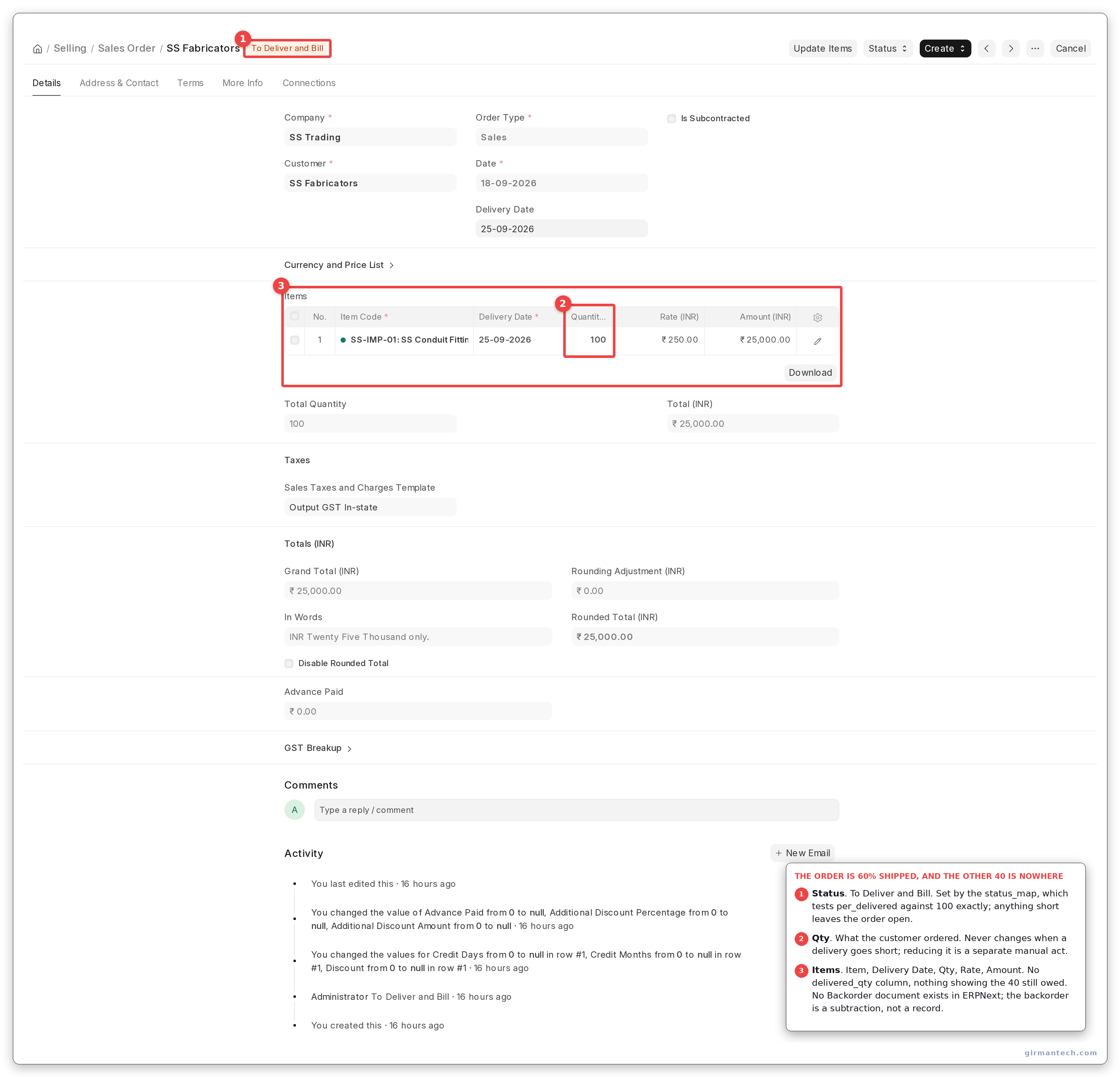
A Sales Order for 100 units after a partial Delivery Note, showing status To Deliver and Bill. The items grid carries Item, Delivery Date, Qty, Rate and Amount. There is no delivered quantity column and nothing showing the 40 still owed.
The Sales Order now reads:
SAL-ORD-2026-00003  status=To Deliver and Bill  per_delivered=60.0
SS-IMP-01  ordered=100.0  delivered_qty=60.0
The 40 is owed. Ask the system where it is stored and the answer is that it is not:
DocTypes matching 'backorder' / 'back order' : []
Sales Order Item fields for pending/remaining: []
computed at report time instead              : qty - delivered_qty = 40.0
There is no backorder document in ERPNext and no field holding the outstanding quantity. The backorder is a subtraction, not a record. Everything below follows from that.
It is a legitimate design: the order stays open, and an open order is itself a commitment. It is also why the failures below are arithmetic failures rather than workflow ones.
Step 2: Understand that an over-delivery cannot cover a shortfall
This is the step teams skip, and it produces the most confusing support ticket in the set.
Over-delivery is allowed within over_delivery_receipt_allowance, set on the Item or globally at Stock Settings > Over Delivery/Receipt Allowance (%). Neither JSON carries a default key, so out of the box it reads 0.0 and over-delivery is refused:
delivering 110 against 100 raised OverAllowanceError:
  This document is over limit by Qty 10.0 for item SS-IMP-01.
  Are you making another Delivery Note against the same Sales Order Item?
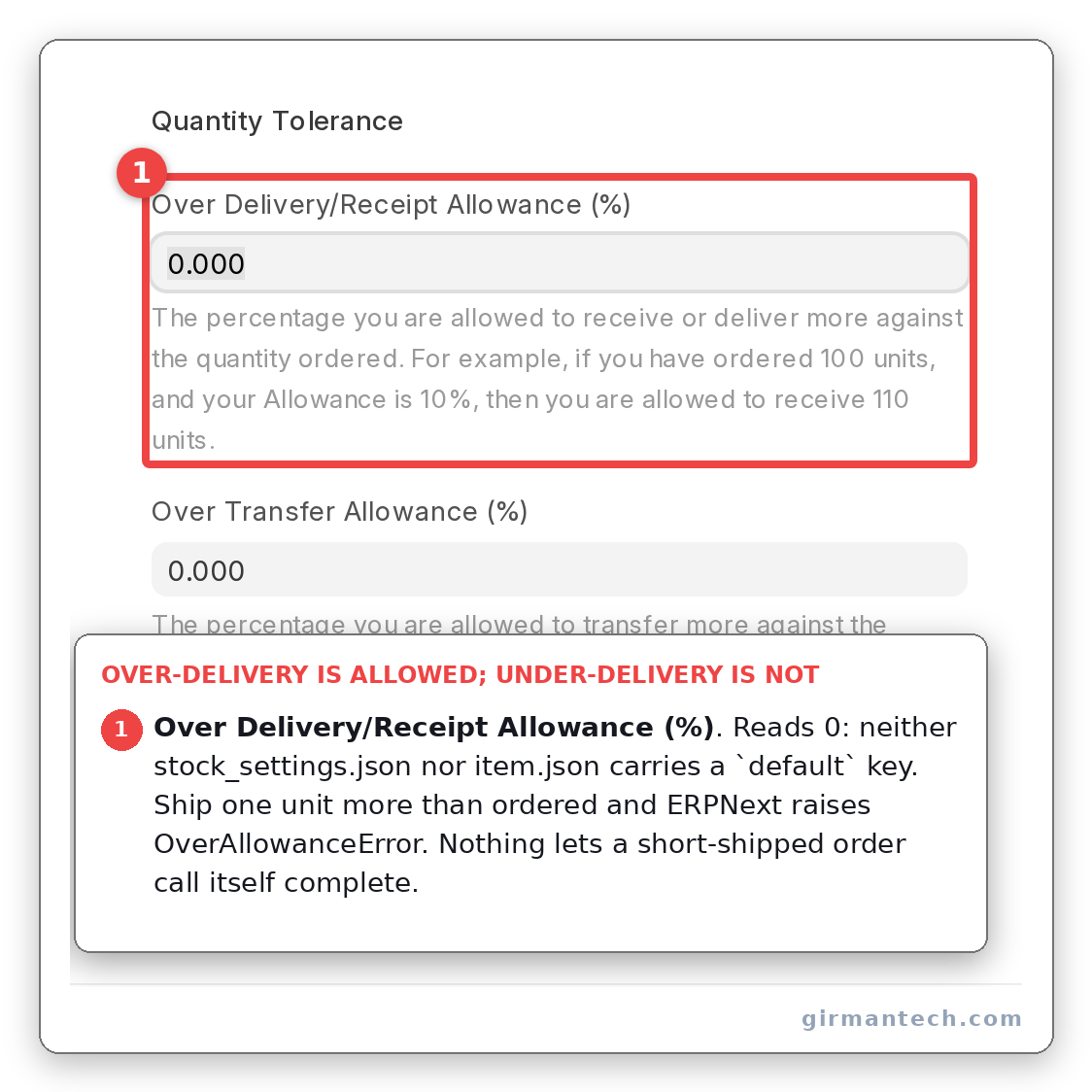
Stock Settings showing Over Delivery/Receipt Allowance (%) reading 0, the shipped state.
Raise the allowance and the interesting behaviour appears. We built a 200-unit order across two lines and shipped exactly 200 units (120 of the first, 80 of the second):
SAL-ORD-2026-00004
SS-IMP-01  ordered=100.0  delivered_qty=120.0
SS-IMP-02  ordered=100.0  delivered_qty=80.0
total shipped = 200.0   total ordered = 200.0
per_delivered = 90.0    status = To Deliver and Bill
Two hundred units shipped against a two-hundred-unit order, and the order is 90% delivered. status_updater.py:609 caps each row at min(delivered, ordered) before summing, so the extra 20 counts for nothing and the missing 20 still counts against you. That is the right answer (the customer is genuinely owed 20 of the second item), but it means "we shipped the full quantity" and "the order is complete" are different claims.
Step 3: Close the order, and see what gets recorded
When the remainder will never ship, somebody closes the order: Status > Close. ERPNext permits this at any delivery percentage; sales_order.py:989-990 explicitly allows closing while per_delivered < 100.
What it writes is the interesting part. We delivered 60 of 100 and closed:
after close:
  status         = 'Closed'
  per_delivered  = 60.0
  delivered_qty  = 60.0
Nothing changed but the status flag. No field records that 40 units were abandoned, who decided it, or when. The quantity you chose not to ship stays, forever, the difference between two numbers that describe something else.
There is no guard on the way out either. Nothing stops you closing an order with stock reserved against it, or with an open Material Request raised to fulfil it.
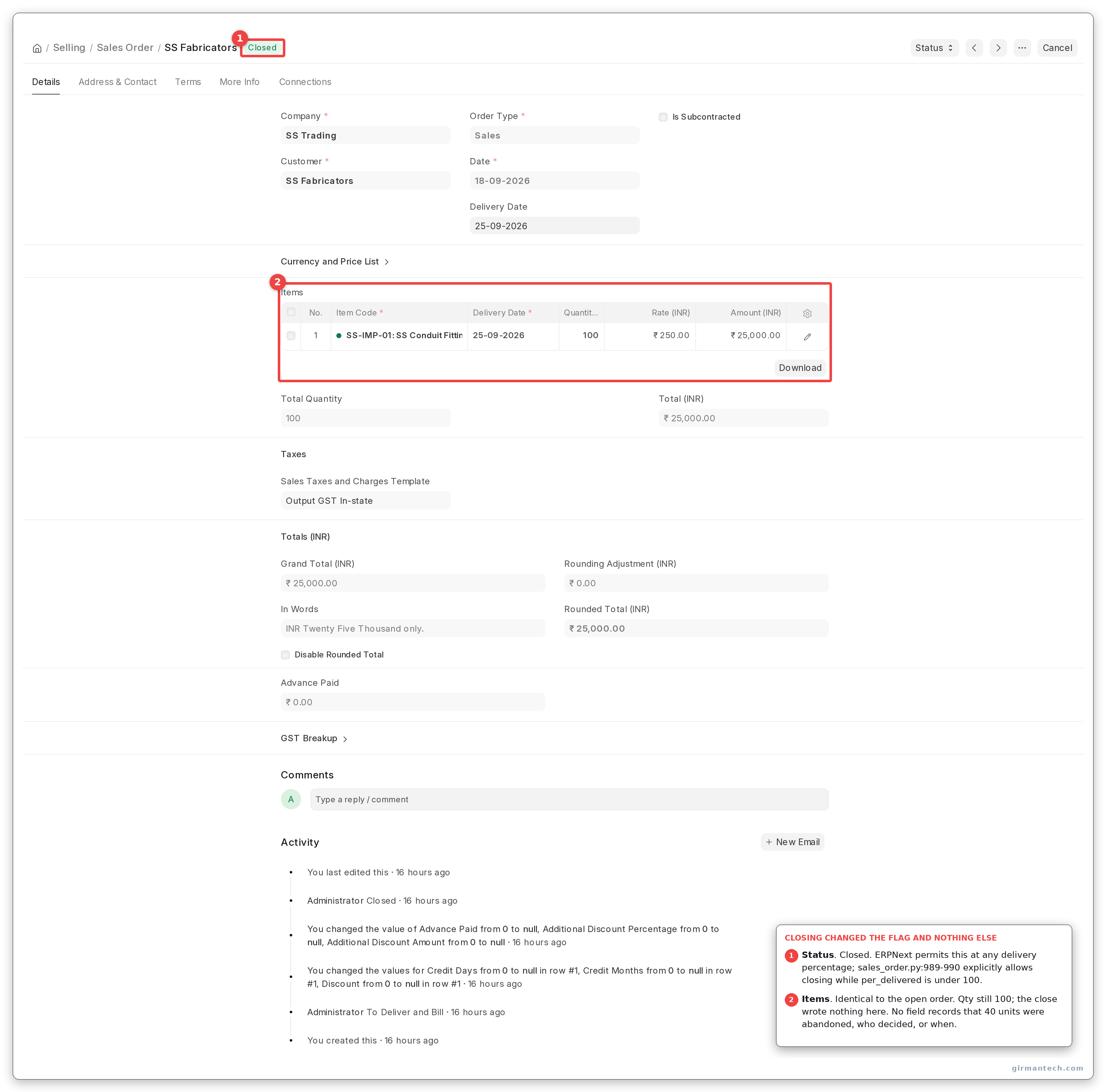
The same shape of order after Status > Close, showing Closed in the header and an items table identical to the open one. The close wrote nothing into it.
Step 4: Run the pending report, which does not respect the close
Selling > Sales Order Analysis answers "what do we still owe". Its pending column, sales_order_analysis.py:73:
(soi.qty - soi.delivered_qty) AS pending_qty
and its filter at :89:
and so.status not in ('Stopped', 'On Hold')
and so.docstatus = 1
Closed is not in that exclusion list. So the order we just closed comes straight back:
before close: SAL-ORD-2026-00003  status='To Deliver and Bill'  pending_qty=40.0
after close:  SAL-ORD-2026-00003  status='Closed'               pending_qty=40.0
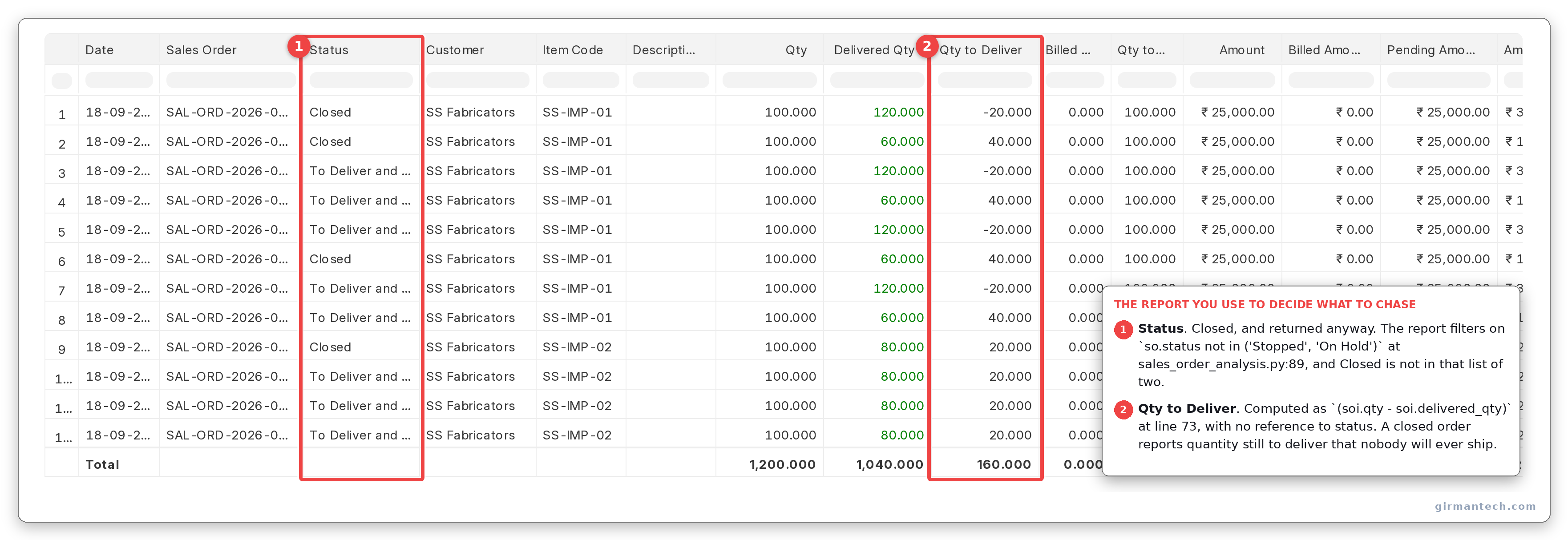
Sales Order Analysis with the Status column showing Closed on the same row as a Qty to Deliver of 40.
The report you use to decide what to chase includes the orders you decided not to chase. The Status column is there to read, so it is survivable once you know, but nobody knows by default, and it is how a pending list drifts from evidence to folklore.
The same query on the mixed order shows the other edge:
SS-IMP-02  ordered=100.0  delivered=80.0   pending_qty=20.0
SS-IMP-01  ordered=100.0  delivered=120.0  pending_qty=-20.0
A negative Qty to Deliver. Summed across a customer, the over-delivered line nets off the short one and the total says you owe nothing while one item is still 20 short.
The adjacent capability: reserving stock against a backorder
The obvious protection for an outstanding quantity is to reserve stock for it, so the next order cannot take what this one is waiting on. ERPNext has this, and it is off.
enable_stock_reservation carries default: "0" in stock_settings.json and read 0 on our live site. Switch it on under Stock Settings > Enable stock reservation and a Stock Reservation Entry holds stock against a specific order line. allow_partial_reservation defaults to "1", so a 100-unit order against 90 available reserves the 90 (the behaviour you want here).
One caveat: cancelling a Sales Order releases its reservations, and closing one does not. A closed order can leave stock reserved against a line nobody will ship.
Planning the replenishment that clears a backorder is a different tool again: material requirements planning.
How the four systems handle a short shipment
| Capability | ERPNext v16 | Odoo 19 | SAP Business One | NetSuite | Dynamics 365 BC |
|---|---|---|---|---|---|
| Backorder document | None | Yes: a new stock.picking linked by backorder_id | None: "Backorder" is a report | None | None: "back order" is a report |
| Where the outstanding quantity lives | Computed at query time, qty − delivered_qty | On the backorder document, as demand | Open quantity on an order left Open | Stored: quantityBackOrdered | Stored: Outstanding Quantity, non-editable |
| Prompt when a shipment goes short | None, silent | Yes, by default: "Create Backorder?". create_backorder defaults to ask | Silent. The availability check fires at order entry, not shipment, and is opt-in | Silent | Silent |
| Cancel the remainder | Manual close | One click: "No Backorder", or set the operation type to never | Manual: Data > Close, or Close Row | Manual Closed checkbox; auto-close only via a SuiteApp, and you must bill first | Manual: edit Quantity down to Quantity Shipped |
| Refuse a partial shipment up front | No equivalent | Per operation type | Yes: Allow Partial Delivery, per sales order | Per line, via Complete Qty | Yes: Shipping Advice = Complete, per customer |
| Stock reserved to the line out of the box | No: enable_stock_reservation default 0 | Yes: reservation_method default at_confirm | No: a soft Committed aggregate only; hard allocation needs a Reserve Invoice or Advanced ATP | Yes: commit defaults to Available Qty | No: reservation is per-item opt-in |
| Priority rule when stock arrives | None | First come, first served at confirmation | None standard | Supply Allocation, behind a feature flag | Reservation Worksheet, By Customer Priority |
| Records why a remainder was abandoned | No | No, but the cancelled moves survive | No | No | No |
| Licensing | GPLv3, no licence fee | LGPL-3: all of the above is in Community | Proprietary, per named user | Proprietary SaaS subscription | Per-user subscription; reservation is Essentials, not Premium |
Defaults as at September 2026, verified against each vendor's own source, documentation or licence guide: Odoo against the 19.0 branch, Business Central against Microsoft Learn and the Base Application AL, NetSuite against Oracle's help, SAP Business One against the SAP Help Portal for 10.0.
ERPNext is the only row in the table with no way to refuse a short shipment before it happens. Business Central blocks it per customer, SAP Business One per order. In ERPNext the shipment goes out and the consequences are worked out afterwards.
Third-party ratings
| Product | G2 | Capterra | Gartner Peer Insights |
|---|---|---|---|
| ERPNext | 4.3 (51) | 4.5 (140) | 4.5 (59) |
| SAP Business One | 4.3 (542) | 4.3 (344) | no product page |
| Odoo | 4.2 (355) | 4.2 (1,331) | 4.1 (29) |
| Oracle NetSuite | 4.1 (4,949) | 4.2 (2,069) | 4.3 (442) |
| Dynamics 365 Business Central | 4.0 (count not confirmed) | 4.1 (209) | 4.4 (346) |
All observed on 18 September 2026. Fourteen of the fifteen cells were read off the live listing; Business Central's G2 review count is the exception. Two searches returned 888 and 912 and neither could be confirmed against the page, so no number is printed. SAP Business One genuinely has no Gartner Peer Insights product page. Search-engine snippets ran stale against every live page checked, which is why nothing here comes from one.
Read those with the counts in view, because they undercut our own best number. ERPNext leads on Capterra and Gartner, and does it on 140 and 59 reviews against NetSuite's 2,069 and 442. A 4.5 from 59 self-selected reviewers is a weaker claim than a 4.3 from 442. On G2, the site with the largest samples, ERPNext is level with SAP Business One on a tenth of the reviews. The sample sizes are the more useful column.
The takeaway. ERPNext is not behind the market here. It matches it. SAP Business One, NetSuite and Business Central all leave the remainder on an open order, none creates a backorder document, none prompts at short shipment. Odoo is the exception and is genuinely better for it. Where ERPNext stands alone is narrower: it is the only one of the five that does not store the outstanding quantity as a field, and the only one shipping with line-level reservation off. The second is a settings change, not a build.
One honest limitation
ERPNext never asks you what to do with the remainder.
Systems that raise a backorder document force the question at validation: create one for the balance, or do not. The decision gets made when the information is freshest (the picker is standing there, the reason is known), and the answer becomes a record either way.
ERPNext makes no such prompt. You submit the Delivery Note for 60, the order stays open at 60%, and the decision about the remaining 40 is deferred indefinitely to whoever next reads a report. If it is ever made, closing records the outcome but not the quantity, the reason or the date. The system cannot tell an order awaiting stock from an order everybody has given up on, because it stores the same thing for both.
This bites hardest in project and contract supply, where one order runs for months across a dozen shipments. By shipment eight, "what is outstanding and why" is a question the data cannot answer, and somebody rebuilds it in a spreadsheet, which is where this started.
Mitigate it before go-live, not after. Two things work: add a custom field to Sales Order for why a line was closed short and make closing require it, and amend the Sales Order Analysis filter to exclude Closed. One clause turns the pending report back into evidence. Neither is difficult, and both are far harder to retrofit once three years of ambiguous closed orders exist.
A second constraint, smaller but real: there is no under-delivery tolerance. Over-delivery has an allowance and a bypass role. Nothing lets an order that shipped 99.5% consider itself done, so short-closes are always manual, always a judgement call, and always unrecorded.
Frequently asked questions
Does ERPNext have backorder management? Not as a distinct document. ERPNext keeps the undelivered quantity on the open Sales Order and computes it as ordered minus delivered when a report asks. There is no Backorder DocType in v16 and no field storing the outstanding quantity: the capability exists, the object does not.
How do I see all outstanding quantities across customers in ERPNext? Run Selling > Sales Order Analysis and read the Qty to Deliver column, which is ordered qty minus delivered qty. Its filter excludes only Stopped and On Hold orders, so orders you deliberately Closed still appear with a quantity outstanding. Add the Status column and filter it yourself, or amend the report.
What happens to the remaining quantity when I close a partially delivered Sales Order in ERPNext? Nothing is written about it. The status becomes Closed; the delivered quantity and delivery percentage stay as they were. The abandoned quantity stays implicit in the difference between ordered and delivered. If you will need the reason later, add a custom field before you start closing orders.
Can I over-deliver against a Sales Order in ERPNext? Yes, up to the Over Delivery/Receipt Allowance percentage on the Item or in Stock Settings. Neither ships with a default, so out of the box the allowance is zero and over-delivery is refused with an OverAllowanceError. Over-delivering one line does not compensate for a shortfall on another. Each line is capped at its ordered quantity first.
Does ERPNext reserve stock for backorders automatically?
No. Stock reservation exists but enable_stock_reservation is off by default. Once enabled, partial reservation is allowed by default, so an order for 100 against 90 available reserves the 90. Cancelling an order releases its reservations; closing one does not.