



.png&w=3840&q=75)
Introduction
As your business grows, managing purchases becomes more challenging. Tracking purchase requests, supplier orders, goods received, and invoices across spreadsheets or multiple systems can lead to delays, invoice errors, duplicate payments, and inventory mismatches.
ERPNext simplifies this process by managing the entire Procure-to-Pay (P2P) cycle in one place from Material Request to Supplier Payment. With connected workflows and real time visibility, teams can collaborate more efficiently while reducing manual effort.
At the heart of this process is 3-Way Matching, a key procurement control that compares three essential documents: the Purchase Order (PO), Purchase Receipt (GRN), and Purchase Invoice (PI). By verifying that what was ordered, received, and invoiced matches before payment is approved, businesses can reduce errors, prevent duplicate payments, and strengthen financial controls.
In this blog, we'll explore how 3-Way Matching works in ERPNext and how it helps businesses build a more accurate, efficient, and reliable purchasing process.
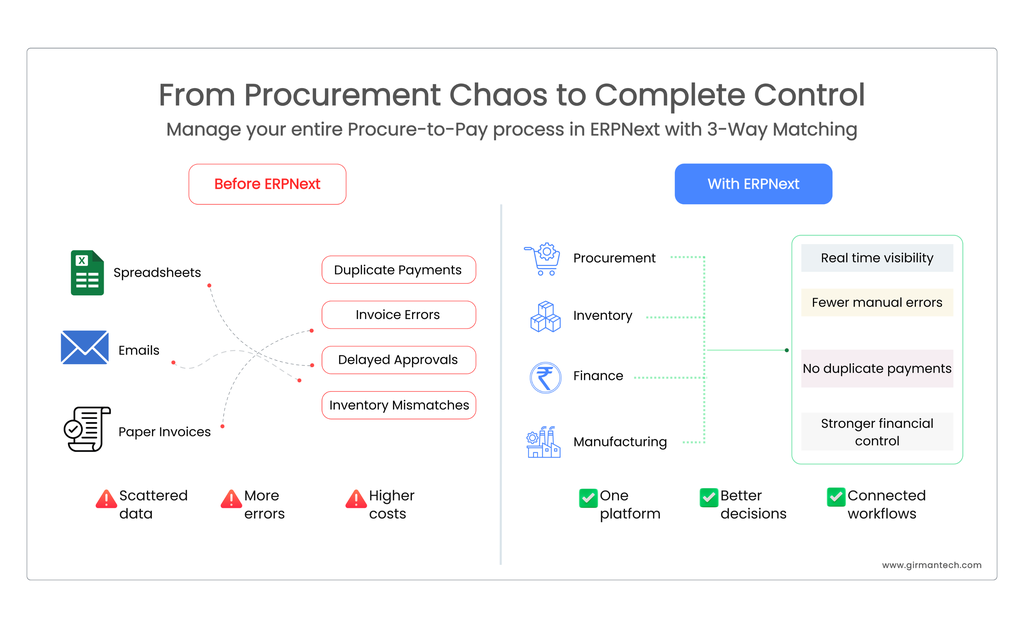
From procurement chaos to complete control with ERPNext
The Foundation of an Effective Buying Cycle
Three essential doctypes that drive the Procure-to-Pay (P2P) purchase workflow are purchase order, purchase receipt (GRN) and purchase invoice. Each one references the previous and the data are auto fetched from last generated document hence the audit trail is built into the data model rather than bolted on afterward.
A. Purchase Order [PO]
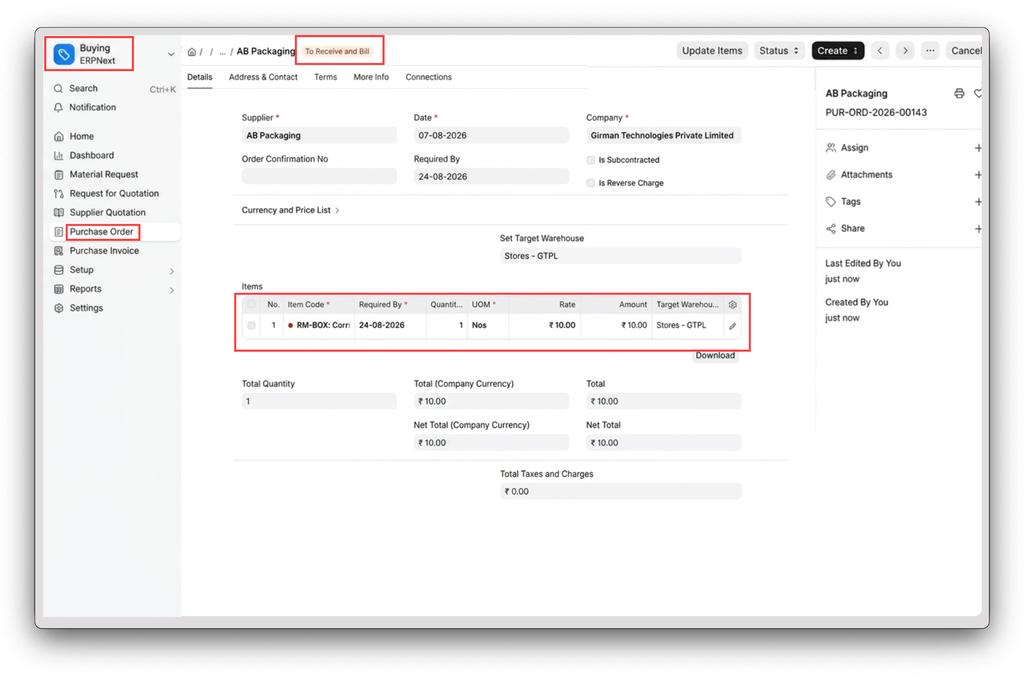
The first document in the cycle a formal request to the supplier capturing items, quantity, rate, schedule date, and payment terms.
- Initiates the procurement transaction and locks in commercial terms.
- Becomes the reference document every downstream Purchase Receipt and Purchase Invoice line item is validated against.
B. Purchase Receipt [GRN]
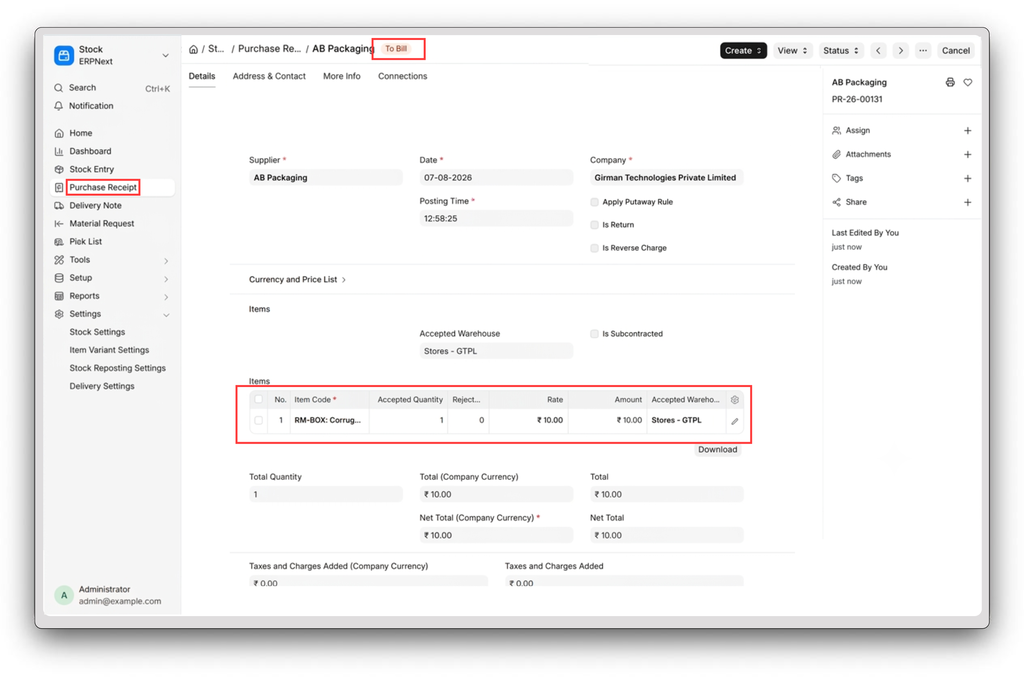
After the purchase order [PO] is created then once goods arrive at the delivery location by supplier then purchase receipt is created which is also known as goods received note [GRN] in traditional ERP terminology. This document captures accepted quantity and rejected quantity as per line item, and is the trigger for stock ledger updates.
- Confirms actual quantity received vs. ordered quantity.
- Updates inventory in real time on submit.
- Sets received quantity, which the Purchase Invoice checks against before allowing billing.
C. Purchase Invoice [PI]
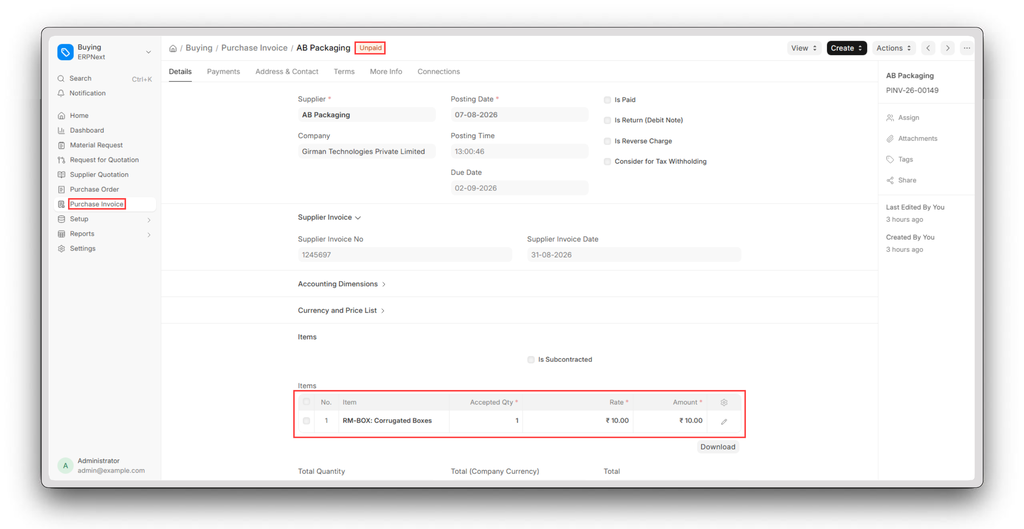
The final step in 3-way matching is supplier's bill that is also known as purchase invoice (PI) generated only after receipt and terms are validated. On submit, it posts GL entries and clears the Stock Received but Not Billed account against the Purchase Receipt.
- Records the payable and creates the financial liability
- Triggers the payment approval workflow
Because Purchase Order [PO], Purchase Receipt, and Purchase Invoice are sequentially linked, each document inherits and validates against the one before it. That interlocking structure not a separate "Matching Report" is what makes 3-Way Matching enforceable in ERPNext.
3-Way Matching: A Key Control in Procurement
3-Way Matching is a doctype level control, not a manual checklist it's ERPNext's built-in approach to invoice matching and supplier invoice validation. In ERPNext, it means the system cross validates the Purchase Order [PO], Purchase Receipt [GRN], and Purchase Invoice [PI] at header and line item level before an invoice is eligible for payment. Quantity, rate, and item consistency across all three documents is what determines whether a payment goes through cleanly or gets held as an exception.
By implementing 3-Way matching, businesses gain greater payment accuracy, reduce manual errors, prevent duplicate payments, and establish a scalable control framework that grows alongside the organization.
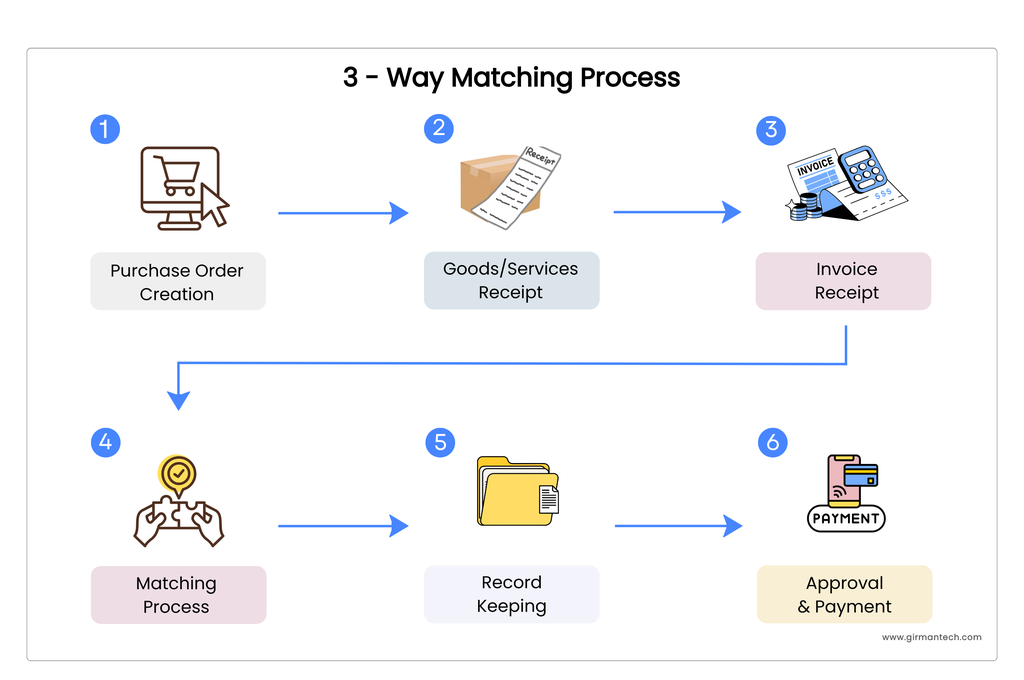
How ERPNext Connects the Procurement Document Flow
ERPNext links Purchase Order [PO] → Purchase Receipt [GRN] → Purchase Invoice using the pattern: each document is generated directly from its predecessor, carrying forward item, rate, and tax data instead of requiring re-entry.
- Purchase Order captures supplier, items, quantities, rate, and delivery terms
- Purchase Receipt [GRN] is created from the Purchase Order [PO]; per received updates automatically as receipts are submitted
- Purchase Invoice can be created from either the Purchase Order [PO] or the Purchase Receipt [GRN], depending on the org's process the invoice compares ordered quantity, received quantity, and invoiced quantity at the line item level before it can be submitted for payment.
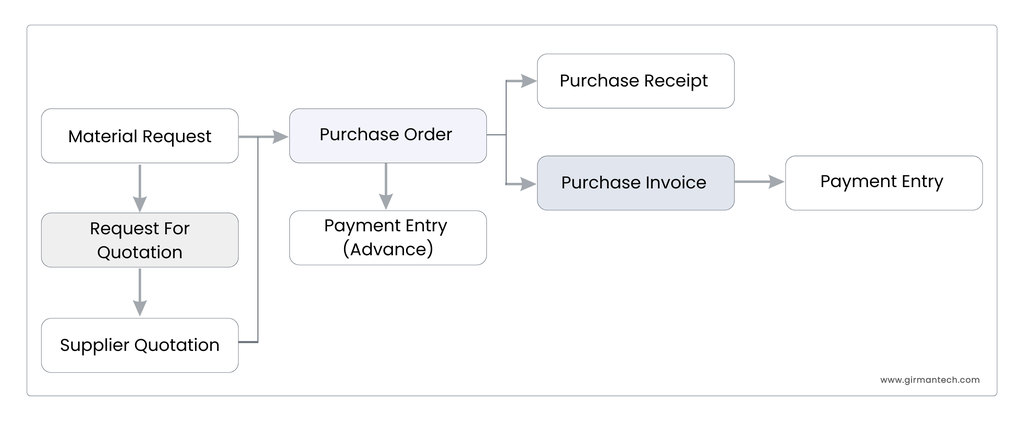
ERPNext's linked document flow: PO → Purchase Receipt → Purchase Invoice
This linked architecture is the actual mechanism behind 3-Way Matching data consistency, inventory accuracy, and financial control fall out of the document relationships rather than a separate audit step.
Simplifying the Buying Cycle with One Click Actions
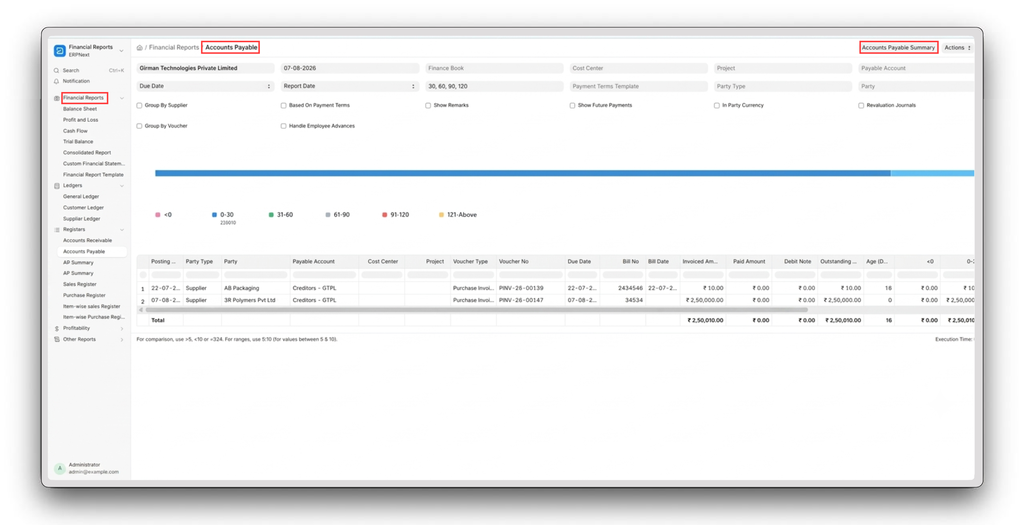
ERPNext removes redundant data entry through the action: generate a purchase receipt (GRN) directly from a purchase Order, or a purchase invoice from the Purchase Receipt (or Purchase Order). Supplier details, items, quantities, rate, and tax templates carry over automatically, keeping every downstream document consistent with its source.
Add on capabilities of ERP Next that extend the buying cycle
- Purchase Analytics Dashboard - Spend, supplier performance, and buying trends.
- Role Based Access Control - Responsibilityestricts procurement actions by user responsibility.
- Integrated Accounts Payable [AP] - Purchasing tied directly to accounting and payments.
- Inventory Visibility - Livestock check before a Purchase Order [PO] is raised.
- Automatic Reordering - Material Requests generated from reorder levels.
- Approval Workflows - Configurable multi-level Purchase Order [PO] approval routing.
- Supplier Quotation Comparison - Evaluate vendors before committing.
- Budget Validation - Flags purchases that exceed approved budget.
Proof at scale
-
KEPCO Group (HVAC manufacturing) - Centralized procurement across multiple countries, managing 10,000+ SKUs on a standardized buying workflow
-
Avanti Overseas Pvt. Ltd. (Manufacturing) - Unified procurement across four plants, tightening coordination between procurement, inventory, production, and finance
-
RaajaRam Group (Manufacturing & Distribution) - Replaced fragmented purchasing with a single P2P workflow for full purchase tracking
Source: https://frappe.io/stories
2-Way vs. 3-Way vs. 4-Way Matching: Choosing the Right Control
-
2-Way Matching - Purchase Order [PO] vs. Invoice only. Fast, but no validation that goods were actually received.
-
3-Way Matching - Adds the Purchase Receipt (GRN), so ordered, received, and invoiced quantities must all agree before payment.
-
4-Way Matching - Adds a Quality Inspection document in ERPNext, confirming received goods also meet quality standards before approval.
3-Way Matching is the default for most organizations because it balances control with speed enough validation to catch discrepancies and fraud, without the extra inspection overhead 4-way matching requires for regulated or quality critical goods. It's the standard fit for manufacturing, retail, distribution, and services businesses running on ERPNext.
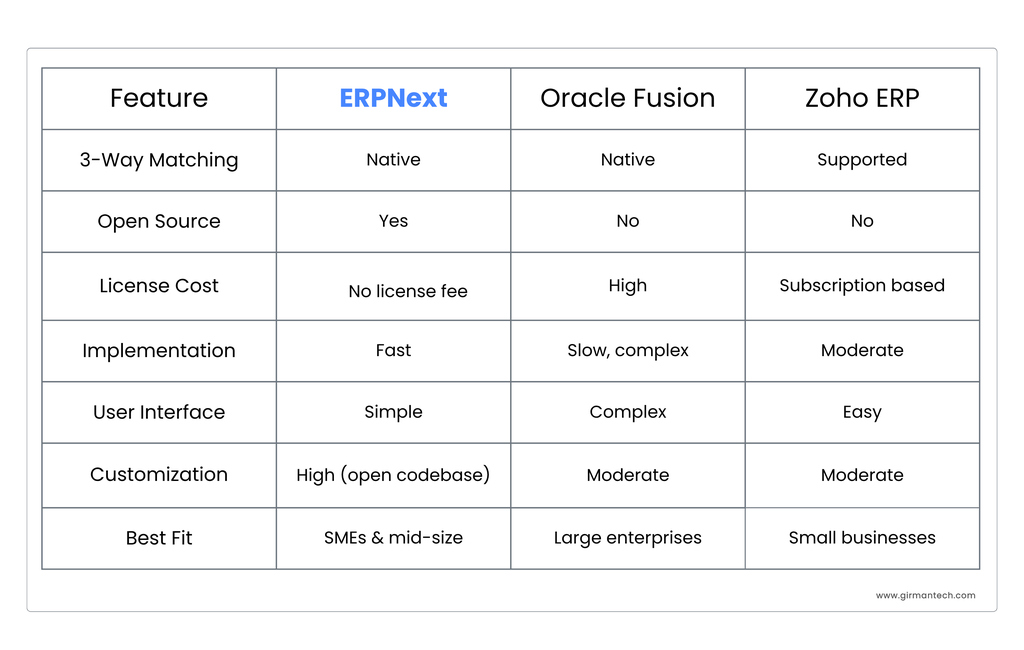
ERPNext vs. Oracle vs. Zoho: A Quick Comparison
3-Way Matching exists natively across all three platforms. The differentiator is cost, implementation timeline, and how customizable the underlying system is.
Conclusion
3-Way matching is a procurement control that only works if it's enforced at the data layer not left to manual review. By linking Purchase Order, Purchase Receipt, and Purchase Invoice into a single doctype chain, ERPNext makes that enforcement automatic: consistent data, real time inventory accuracy, and full traceability across the Procure-to-Pay [P2P] cycle at a fraction of the implementation cost and complexity of Oracle or Zoho.