



About Keep Learning: A Multi Institute Education Group Managing ₹50 Crore+ in Annual Budgets
The organisation is a rapidly growing, multi institute education group operating across several legal entities and departments in Bengaluru, India, with 350+ employees and an annual operating budget of more than ₹50 crore (₹500 million+). The finance team processes payments to more than 5,000 vendors and runs its core operations - Accounting, Purchase, and Stock on ERPNext, alongside Frappe HR for people operations.
The organisation's enterprise training arm works across sectors including technology, manufacturing, retail, BFSI, and healthcare, operating out of offices in Bengaluru and Mumbai a footprint that explains why a single, centralized budgeting system across multiple companies and departments mattered more than it would for a single campus institution.
| Industry | Apps Implemented | Modules Implemented |
|---|---|---|
| Higher Education | ERPNext, Frappe HR | Accounting, Purchase, Stock |
Challenges
The Manual Budget Approvals Holding the Institute Back
Standard ERPNext budgeting works at the cost center level but this institute needed to control and track spend by department, across multiple companies and campuses. On top of that, a few specific gaps were slowing the finance team down:
-
No department wise budget control. With budgeting natively tied to cost centers, there was no direct way to cap spend by department across each institute without heavy manual tracking.
-
No hard budget ceiling. Once a department's allocation was set, there was nothing stopping a purchase request from being raised or approved above it, so overspends were often caught only after the fact.
-
Reallocation meant starting over. Moving unused budget from one line item to another (say, from an underspent travel budget to an over committed vendor payment) required cancelling the original budget document and recreating it a slow, error-prone workaround for something that should have been a single action.
-
Purchase approvals ran on email. A purchase request moving from request to quotation to order to invoice had no single tracking view, so finance had to chase status manually, and approvals that should take minutes were taking the better part of a day.
-
The institute considered continuing to manage budget caps through manual spreadsheet tracking layered on top of ERPNext, but with 5,000+ vendors and 350+ employees across multiple campuses, that approach didn't scale.
Why Keep Learning Chose Girman Technologies for ERPNext
The institute was already running ERPNext, implemented with support from Girman Technologies. Rather than bring in a second vendor for a finance specific build, they extended the engagement with Girman Technologies as their Certified Frappe Partner since the team already understood the institute's cost center structure, company hierarchy, and prior customizations from an earlier HR rollout.
Solution Implemented
The ERPNext Build: Department Wise Budgeting, Reallocation, and a Procurement Tracker
Since native ERPNext budgeting runs on cost centers rather than departments, Girman Technologies mapped each department to its own cost center giving finance department level budgets without moving away from ERPNext's standard accounting engine. One honest complication during rollout: getting the cost center hierarchy to cleanly mirror the department structure across multiple companies took extra tuning, since a one to one mapping had to hold consistently for reporting to stay accurate later.
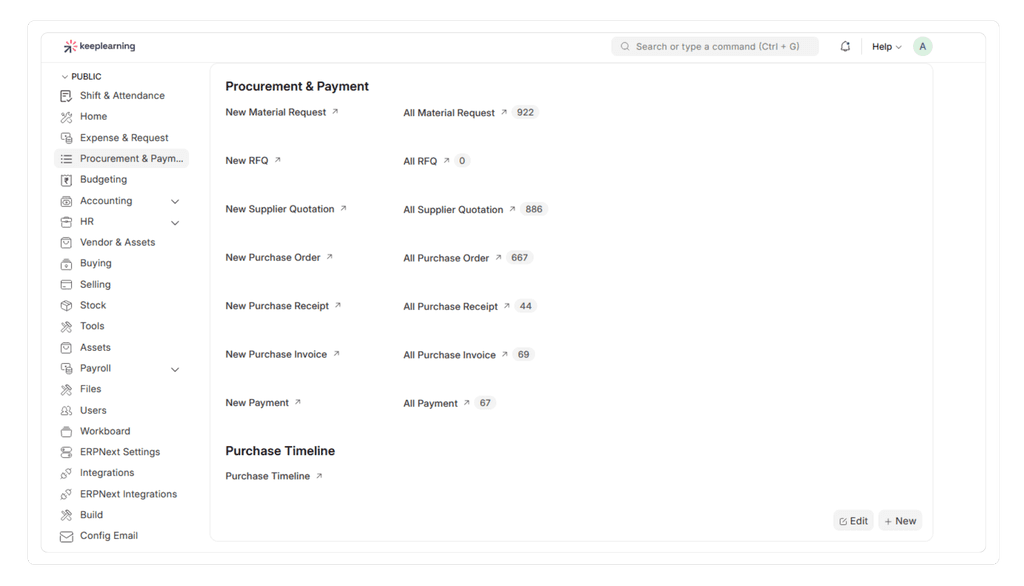
Apps, Modules & Workflows Built for the Institute:
-
Department to cost center mapping - Every department across every company was mapped one to one to a cost center, so department wise budgets could be enforced using ERPNext's native budget engine.
-
Master budget ceilings - A master budget was configured per company and department, so no individual budget line could be uploaded or approved above the sanctioned limit.
-
Bulk budget upload tool - Finance selects a company and downloads a pre formatted spreadsheet of every account in the system with month wise columns; once filled in and re-uploaded against a cost center and year, budgets are created automatically instead of one at a time.
-
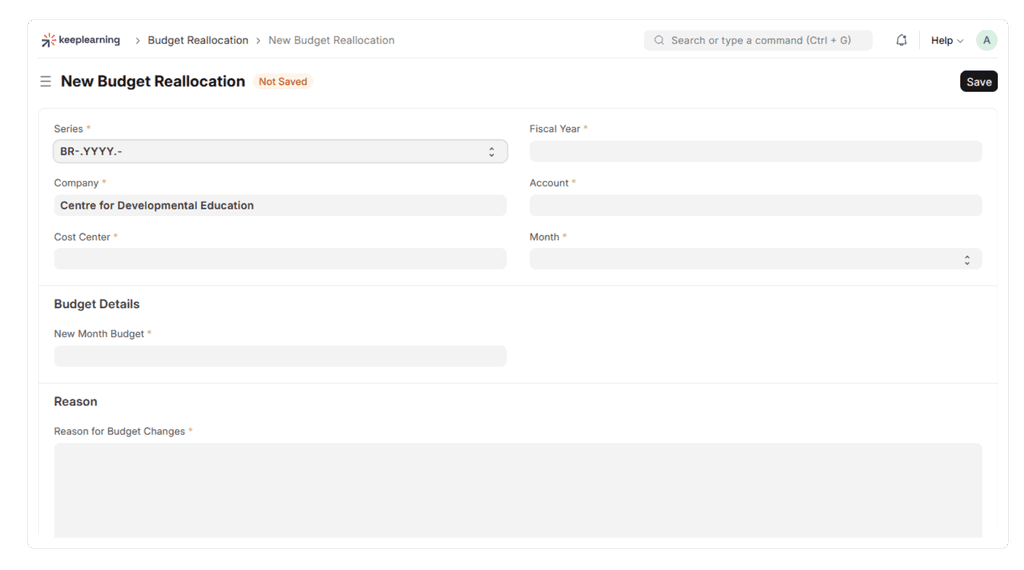
One click budget reallocation - Moving unused budget from one account to another (e.g., an underspent travel line to an over-committed vendor payment) now happens in a single window, replacing the earlier cancel and recreate workaround.
-
Budget restriction controls - Purchase requests can no longer be raised or approved past the assigned budget without an authorized override, closing the gap that previously allowed accidental overspend.
-
Procurement / Purchase Timeline tracker - Every purchase request is now trackable end to end (request → quotation → order → receipt → invoice → payment) from a single dashboard, so finance no longer has to chase status across email threads.
-
Finance Dashboard - A live view of expense vs. budget, non-budgeted vendor concentration, and creditor ageing, broken down by cost center and month.
-
Asset management dashboard - A lighter touch build on ERPNext's standard Assets module, giving the institute a consolidated view of institute wide assets alongside its finance data.
Key Benefits
What the Institute's Finance Team Gained
-
Budget approvals that used to take the better part of a day over email now happen in minutes, since the system checks the sanctioned budget automatically before allowing an approval.
-
Reallocating unused budget between accounts dropped from a multi step cancel and reissue process to a single action.
-
Uploading a full company's monthly budgets went from manual, account by account entry to a bulk spreadsheet upload.
-
Every purchase request is now visible end to end, from initial request through to payment, without needing to check in with the accounts team.
-
Department-level budget visibility means department heads can see their own spend against their own allocation, instead of relying on finance to relay it.
Impact
The Results: The Institute's Finance Operations Today
-
**Reduction in manual budget tracking effort:- ** The finance team estimates roughly 70–75% less manual reconciliation work now that budgets, reallocations, and approvals run inside ERPNext instead of spreadsheets and email.
-
Faster approvals:- Purchase and budget approvals that previously took hours to a full day over email now complete in minutes, since sanctioned budgets are checked automatically.
-
Fewer overspend errors:- Budget restriction controls have eliminated the earlier pattern of purchase requests being approved after a department's allocation was already exhausted.
-
Scale supported:- The system now manages an annual budget of ₹50 crore+ (500 million+) and payments to 5,000+ vendors across multiple institutes and companies, all from a single ERPNext instance.
Future Plans
With department wise budgeting, reallocation, and procurement tracking now live, the natural next step is extending the same Finance Dashboard visibility down to individual department heads' own logins, and layering budget variance reporting on top of the existing expense-vs-budget view turning a monthly finance review into something department heads can check on their own, anytime.
Conclusion
From Manual Email Approvals to a Real-Time Budget Control System
What started as a cost center workaround for department wise budgeting has grown into a full finance control layer for this Education Industry covering budgeting, reallocation, procurement tracking, and asset visibility across every campus the organisation runs, on top of the same ERPNext instance already powering its HR and accounting.
Related Reading
How a Multi-Institute Education Group Automated HR & Payroll with Frappe HR
This organisation didn't stop at finance - see how the same ERPNext rollout also centralized employee management, automated payroll, and streamlined HR approvals.
Explore More ERPNext Case Studies →
Schedule a Free 30-Minute ERPNext Consultation
Book a free demo to see how ERPNext can bring the same department wise budget control, procurement tracking, and finance visibility to your organisation.